Unit-3
Relational query
Language
Looping Outline
- Structure of Relational Databases
- Key
- Relational Algebra
- Fundamental Operators and Syntax
- Selection
- Projection
- Cross Product OR Cartesian Product
- Joins
- Set Operators
- Division
- Rename
- Aggregate Functions
- Open Source and Commercial DBMS
Structure of Relational Databases
Columns (5)
Table (Relation): A database object that holds a collection of data for a specific topic.
Table consist of rows and columns.
Attributes:
RollNo Name Branch Semester SPI Title of column Column (Attribute): The vertical component of a CE table. A column has a name and a particular data Mitesh CI type; e.g. varchar, decimal, integer, datetime etc. Rows or Mayur CE Tuples or Record (Tuple): The horizontal component of a Nilesh EE Cardinality = No of tuples (7)
Records (7)
table, consisting of a sequence of values, one for Hitesh CI each column of the table. It is also known as row. Tarun ME A database consists of a collection of tables Suresh CE (relations), each having a unique name.
Degree = No of columns (5)
Domain is a set of all possible unique values for a specific column.
Domain of Branch attribute is (CE, CI, ME, EE)

Super Key
A super key is a set of one or more attributes whose values uniquely identifies each record within a relation (table).
Super Key Super Key Super Key EnrollNo (RollNo, Branch, Sem)
(SPI, Name, BL)
| EnrollNo | RollNo | Branch | Sem | SPI | Name | BL |
|---|---|---|---|---|---|---|
| 190540107001 | 101 | CE | 3 | 8 | jack | 0 |
| 190540107002 | 102 | CE | 3 | 7 | Mitesh | 1 |
| 190540106001 | 101 | CI | 3 | 6 | Mayur | 2 |
| 190540106002 | 102 | CI | 3 | 9 | Nilesh | 0 |
| 180540107001 | 101 | CE | 5 | 7 | Hitesh | 1 |
| 180540106001 | 101 | CI | 5 | 8 | Tarun | 0 |
| 180540106002 | 102 | CI | 5 | 9 | Suresh | 0 |
Candidate Key
A candidate key is a subset of a super key.
A candidate key is a single attribute or the least combination of attributes that uniquely identifies each record in the table.
A candidate key is a super key for which no proper subset is a super key.
Every candidate key is a super key but every super key is not a candidate key.
Candidate Key Candidate Key EnrollNo (RollNo, Branch, Sem)
| EnrollNo | RollNo | Branch | Sem | SPI | Name | BL |
|---|---|---|---|---|---|---|
| 190540107001 | 101 | CE | 3 | 8 | jack | 0 |
| 180540107002 | 101 | CE | 5 | 7 | Mitesh | 1 |
| 190540106001 | 101 | CI | 3 | 6 | Mayur | 2 |
| 180540106002 | 101 | CI | 5 | 9 | Nilesh | 0 |
Primary Key
A primary key is a candidate key that is chosen by database designer to identify tuples uniquely in a relation (table).
Primary Key
Candidate Key Candidate Key EnrollNo (RollNo, Branch, Sem)
| EnrollNo | RollNo | Branch | Sem | SPI | Name | BL |
|---|---|---|---|---|---|---|
| 190540107001 | 101 | CE | 3 | 8 | jack | 0 |
| 180540107002 | 101 | CE | 5 | 7 | Mitesh | 1 |
| 190540106001 | 101 | CI | 3 | 6 | Mayur | 2 |
| 180540106002 | 101 | CI | 5 | 9 | Nilesh | 0 |
Alternate Key
An alternate key is a candidate key that is not chosen by database designer to identify tuples uniquely in a relation.
Primary Key Alternate Key
Candidate Key Candidate Key EnrollNo (RollNo, Branch, Sem)
| EnrollNo | RollNo | Branch | Sem | SPI | Name | BL |
|---|---|---|---|---|---|---|
| 190540107001 | 101 | CE | 3 | 8 | jack | 0 |
| 180540107002 | 101 | CE | 5 | 7 | Mitesh | 1 |
| 190540106001 | 101 | CI | 3 | 6 | Mayur | 2 |
| 180540106002 | 101 | CI | 5 | 9 | Nilesh | 0 |
Primary Key rules
A primary key may have one or more attributes.
There is only one primary key in the relation (table).
A primary key attribute value cannot be NULL.
Generally, the value of a primary key attribute does not change.
Foreign Key
A foreign key is used to link two relations (tables).
A foreign key is an attribute or collection of attributes in one table that refers to the primary key in another table.
A table containing the foreign key is called the child table, and the table containing the primary key is called the parent table.
Parent Child Table Table
Project EnrollNo Name Branch Sem ProjectID Title EnrollNo 190540107001 jack CE Bank 190540107001 190540107002 Mitesh CE College 190540107002 190540107003 Nilesh CE School 190540107003 Hospital 190540107001 190540107004 Meet CE
Relational Algebra Operations
| Operator | Description |
|---|---|
| Selection | Display particular rows/records/tuples from a relation |
| Projection | Display particular columns from a relation |
| Cross Product | Multiply each tuples of both relations |
| Joins | Combine data or records from two or more tables 1. Natural Join / Inner Join 2. Outer Join 1. Left Outer Join 2. Right Outer Join 3. Full Outer Join |
| Set Operators | Combine the results of two queries into a single result. 1. Union 2. Intersection 3. Minus / Set-difference |
| Division | Divides one relation by another |
| Rename | Rename a column or a table |
Selection Operator
Symbol: σ (Sigma)
Notation: σ condition (Relation)
Operation: Selects tuples from a relation that satisfy a given condition.
Operators: =, <>, <, >, <=, >=, Λ (AND), V (OR)
Answer σBranch=‘CE’ (Student)
Example Display the detail of students belongs to “CE” Branch.
| Student | |||
|---|---|---|---|
| RollNo | Name | Branch | SPI |
| 101 | jack | CE | 8 |
| 102 | Mitesh | ME | 9 |
| 103 | Nilesh | CI | 9 |
| 104 | Meet | CE | 9 |
| Output | |||
|---|---|---|---|
| RollNo | Name | Branch | SPI |
| 101 | jack | CE | 8 |
| 104 | Meet | CE | 9 |
Selection Operator [σ condition (Relation)]
Example Display the detail of students belongs to “CE” Branch and having SPI more than 8.
| Student | |||
|---|---|---|---|
| RollNo | Name | Branch | SPI |
| 101 | jack | CE | 8 |
| 102 | Mitesh | ME | 9 |
| 103 | Nilesh | CI | 9 |
| 104 | Meet | CE | 9 |
| Answer | (Student) σBranch=‘CE’ Λ SPI>8 | ||||
|---|---|---|---|---|---|
| Output | |||||
| RollNo | Name | Branch | SPI | ||
| 104 | Meet | CE | 9 |
Selection Operator [σ condition (Relation)]
Example Display the detail of students belongs to either “CI” or “ME” Branch.
| Student | |||
|---|---|---|---|
| RollNo | Name | Branch | SPI |
| 101 | jack | CE | 8 |
| 102 | Mitesh | ME | 9 |
| 103 | Nilesh | CI | 9 |
| 104 | Meet | CE | 9 |
σBranch=‘CI’ V Branch=‘ME’ (Student)
Answer
| Output | |||
|---|---|---|---|
| RollNo | Name | Branch | SPI |
| 102 | Mitesh | ME | 9 |
| 103 | Nilesh | CI | 9 |
Selection Operator [σ condition (Relation)]
Example Display the detail of students whose SPI between 7 and 9.
| Student | |||
|---|---|---|---|
| RollNo | Name | Branch | SPI |
| 101 | jack | CE | 8 |
| 102 | Mitesh | ME | 9 |
| 103 | Nilesh | CI | 9 |
| 104 | Meet | CE | 9 |
σSPI>7 Λ SPI<9 (Student)
Answer
RollNo Name Branch SPI CE
Exercise
| Student | |||
|---|---|---|---|
| RollNo | Name | Branch | SPI |
| 101 | Raj | CE | 6 |
| 102 | Meet | ME | 8 |
| 103 | Harsh | EE | 7 |
| 104 | Punit | CE | 9 |
Write down the relational algebra for the student table.
Display the detail of students whose RollNo is less than 104.
Display the detail of students having SPI more than 8.
Display the detail of students belongs to “CE” Branch having SPI less than 8.
Display the detail of students belongs to either “CE” or “ME” Branch. Display the detail of students whose SPI between 6 and 9.
| Employee | |||
|---|---|---|---|
| EmpID | Name | Dept | Salary |
| 101 | Nilesh | Sales | 10000 |
| 102 | Mayur | HR | 25000 |
| 103 | Hardik | HR | 15000 |
| 104 | Ajay | Admin | 20000 |
Write down the relational algebra for the employee table. Display the detail of all employee.
Display the detail of employee whose Salary more than 10000.
Display the detail of employee belongs to “HR” Dept having Salary more than 20000.
Display the detail of employee belongs to either “HR” or “Admin” Dept. Display the detail of employee whose Salary between 10000 and 25000 and belongs to “HR” Dept.
Projection Operator
Symbol: ∏ (Pi)
Notation: ∏ attribute set (Relation)
Operation: Selects specified attributes of a relation.
It removes duplicate tuples (records) from the result.
Answer ∏ RollNo, Name, Branch (Student)
Example Display RollNo, Name and Branch of all students.
| Student | |||
|---|---|---|---|
| RollNo | Name | Branch | SPI |
| 101 | jack | CE | 8 |
| 102 | Mitesh | ME | 9 |
| 103 | Nilesh | CI | 9 |
| 104 | Meet | CE | 9 |
RollNo Name Branch CE Mitesh ME Nilesh CI CE
Exercise
| Student | |||
|---|---|---|---|
| RollNo | Name | Branch | SPI |
| 101 | Raj | CE | 6 |
| 102 | Meet | ME | 8 |
| 103 | Harsh | EE | 7 |
| 104 | Punit | CE | 9 |
Write down the relational algebra for the student table. Display RollNo, Name and SPI of all students.
Display Name and SPI of all students.
Display the Name of all students.
Display the Name of all branches.
| Employee | |||
|---|---|---|---|
| EmpID | Name | Dept | Salary |
| 101 | Nilesh | Sales | 10000 |
| 102 | Mayur | HR | 25000 |
| 103 | Hardik | HR | 15000 |
| 104 | Ajay | Admin | 20000 |
Write down the relational algebra for the employee table. Display EmpID with Name of all employee.
Display Name and Salary of all employee.
Display the Name of all employee.
Display the Name of all departments.
Combined Projection & Selection Operation
Example Display RollNo, Name & Branch of “ME” Branch students.
| Student | |||
|---|---|---|---|
| RollNo | Name | Branch | SPI |
| 101 | jack | CE | 8 |
| 102 | Mitesh | ME | 9 |
| 103 | Nilesh | CI | 9 |
| 104 | Meet | CE | 7 |
Step-1 σBranch=‘ME’ (Student)
Answer ∏ RollNo, Name, Branch (σBranch=‘ME’ (Student))
Output-1 Output-2 RollNo Name Branch SPI RollNo Name Branch Mitesh ME Mitesh ME
Combined Projection & Selection Operation
Example Display Name, Branch and SPI of students whose SPI is more than 8.
| Student | |||
|---|---|---|---|
| RollNo | Name | Branch | SPI |
| 101 | jack | CE | 8 |
| 102 | Mitesh | ME | 9 |
| 103 | Nilesh | CI | 9 |
| 104 | Meet | CE | 7 |
| Answer | ∏ (Student)) Name, Branch, SPI (σSPI>8 | ||||
|---|---|---|---|---|---|
| Output-2 | |||||
| Name | Branch | SPI | |||
| Mitesh | ME | 9 | |||
| Nilesh | CI | 9 |
Step-1 σSPI>8 (Student)
| Output-1 | |||
|---|---|---|---|
| RollNo | Name | Branch | SPI |
| 102 | Mitesh | ME | 9 |
| 103 | Nilesh | CI | 9 |
Combined Projection & Selection Operation
Example Display Name, Branch and SPI of students who belongs to “CE” Branch and SPI is more than 7.
| Student | |||
|---|---|---|---|
| RollNo | Name | Branch | SPI |
| 101 | jack | CE | 8 |
| 102 | Mitesh | ME | 9 |
| 103 | Nilesh | CI | 9 |
| 104 | Meet | CE | 7 |
Step-1 σBranch=‘CE’ Λ SPI>7 (Student)
Answer ∏ Name, Branch, SPI (σBranch=‘CE’ Λ SPI>7 (Student))
| Output-2 | ||
|---|---|---|
| Name | Branch | SPI |
| jack | CE | 8 |
Output-1 RollNo Name Branch SPI CE
Combined Projection & Selection Operation
Example Display Name of students along with their Branch who belong to either “ME” Branch or “CI” Branch.
| Student | |||
|---|---|---|---|
| RollNo | Name | Branch | SPI |
| 101 | jack | CE | 8 |
| 102 | Mitesh | ME | 9 |
| 103 | Nilesh | CI | 9 |
| 104 | Meet | CE | 7 |
Step-1 σBranch=‘ME’ V Branch=‘CI’ (Student)
Answer ∏ Name, Branch (σBranch=‘ME’ V Branch=‘CI’ (Student))
Output-1 Output-2 RollNo Name Branch SPI Name Branch Mitesh ME Mitesh ME Nilesh CI Nilesh CI
Exercise
| Student | |||
|---|---|---|---|
| RollNo | Name | Branch | SPI |
| 101 | Raj | CE | 6 |
| 102 | Meet | ME | 8 |
| 103 | Harsh | EE | 7 |
| 104 | Punit | CE | 9 |
Write down the relational algebra for the student table.
Display Rollno, Name and SPI of all students belongs to “CE” Branch. List the Name of students with their Branch whose SPI is more than 8 and belongs to “CE” Branch.
List the Name of students along with their Branch and SPI who belongs to either “CE” or “ME” Branch and having SPI more than 8.
Display the Name of students with their Branch name whose SPI between 7 and 9.
| Employee | |||
|---|---|---|---|
| EmpID | Name | Dept | Salary |
| 101 | Nilesh | Sales | 10000 |
| 102 | Mayur | HR | 25000 |
| 103 | Hardik | HR | 15000 |
| 104 | Ajay | Admin | 20000 |
Write down the relational algebra for the employee table. Display the Name of employee belong to “HR” Dept and having salary more than 20000.
Display the Name of all “Admin” and “HR” Dept’s employee.
List the Name of employee with their Salary who belongs to “HR” or “Admin” Dept having salary more than 15000.
Display the Name of employee along with their Dept name whose salary between 15000 and 30000.
Cartesian Product / Cross Product
Section - 3.3
Cartesian Product / Cross Product
Symbol: X (Cross)
Notation: Relation-1 (R1) X Relation-2 (R2) OR Algebra-1 X Algebra-2 Operation: It will multiply each tuples of Relation-1 to each tuples of Relation-2. Attributes of Resultant Relation = Attributes of R1 + Attributes of R2 Tuples of Resultant Relation = Tuples of R1 * Tuples of R2 Answer (Student) X (Result) Example Perform Cross Product between Student and Result.
| Output | ||||
|---|---|---|---|---|
| Student.RNo | Name | Branch | Result.RNo | SPI |
| 101 | jack | CE | 101 | 8 |
| 101 | jack | CE | 102 | 9 |
| 102 | Mitesh | ME | 101 | 8 |
| 102 | Mitesh | ME | 102 | 9 |
Result RNo Name Branch RNo SPI CE Mitesh ME
If both relations have some attribute with the same name, it can be distinguished by combing relation-name.attribute-name.
Cartesian Product / Cross Product Example
Example Perform Cross Product between Student and Result.
Consider only selected attributes
- Student – RNo, Name and Branch
| Student | |||
|---|---|---|---|
| RNo | Name | Branch | Sem |
| 101 | jack | CE | 3 |
| 102 | Mitesh | ME | 5 |
| Result | |||
|---|---|---|---|
| RNo | SPI | BL | Rank |
| 101 | 8 | 1 | 2 |
| 103 | 9 | 0 | 1 |
- Result – RNo, SPI and BL
Answer ∏ RNo, Name, Branch (Student) X ∏ RNo, SPI, BL (Result)
| Output | |||||
|---|---|---|---|---|---|
| Student.RNo | Name | Branch | Result.RNo | SPI | BL |
| 101 | jack | CE | 101 | 8 | 1 |
| 101 | jack | CE | 103 | 9 | 0 |
| 102 | Mitesh | ME | 101 | 8 | 1 |
| 102 | Mitesh | ME | 103 | 9 | 0 |
Cartesian Product / Cross Product Example
Example Perform Cross Product between Student and Result.
Consider only selected tuples
- Student – Branch=‘CE’ and Sem=3 Result
- Result – SPI>7 and BL<1 RNo Name Branch Sem RNo SPI BL Rank CE Mitesh ME Om CE Dhara CE
Answer σBranch=‘CE’ Λ Sem=3 (Student) X σSPI>7 Λ BL<1 (Result)
| Student.RNo | Name | Branch | Sem | Result.RNo | SPI | BL | Rank |
|---|---|---|---|---|---|---|---|
| 101 | jack | CE | 3 | 103 | 9 | 0 | 1 |
| 103 | OM | CE | 3 | 103 | 9 | 0 | 1 |
Natural Join / Inner Join
Section - 3.4
Natural Join / Inner Join
Symbol:
Notation: Relation-1 (R1) Relation-2 (R2) OR Algebra-1 Algebra-2 Operation: Natural join will retrieve consistent data from multiple relations. It combines records from different relations that satisfy a given condition.
| Steps performed in Natural Join | |
|---|---|
| Steps | Description |
| Step – 1 | It performs Cartesian Product |
| Step – 2 | Then it deletes inconsistent tuples |
| Step – 3 | Then it removes an attribute from duplicate attributes |
Natural Join / Inner Join Example
Example Perform Natural Join between Student and Result.
Answer (Student) (Result)
Result RNo Name Branch RNo SPI RNo Name Branch SPI CE CE Mitesh ME To perform a Natural Join there must be one common attribute (column) between two relations.
Steps performed in Natural Join
| Step:1 Perform Cross Product | ||||
|---|---|---|---|---|
| Student.RNo | Name | Branch | Result.RNo | SPI |
| 101 | jack | CE | 101 | 8 |
| 101 | jack | CE | 103 | 9 |
| 102 | Mitesh | ME | 101 | 8 |
| 102 | Mitesh | ME | 103 | 9 |
| Step:2 | Removes inconsistent tuples | |||||||
|---|---|---|---|---|---|---|---|---|
| Student.RNo | Name | Branch Result.RNo | SPI | |||||
| 101 | jack | CE 101 | 8 | |||||
| Step:3 | Removes an attribute from duplicate | |||||||
| RNo | Name | Branch | SPI | |||||
| 101 | jack | CE | 8 |
Natural Join / Inner Join Example
Example Perform Natural Join between Branch and Faculty.
Answer (Branch) (Faculty)
Branch Faculty BID BName HOD FID FName BID BID Bname HOD FID FName CE Shah 101 Raj CE Shah 101 Raj ME Patel 103 Meet ME Patel 103 Meet
To perform a Natural Join there must be one common attribute (column)
between two relations.
Write down relational algebra for the following tables/relations
Relations Student (Rno, Sname, Address, City, Mobile)
Department (Did, Dname)
Academic (Rno, Did, SPI, CPI, Backlog)
Guide (Rno, PName, Fid)
Faculty (Fid, Fname, Subject, Did, Salary)
Example List the name of students with their department name and SPI of all student belong to “CE” department.
Answer ∏ Sname, Dname, SPI (σDname=‘CE’ (Student (Department Academic)))
Example Display the name of students with their project name whose guide is “A. J. Shah”.
Answer ∏ Sname, Pname (σFname=‘A.J.Shah’ (Student (Guide Faculty)))
Exercise: Write down relational algebra for the following tables/relations
Relations Student (Rno, Sname, Address, City, Mobile)
Department (Did, Dname)
Academic (Rno, Did, SPI, CPI, Backlog)
Guide (Rno, PName, Fid)
Faculty (Fid, Fname, Subject, Did, Salary)
List the name of students with their department name having backlog 0.
List the name of faculties with their department name and salary having salary more than 25000 and belongs to “CE” department.
List the name of all faculties of “CE” and “ME” department whose salary is more than 50000.
Display the students name with their project name of all “CE” department’s students whose guide is “Z.Z. Patel”.
Display the name of faculties with their department name who belongs to “CE” department and tough “CPU” subject having salary more than 25000.
List the name of students with their department name doing project “Hackathon” under guide “I. I. Shah”.
Outer Join
In natural join some records are missing, if we want that missing records than we have to use outer join.
Three types of Outer Join Sr.
Outer Join Symbol Left Outer Join Right Outer Join Full Outer Join
To perform a Outer Join there must be one common attribute (column)
between two relations.
Left Outer Join
Symbol:
Notation: Relation-1 (R1) Relation-2 (R2) OR Algebra-1 Algebra-2 Operation:
Display all the tuples of the left relation even through there is no matching tuple in the right relation. For such kind of tuples having no matching, the attributes of right relation will be padded with NULL in resultant relation.
Example Perform Left Outer Join between Student and Result.
Answer (Student) (Result)
Result RollNo Name Branch RollNo SPI RollNo Name Branch SPI Raj CE Raj CE ME ME NULL
Exercise What is the output of (Result) (Student).
Left Outer Join Example
Example Perform Left Outer Join between Student and Result. (Display RollNo, Name and SPI)
Result RollNo Name Branch RollNo SPI BL Raj CE ME
Answer ∏ RollNo, Name, SPI
((Student) (Result))
| Output | ||
|---|---|---|
| RollNo | Name | SPI |
| 101 | Raj | 8 |
| 102 | Meet | NULL |
Right Outer Join
Symbol:
Notation: Relation-1 (R1) Relation-2 (R2) OR Algebra-1 Algebra-2 Operation:
Display all the tuples of right relation even through there is no matching tuple in the left relation.
For such kind of tuples having no matching, the attributes of left relation will be padded with NULL in resultant relation.
Example Perform Right Outer Join between Student and Result.
Answer (Student) (Result)
| Output | |||
|---|---|---|---|
| RollNo | Name | Branch | SPI |
| 101 | Raj | CE | 8 |
| 103 | NULL | NULL | 9 |
| Student | Result | ||||||
|---|---|---|---|---|---|---|---|
| RollNo | Name | Branch | RollNo | SPI | |||
| 101 | Raj | CE | 101 | 8 | |||
| 102 | Meet | ME | 103 | 9 |
Exercise What is the output of (Result) (Student).
Right Outer Join Example
Example Perform Right Outer Join between Student and Result. (Display RollNo, Name and SPI)
Result RollNo Name Branch RollNo SPI BL Raj CE ME
Answer ∏ RollNo, Name, SPI
((Student) (Result))
RollNo Name SPI Raj NULL
Full Outer Join
Symbol:
Notation: Relation-1 (R1) Relation-2 (R2) OR Algebra-1 Algebra-2 Operation:
Display all the tuples of both of the relations. It also pads null values whenever required. (Left outer join + Right outer join)
For such kind of tuples having no matching, it will be padded with NULL in resultant relation.
Example Perform Full Outer Join between Student and Result.
Answer (Student) (Result)
| Output | |||
|---|---|---|---|
| RollNo | Name | Branch | SPI |
| 101 | Raj | CE | 8 |
| 102 | Meet | ME | NULL |
| 103 | NULL | NULL | 9 |
| Student | Result | ||||||
|---|---|---|---|---|---|---|---|
| RollNo | Name | Branch | RollNo | SPI | |||
| 101 | Raj | CE | 101 | 8 | |||
| 102 | Meet | ME | 103 | 9 |
Exercise What is the output of (Result) (Student).
Full Outer Join Example
Example Perform Full Outer Join between Student and Result. (Display RollNo, Name and SPI)
Result RollNo Name Branch RollNo SPI BL Raj CE ME
Answer ∏ RollNo, Name, SPI
((Student) (Result))
| Output | ||
|---|---|---|
| RollNo | Name | SPI |
| 101 | Raj | 8 |
| 102 | Meet | NULL |
| 103 | NULL | 9 |
Set Operators
Set operators combine the results of two or more queries into a single result.
Three types of Set Operators Sr.
Set Operator Symbol Union U Intersect / Intersection ∩ Minus / Set difference −
Conditions Set operators will take two or more queries as input, which must be union-compatible.
- Both queries should have same (equal) number of columns
- Corresponding attributes should have the same data type or domain
Conditions to perform Set Operators
Conditions-1 Both queries should have same (equal) number of columns.
| Student | ||
|---|---|---|
| RNo | Name | Dept |
| 101 | Raj | CE |
| 102 | Meet | ME |
| 103 | Jay | CE |
| Faculty | ||
|---|---|---|
| FId | Name | Dept |
| 101 | Patel | CE |
| 102 | Shah | ME |
| 103 | Dave | ME |
| Student | Faculty | ||||||||
|---|---|---|---|---|---|---|---|---|---|
| RNo | Name | Dept | SPI | FId | Name | Dept | |||
| 101 | Raj | CE | 8 | 101 | Patel | CE | |||
| 102 | Meet | ME | 9 | 102 | Shah | ME | |||
| 103 | Jay | CE | 9 | 103 | Dave | ME |
Conditions-2 Corresponding attributes should have the same data type.
| Student | Faculty | |||||||||
|---|---|---|---|---|---|---|---|---|---|---|
| RNo | Name | Dept | SPI | FId | Name | Dept | Sub | |||
| 101 | Raj | CE | 8 | 101 | Patel | CE | DS | |||
| 102 | Meet | ME | 9 | 102 | Shah | ME | DBMS | |||
| 103 | Jay | CE | 9 | 103 | Dave | ME | DF |
| Student | Faculty | |||||||||
|---|---|---|---|---|---|---|---|---|---|---|
| RNo | Name | Dept | SPI | FId | Name | Dept | Exp | |||
| 101 | Raj | CE | 8 | 101 | Patel | CE | 5 | |||
| 102 | Meet | ME | 9 | 102 | Shah | ME | 3 | |||
| 103 | Jay | CE | 9 | 103 | Dave | ME | 4 |
Set Operators [Exercise]
Exercise Check whether following tables are compatible or not:
- A: (First_name(char), Last_name(char), Date_of_Birth(date))
- B: (FName(char), LName(char), PhoneNumber(number))
Χ (Not compatible) Both tables have 3 attributes but third attributes datatype is different.
- A: (First_name(char), Last_name(char), Date_of_Birth(date))
- B: (FName(char), LName(char), DOB(date))
- (Compatible) Both tables have 3 attributes and of same data type.
- Person (PersonID, Name, Address, Hobby)
- Professor (ProfessorID, Name, OfficeAddress, Salary)
- (Not compatible) Both tables have 4 attributes but forth attributes datatype is different.
∏ Name, Address (Person)
&
∏ Name, OfficeAddress (Professor)
- (Compatible) Both tables have 2 attributes and of same data type.
Union Operator
Symbol: U Notation: Relation-1 (R1) U Relation-2 (R2) OR Algebra-1 U Algebra-2 Operation:
It displays all the tuples/records belonging to the first relation (left relation) or the second relation (right relation) or both.
It also eliminates duplicate tuples (tuples present in both relations appear once).
Example Perform Union between Customer and Employee.
Answer (Customer) U (Employee)
Customer Employee Name Name Name Manoj Suresh Suresh Manoj Suresh Exercise Is there any difference in the output if we swap the tables in Union operator. (Employee) U (Customer).
Intersect/ Intersection Operator
Symbol: ∩ Notation: Relation-1 (R1) ∩ Relation-2 (R2) OR Algebra-1 ∩ Algebra-2 Operation:
It displays all the tuples/records belonging to both relations. OR It displays all the tuples/records which are common from both relations.
| Example | Perform Intersection between Customer and Employee. | Answer | ∩ (Customer) (Employee) | ||||||
|---|---|---|---|---|---|---|---|---|---|
| Customer | Employee | Output | |||||||
| Name | Name | Name | |||||||
| jack | Meet | Meet | |||||||
| Suresh | Suresh | Suresh | |||||||
| Meet | Manoj |
Exercise Is there any difference in the output if we swap the tables in Intersection. (Employee) ∩ (Customer).
Minus/ Set difference Operator
Symbol: − Notation: Relation-1 (R1) − Relation-2 (R2) OR Algebra-1 − Algebra-2 Operation:
It displays all the tuples/records belonging to the first relation (left relation) but not in the second relation (right relation).
Example Perform Set difference between Customer and Employee.
Answer (Customer) − (Employee)
Customer Employee Name Name Name
Suresh Suresh Manoj
Exercise Is there any difference in the output if we swap the tables in Set difference. (Employee) − (Customer).
Union Operators Example
Example Display Name of person who are either employee or customer.
Customer Employee ID Name Balance ID Name Dept Salary 10000 Suresh CE 8000 Suresh 20000 Manoj ME 9000
∏ Name (Customer) U ∏ Name (Employee)
Answer
Name Manoj
Suresh
Intersect/ Intersection Operators Example
Example Display Name of person who are employee as well as customer.
Customer Employee ID Name Balance ID Name Dept Salary 10000 Suresh CE 8000 Suresh 20000 Manoj ME 9000
∏ Name (Customer) ∩ ∏ Name (Employee)
Answer
Name Suresh
Minus/ Set difference Operators Example
Example Display Name of person who are employee but not customer.
Customer Employee ID Name Balance ID Name Dept Salary 10000 Suresh CE 8000 Suresh 20000 Manoj ME 9000
∏ Name (Employee) − ∏ Name (Customer)
Answer
Name Manoj
Minus/ Set difference Operators Example
Example Display Name of person who are customer but not employee.
Customer Employee ID Name Balance ID Name Dept Salary 10000 Suresh CE 8000 Suresh 20000 Manoj ME 9000
∏ Name (Customer) − ∏ Name (Employee)
Answer
Name
Set Operators [Exercise]
Exercise What is the output of following relational algebra for the below mentioned tables:
Employee Customer ID Name Balance ID Name Dept Salary 10000 Suresh CE 8000 Suresh 20000 Manoj ME 9000
Algebra-1 ∏ ID, Name (Customer) U ∏ ID, Name (Employee)
Algebra-2 ∏ ID, Name, Balance (Customer) U ∏ ID, Name, Salary (Employee)
Algebra-3 ∏ ID, Name (Customer) ∩ ∏ ID, Name (Employee)
Algebra-4 ∏ ID, Name, Balance (Customer) ∩ ∏ ID, Name, Salary (Employee)
Set Operators [Exercise]
Exercise What is the output of following relational algebra for the below mentioned tables:
Employee Customer ID Name Balance ID Name Dept Salary 10000 Suresh CE 8000 Suresh 20000 Manoj ME 9000
Algebra-1 ∏ ID, Name (Customer) − ∏ ID, Name (Employee)
Algebra-2 ∏ ID, Name, Balance (Customer) − ∏ ID, Name, Salary (Employee)
Algebra-3 ∏ ID, Name (Employee) − ∏ ID, Name (Customer)
Algebra-4 ∏ ID, Name, Balance (Employee) − ∏ ID, Name, Salary (Customer)
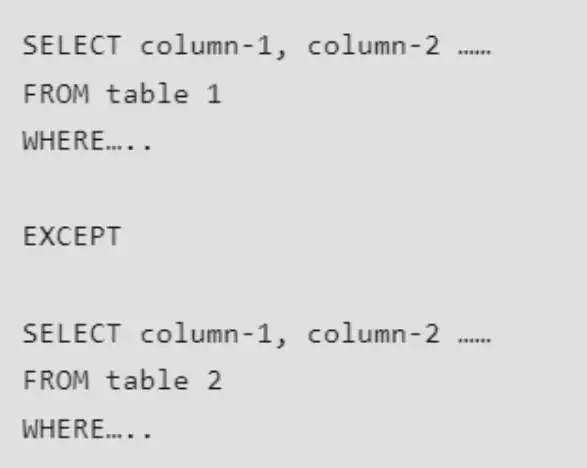
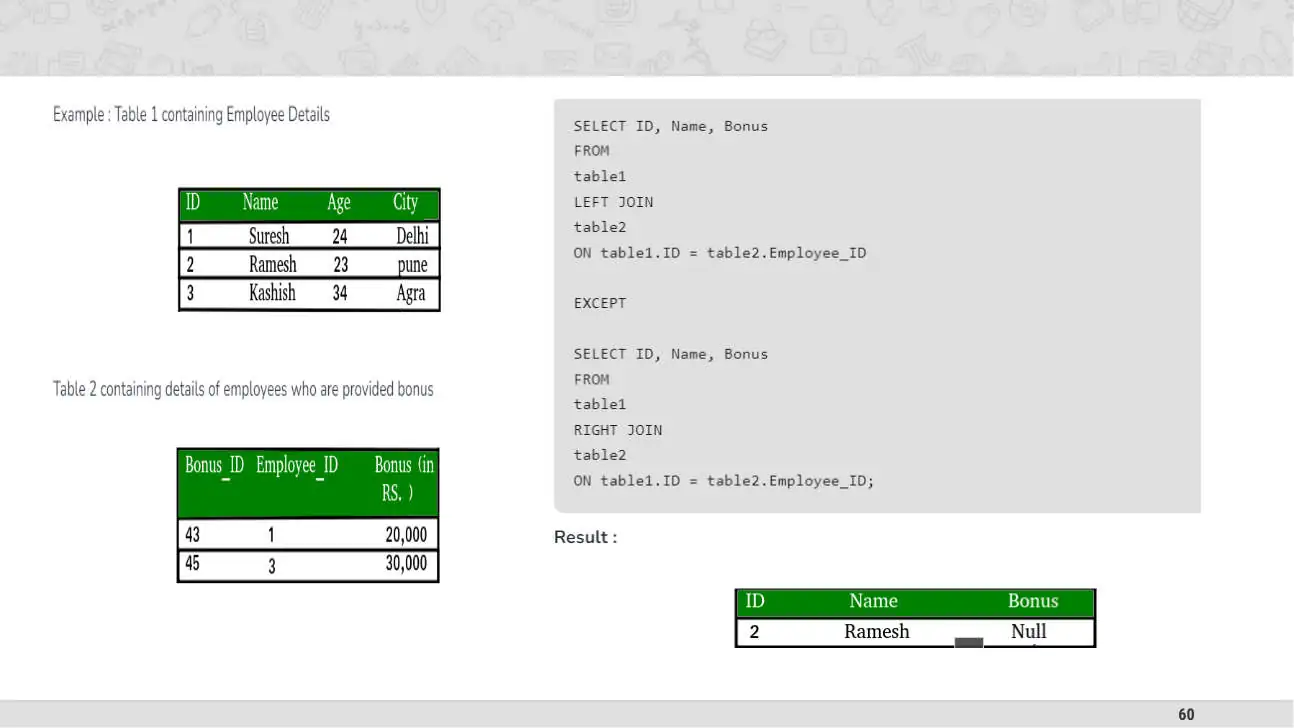
EXCEPT
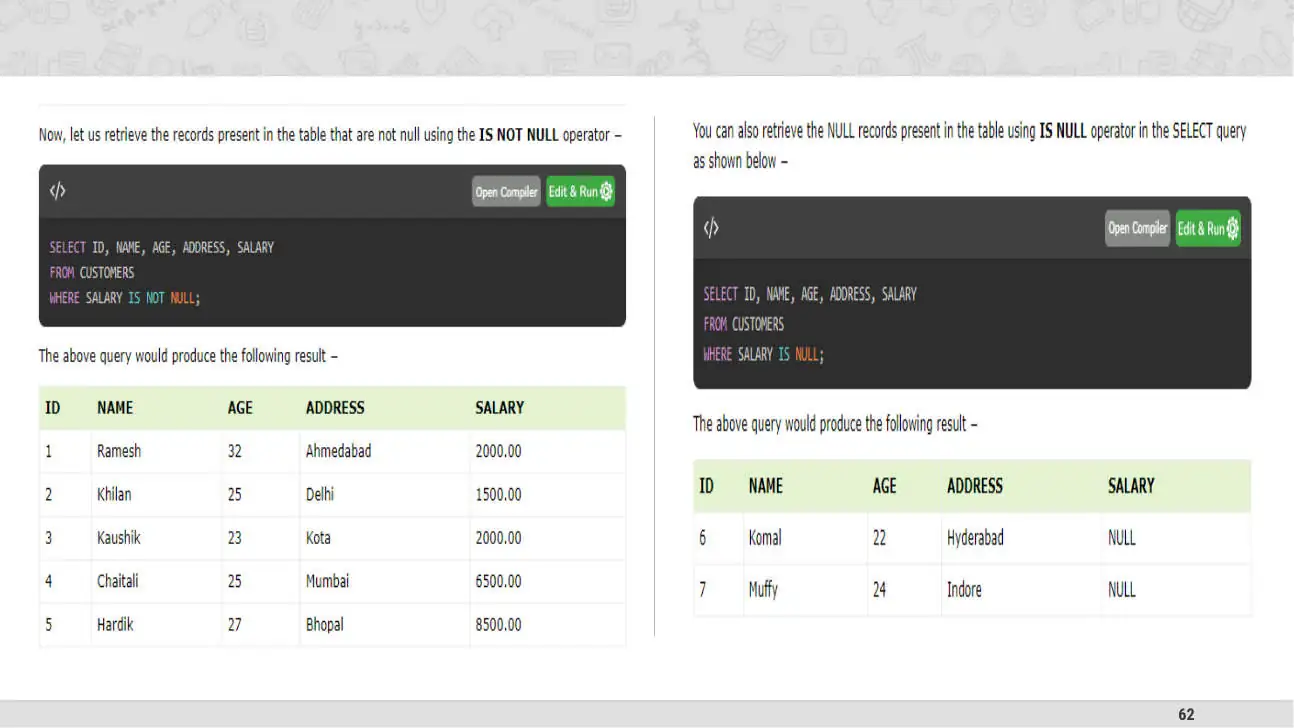
EXCEPT : contains all the rows that are returned by the first SELECT operation, and not returned by the second SELECT operation.
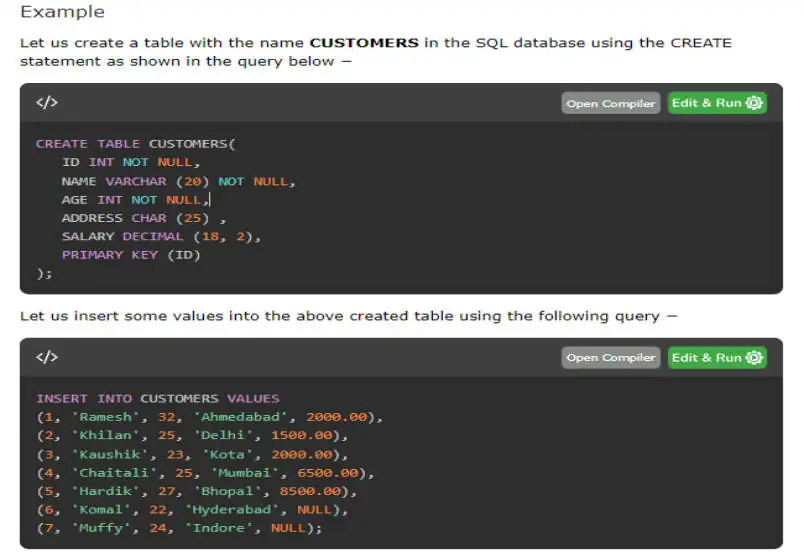
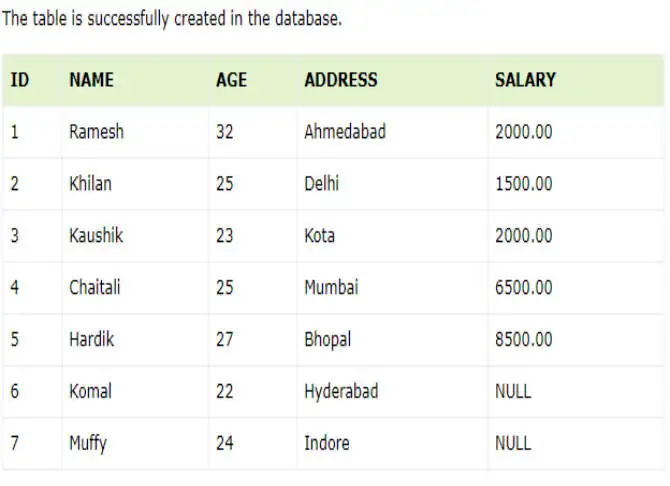
SQL - NULL Values
SQL uses the term NULL to represent a non-existent data value in the database. These values are not the same as an empty string or a zero. They don't hold any space in the database and are used to signify the absence of a value or the unknown value in a data field.
Division Operator
Symbol: ÷ (Division)
Notation: Relation1 (R1) ÷ Relation2 (R2) OR Algebra1 ÷ Algebra2 Condition:
Attributes of relation2/algebra2 must be a proper subset of attributes of relation1/algebra1. Operation:
The output of the division operator will have attributes = All attributes of relation1 – All attributes of relation2 The output of the division operator will have tuples = Tuples in relation1, which are associated with the all tuples of relation2.
Division Operator Example
Example Perform Division operation between Student and Subject.
Answer (Student) ÷ (Subject)
| Student | |
|---|---|
| Name | Subject |
| Raj | DBMS |
| Raj | DS |
| Meet | DS |
| Meet | DF |
| Rohit | DBMS |
| Rohit | DS |
| Rohit | DF |
| Suresh | DBMS |
| Suresh | DF |
| Suresh | DS |
Subject Name Subject Rohit DBMS DS Suresh
DF
Division Operator Example
A B1 B2 B3 B4 Sno PNo PNo PNo PNo PNo S1 P1 P2 P2 P1 P2 S1 P2 P4 P2 P5 S1 P3 P4 S1 P4 Algebra (A) ÷ (B1)
Algebra (A) ÷ (B2)
Algebra (A) ÷ (B3)
Algebra (A) ÷ (B4) S2 P1 S2 P2 SNo SNo SNo SNo S3 P2 S1 S1 S1 S4 P2 S2 S4 S4 P4 S3 S5 P4 S4
Division Operator Example
Example List the name of students doing a project in all technologies.
Project RNo Name Technology TID Technology Raj .NET .NET Raj PHP PHP .NET Android PHP iPhone iPhone
∏ Name, Technology (Student) ÷ ∏ Technology (Project)
Answer Android Rohit Android Name Suresh .NET Suresh iPhone Suresh Android
Rename Operator
Symbol: ρ (Rho)
Notation: ρA (X1,X2….Xn) (Relation)
Operation:
The rename operation is used to rename the output relation.
The result of rename operator are also relations with new name.
The original relation name can not be changed when we perform rename operation on any relation. How to use:
ρ x (E)
Returns a relation E under a new name X.
ρ A1, A2. …,An (E)
Returns a relation E with the attributes renamed to A1, A2, …., An.
ρ x(A1, A2. …,An) (E)
Returns a relation E under a new name X with the attributes renamed to A1, A2, …., An.
Rename Operator Example
Example Rename table Example Rename attributes
| Student | ||
|---|---|---|
| RNo | Name | CPI |
| 101 | Raj | 8 |
| 102 | Meet | 9 |
| 103 | Jay | 7 |
| Student | ||
|---|---|---|
| Rno | Name | CPI |
| 101 | Raj | 8 |
| 102 | Meet | 9 |
| 103 | Jay | 7 |
Algebra ρPerson (Student)
Algebra ρ(RollNo, StudentName, SPI) (Student)
| Person | ||
|---|---|---|
| RNo | Name | CPI |
| 101 | Raj | 8 |
| 102 | Meet | 9 |
| 103 | Jay | 7 |
| Student | ||
|---|---|---|
| RollNo | StudentName | SPI |
| 101 | Raj | 8 |
| 102 | Meet | 9 |
| 103 | Jay | 7 |
Rename Operator Example
Example Rename table and attributes both Example Rename particular attributes
| Student | ||
|---|---|---|
| Rno | Name | CPI |
| 101 | Raj | 8 |
| 102 | Meet | 9 |
| 103 | Jay | 7 |
| Student | ||
|---|---|---|
| Rno | Name | CPI |
| 101 | Raj | 8 |
| 102 | Meet | 9 |
| 103 | Jay | 7 |
| Algebra | (Student) ρStudentName / Name | ||||
|---|---|---|---|---|---|
| Student | |||||
| Rno | StudentName | CPI | |||
| 101 | Raj | 8 | |||
| 102 | Meet | 9 | |||
| 103 | Jay | 7 |
Algebra ρPerson (RollNo, StudentName) (∏ RNo, Name (Student))
Person RollNo StudentName Raj
Jay
Rename Operator Example
Example Find out maximum CPI from student table.
Step-1 ρA (Student) X ρB (Student)
| Output-1 | |||||
|---|---|---|---|---|---|
| A.Rno | A.Name | A.CPI | B.Rno | B.Name | B.CPI |
| 101 | Raj | 8 | 101 | Raj | 8 |
| 101 | Raj | 8 | 102 | Meet | 9 |
| 101 | Raj | 8 | 103 | Jay | 7 |
| 102 | Meet | 9 | 101 | Raj | 8 |
| 102 | Meet | 9 | 102 | Meet | 9 |
| 102 | Meet | 9 | 103 | Jay | 7 |
| 103 | Jay | 7 | 101 | Raj | 8 |
| 103 | Jay | 7 | 102 | Meet | 9 |
| 103 | Jay | 7 | 103 | Jay | 7 |
Rno Name CPI Raj
Jay
Step-2 σA.CPI<B.CPI (ρA (Student) X ρB (Student))
| Output-2 | |||||
|---|---|---|---|---|---|
| A.Rno | A.Name | A.CPI | B.Rno | B.Name | B.CPI |
| 101 | Raj | 8 | 102 | Meet | 9 |
| 103 | Jay | 7 | 101 | Raj | 8 |
| 103 | Jay | 7 | 102 | Meet | 9 |
Rename Operator Example
Example Find out maximum CPI from student table.
Step-3 ∏ A.CPI (σA.CPI<B.CPI (ρA (Student) X ρB (Student)))
Rno Name CPI Output-3 Raj A.CPI
Jay
Step-2 σA.CPI<B.CPI (ρA (Student) X ρB (Student))
| Output-2 | |||||
|---|---|---|---|---|---|
| A.Rno | A.Name | A.CPI | B.Rno | B.Name | B.CPI |
| 101 | Raj | 8 | 102 | Meet | 9 |
| 103 | Jay | 7 | 101 | Raj | 8 |
| 103 | Jay | 7 | 102 | Meet | 9 |
Rename Operator Example
Example Find out maximum CPI from student table.
Step-3 ∏ A.CPI (σA.CPI<B.CPI (ρA (Student) X ρB (Student)))
Rno Name CPI Output-3 Raj A.CPI
Jay
Step-4 ∏ CPI (Student) − ∏ A.CPI (σA.CPI<B.CPI (ρA (Student) X ρB (Student)))
Output-3 CPI A.CPI CPI − =
Aggregate Functions
Symbol: g or G
Notation: g function-name(column), function-name(column), …, function-name(column) (Relation)
Operation:
It takes a more than one value as input and returns a single value as output (result). Aggregate functions are:
Sum (It returns the sum (addition) of the values of a column.)
Max (It returns the maximum value for a column.)
Min (It returns the minimum value for a column.)
Avg (It returns the average of the values for a column.)
Count (It returns total number of values in a given column.)
Aggregate Functions Example
| Student | ||||
|---|---|---|---|---|
| Rno | Name | Branch | Semester | CPI |
| 101 | Ramesh | CE | 3 | 9 |
| 102 | Mahesh | EC | 3 | 8 |
| 103 | Suresh | ME | 4 | 7 |
| 104 | Amit | EE | 4 | 8 |
| 105 | Anita | CE | 4 | 8 |
| 106 | Reeta | ME | 3 | 7 |
| 107 | Rohit | EE | 4 | 9 |
| 108 | Chetan | CE | 3 | 8 |
| 109 | Rakesh | CE | 4 | 9 |
Example Find out sum of CPI of all students.
sum
Answer g sum(CPI) (Student)
Example Find out maximum & minimum CPI.
max min
Answer g max(CPI), min(CPI) (Student)
Example Count the number of students.
count
Answer g count(Rno) (Student)
Example Find out average of CPI of all students.
avg
Answer g avg(CPI) (Student)
8.11
Relational Algebra [Exercise]
Write down relational algebras for the following table:
- Employee (person-name, street, city)
- Works (person-name, company-name, salary)
- Company (company-name, city)
- Managers (person-name, manager-name)
Find the names of all employees who work for “TCS”.
Find the names and cities of residence of all employees who work for “Infosys”.
Find the names, street and city of residence of all employees who work for “ITC” and earn more than