Introduction to data
structures and algorithms
Prof. Madonna Lamin ITMBU, SoCSET
Learning objective
After completion of this unit the students shall be able:
- Discuss the concept of data structure
- Discuss the need of data structure
- Explain the classification of data structure
- Discuss abstract data types (ADTs)
- Discuss various operations on data structures
- Explain algorithm complexity
- Understand the basic concepts and notations of data structures
What is data?
Data is a raw, unorganized fact that needs to be
- processed. It can be numbers, characters, images or other types, and on its own, it doesn’t convey meaning.
Examples:
- A list of names: [“Alice”,”Bob”,”Charlie”]
- Numbers recorded from sensors: [72.5, 71.8, 73.1]
- In computer science, data is the basic input for any computation. It’s what we want to store, manipulate, analyze and transform using programs.
What is data structure?
A data structure is a particular way of organizing and storing data in a computer so that it can be accessed and modified efficiently.
| Types of Data Structures | |
|---|---|
| Linear | Non-Linear |
| Arrays | Trees |
| Linked List | Graphs |
| Stacks | Heaps |
| Queues | Tries |
What is data structure?
Key Properties of data structure:
- Linear vs Non-linear
- Linear Data Structures: Elements are arranged in a sequential order.
- Examples: Array, Linked List, Stack, Queue.
- Non-linear Data Structures: Elements are arranged in a hierarchical or networked manner.
- Examples: Tree, Graph.
- Static vs Dynamic
- Static Data Structures: Fixed size; memory is allocated at compile time.
- Example: Array.
- Dynamic Data Structures: Size can change at runtime; memory is allocated during execution.
- Examples: Linked List, Stack (linked), Queue (linked).
- Homogeneous vs Heterogeneous
- Homogeneous: Stores elements of the same type.
- Example: Array of integers.
- Heterogeneous: Can store elements of different data types.
- Example: Record or struct in C, objects in Python dictionaries.
- Memory Allocation
- Refers to how memory is assigned:
- Contiguous Allocation: Stored in sequential memory blocks (e.g., Arrays).
- Non-contiguous Allocation: Stored in scattered memory locations linked via pointers (e.g., Linked List).
- Time Complexity
- A measure of how fast operations are (insert, delete, search, etc.) depending on data size.
- Examples:
- Array search (unsorted): O(n)
- Binary search on sorted array: O(log n)
- Hash table search: O(1) average case
- Space Complexity
- Amount of memory a data structure needs to store data and auxiliary information.
- Important when working with large datasets or memory-constrained systems.
- Access Methods
- How you retrieve or access data:
- Random Access: Directly access any element (e.g., Arrays).
- Sequential Access: Access elements one by one in order (e.g., Linked List).
- Insertion and Deletion Efficiency
- Some data structures allow fast insertions/deletions (e.g., Linked List: O(1) at head).
- Others are slower (e.g., Array: O(n) for insertion at beginning or middle).
- Searchability
- How quickly you can find elements:
- Hash Tables: Fast (O(1) average)
- Trees (Binary Search Tree): O(log n) if balanced, O(n) if skewed
- Data Integrity and Consistency
- Ensures correctness of operations (especially in complex or shared systems).
- Examples: Trees maintain structure properties (e.g., BST rules), Queues maintain FIFO order.
- Scalability
- Ability to handle growing amounts of data efficiently.
- Dynamic data structures scale better than static ones.
- Reusability and Modularity
- Abstract data types (ADTs) like List, Stack, Queue promote reusability and modular design in software development.
Summary
| Property | Description | Examples |
|---|---|---|
| Linear vs Non-linear | Order of arrangement of data | Array vs Tree |
| Static vs Dynamic | Whether size is fixed or flexible | Array vs Linked List |
| Homogeneous vs Heterogeneous | Type consistency of stored elements | Array vs Structure |
| Memory allocation | Contiguous vs non-contiguous | Array vs Linked List |
| Time complexity | Speed of operations | O(1), O(log n), O(n) |
| Space complexity | Memory required | Array(less) vs Tree(more |
Summary
| Property | Description | Examples |
|---|---|---|
| Access methods | Random or sequential | Array(random) vs List (sequential) |
| Insertion/Deletion | Efficiency of adding/removing items | Stack(fast), Array(slow) |
| Searchability | Speed of search operation | Hash table (fast), List (slow) |
| Data Integrity | Maintains structure/order | BST, Queue |
| Scalability | Handles growing data | Linked List, Tree |
| Reusability | Can be reused in other programs | Stack, Queue (ADT) |
What is algorithm?
- Algorithms are a formulaic approach to solving a given problem.
A complete algorithm includes several
- instructions or methods implemented to solve a problem.
- Algorithms are clear and precise, define inputs and outputs, and have established and measurable parameters.
What is algorithm?
An algorithm is a step-by-step procedure or a finite set of instructions to solve a problem or perform a computation.
Examples:
- Sorting algorithms e.g., Merge Sort, Quick Sort
- Searching algorithms e.g., Binary Search, BFS, DFS
- Graph algorithms e.g., Dijkstra's, Kruskal’s
What is algorithm?
Key properties of algorithm:
Input: Zero or more inputs
- Output: At least one output
- Finiteness: Should terminate after a finite number of steps
- Effectiveness: Each step must be simple and basic Correctness: Should produce the correct result
Relationship between data, data structure and algorithms
Concept Role/Interaction
Data The raw information to be processed
Data Structure The organized format to store and access the data efficiently
Algorithm The method or logic to manipulate data using a suitable structure
In other words, algorithms use data structures to process data efficiently.
Real-world analogy
Imagine a library
- Data = Books
- Data Structure = Bookshelves (arranged by categories, author etc.)
- Algorithm = The librarian’s procedure to find, insert, or remove books
- If books are scattered randomly (poor structure), even a smart librarian(algorithm) will struggle to find them quickly. The same holds in computing.
summary
| Term | Description |
|---|---|
| Data | Raw input, facts or figures |
| Data Structure | Way to store and organize data |
| Algorithm | Set of steps to solve a problem using the data |
Mastering DSA (Data Structure & Algorithms) is essential for building efficient and scalable software systems.
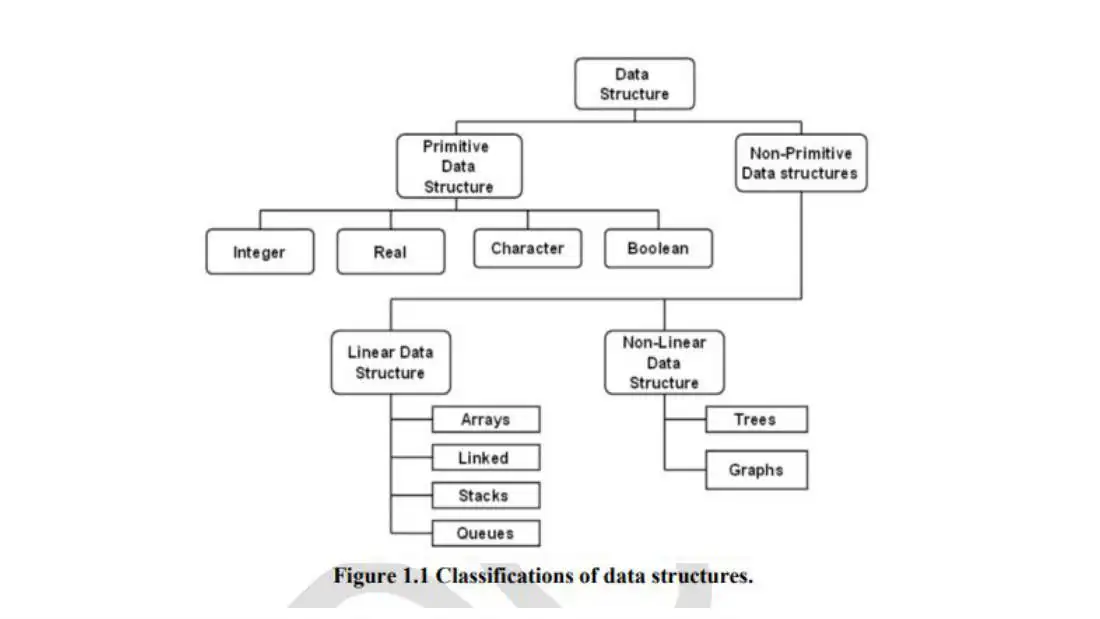
Classification of data structures
A data structure is a way to organize, store and manage data so that it can be used efficiently.
Data structures can be classified in multiple ways:
-
Primitive vs Non-Primitive data structures
-
Linear data structures
-
Non-linear data structures
-
Static vs Dynamic data structures
-
Homogeneous vs Heterogeneous data structures
Primitive vs non-primitive data structures
A. Primitive Data Structures
These are the basic building blocks provided by programming languages.
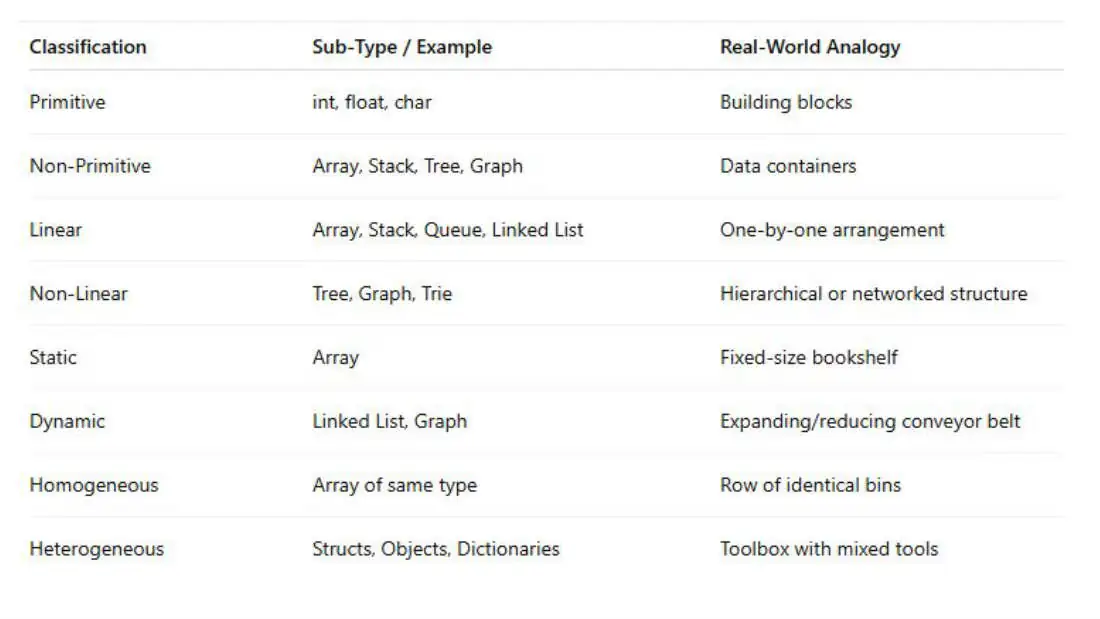
- Examples: int, float, char, boolean
- Real-world analogy: Like alphabets or digits – the basic elements to create complex words or numbers.
B. Non-Primitive Data Structures
These are derived from primitive types and are used to group and organize multiple values.
Divided into two categories:
-
Linear Data Structures
-
Non-Linear Data Structures
Linear data structures
In linear data structures, data elements are arranged sequentially, one after another
| Data Structure | Description | Real-world example |
|---|---|---|
| Array | Fixed-size collection of elements of the same type | A row of lockers numbered 0 to n |
| Linked List | Elements(nodes) connected by pointers | A train where each coach points to the next |
| Stack | LIFO (Last-In First-Out) structure | Stack of plates or books |
| Queue | FIFO(First-In First-Out) structure | Line at a ticket counter |
| Deque | Double-ended queue | People boarding a bus from the front and the back |
Non-linear data structures
In these, data is not stored sequentially. Each element may connect to multiple elements.
| Data Structure | Description | Real-world example |
|---|---|---|
| Tree | Hierarchical structure (root, branches, leaves) | Family tree or file system |
| Binary Tree/BST | Each node has <= 2 children (BST keeps data sorted) | Decision Tree or Tournament Bracket |
| Heap | A specialized tree where parent is always greater/smaller than children | Priority queue in task scheduling |
| Graph | Set of nodes connected by edges | City map, social network, flight routes |
| Trie | Tree used for storing strings (especially prefixes) | Contact search on your phone |
Static vs dynamic data structures
Static
- Fixed-size memory allocated at compile-time
- Example: Arrays
Dynamic
Grows/shrinks at runtime, memory allocated at run-time
- Example: Linked List, Trees
Homogeneous vs non-homogeneous data structures
Homogeneous data structures
- Same data element types
- Example: Array of integers
Heterogeneous data structures
Different data types
- Example: C structs, Python dictionaries
Questions - Conceptual understanding
-
What is the difference between data and data structure?
-
Define an algorithm and list its essential properties.
-
How are data, data structure and algorithms related?
-
Give an example where choosing the right data structure improves algorithm performance.
-
What are some examples of non-linear data structures? Why are they called non-linear?
-
What is the difference between primitive and non-primitive data structures
Answer to 4:
You are building a system to manage and search for unique user IDs from a very large dataset (say, 10 million users). You frequently need to check if a given user ID exists.
- Naive Approach (using a List):
You store all user IDs in a list or array, and to check if a user exists, you linearly search through the list.
- Data Structure: List
- Search Time Complexity: O(n)
- Performance: For 10 million users, checking for existence might take up to 10 million comparisons.
- Optimized Approach (using a Hash Set):
You store all user IDs in a Hash Set. Now, checking for existence becomes a constant time operation.
- Data Structure: Hash Set
- Search Time Complexity: O(1) (average case)
- Performance: Fast, even for millions of records.
Questions -Application-based
1.Which data structure would you choose to implement browser’s back and forward navigation, and why?
Ans: A stack would be used. Stack works on LIFO principle. When you visit a new page, it’s pushed onto the stack. Pressing ‘back’ pops the last visited page.
Questions -Application-based
- You are tasked with finding the shortest route in a city map. Which type of algorithm and data structure would be best?
Answer:
- Algorithm: Dijkstra’s or A* (graph-based shortest path algorithm)
- Data structure: Graph (to represent the city’s intersections and roads)
Explanation:
The city map is naturally modeled as a graph (nodes = places, edges = roads), and shortest path algorithms operate efficiently on such structures.
Questions -Application-based
- Why is an array not a suitable data structure when frequent insertions and deletions are required?
Answer:
Because arrays have fixed sizes and shifting elements during insertion/deletion takes O(n) time.
Explanation:
In such cases, a linked list is preferred as it allows dynamic memory allocation and efficient insertions/deletions (O(1) if pointer is known).
True/False with justification
True or False: Every algorithm must use a data structure.
Answer:
False
Explanation:
While many algorithms benefit from using data structures, not all require them. Example: a simple arithmetic computation algorithm may not need a complex structure.
True/False with justification
True or False: The efficiency of an algorithm depends solely on its logic, not on the data structure used.
Answer:
False
Explanation:
The data structure chosen significantly impacts the time and space complexity of an algorithm. A poor data structure can slow down even the best algorithm.
True/False with justification
True or False: All non-primitive data structures are dynamic in nature.
Answer:
False
Explanation:
Some non-primitive structures like arrays are static — their size is fixed at creation. Others like linked lists or trees are dynamic.
True/False with justification
True or False: A graph can be both a linear and non-linear data structure.
Answer:
False
Explanation:
A graph is inherently nonlinear due to multiple connections between elements that don’t follow a linear sequence.
algorithm
A guessing game Let’s play a little game to give you an idea of how different algorithms for the same problem can have wildly different efficiencies.
The computer is going to randomly select an integer from 1 to 15. You’ll keep guessing numbers until you find the computer’s number, and the computer will tell you each time if your guess was too high or too low.
1 2 3 4 5 6 7 8 9 10 11 12 13 14 15
- Once you’ve found the number, reflect on what technique you used when deciding what number to guess next.
- Maybe you guessed 1, then 2, then 3, then 4, and so on, until you guessed the right number.
We call this approach linear search, because you guess all the
- numbers as if they were lined up in a row. It would work.
- But what is the highest number of guesses you could need?
- If the computer selects 15, you would need 15 guesses. Then again, you could be really lucky, which would be when the computer selects 1 and you get the number on your first guess. How about on average? If the computer is equally likely to select any numbers from 1 to 15, then on an average you’ll need 8 guesses.
- But you could do something more efficient than just guessing 1,2,3,4,5,... right?
- Since the computer tells you whether a guess is too low, too high or correct, you can start off by guessing 8.
If the number that the computer selected is less than 8, then
- because you know that 8 is too high, you can eliminate all the numbers from 8 to 15 from further consideration.
- If the number selected by the computer is greater than 8, then you can eliminate 1 through 8. Either way, you can eliminate half the numbers.
- On your next guess, eliminate half of the remaining numbers. Keep going, always eliminating half of the remaining numbers.
We call this halving approach binary search, and no matter which number from 1 to 15 the computer has selected, you should be able to find the number in at most 4 guesses with this technique.
Algorithm
Route-finding Sometimes, very different-sounding problems turn out to
- be similar when you think how to solve them.
What do Pac-Man, the royal family of Britain and driving
- to Orlando have in common? They all involve route-finding or path-search problems:
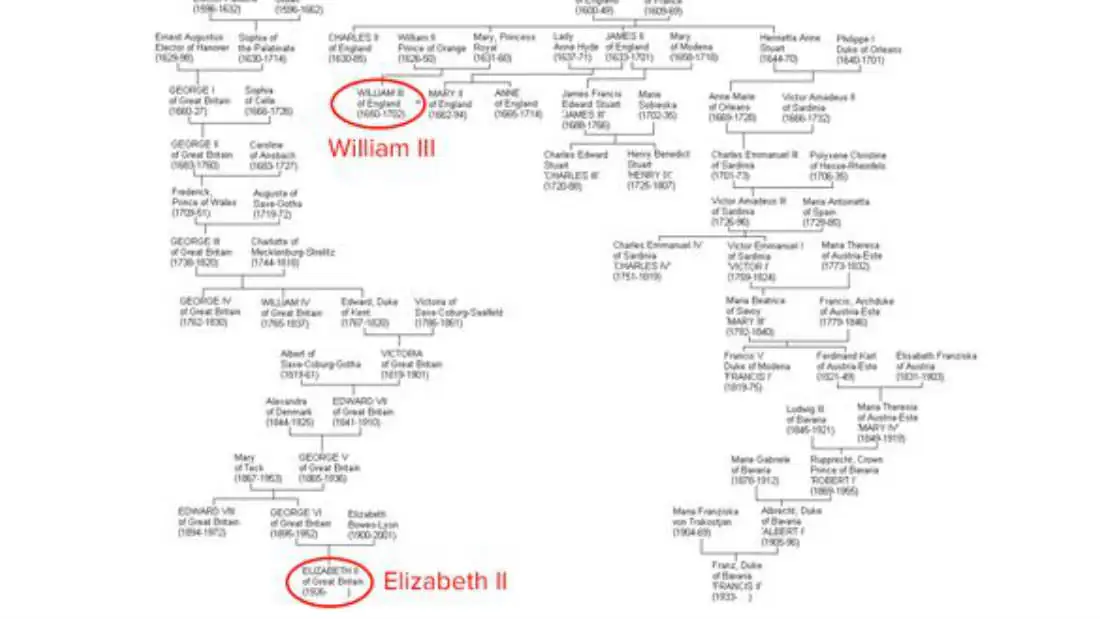
- How is the current Prince William related to King William III, who endowed the College of William and Mary in 1693?
- What path should a ghost follow to get to Pac-Man as quickly as possible?
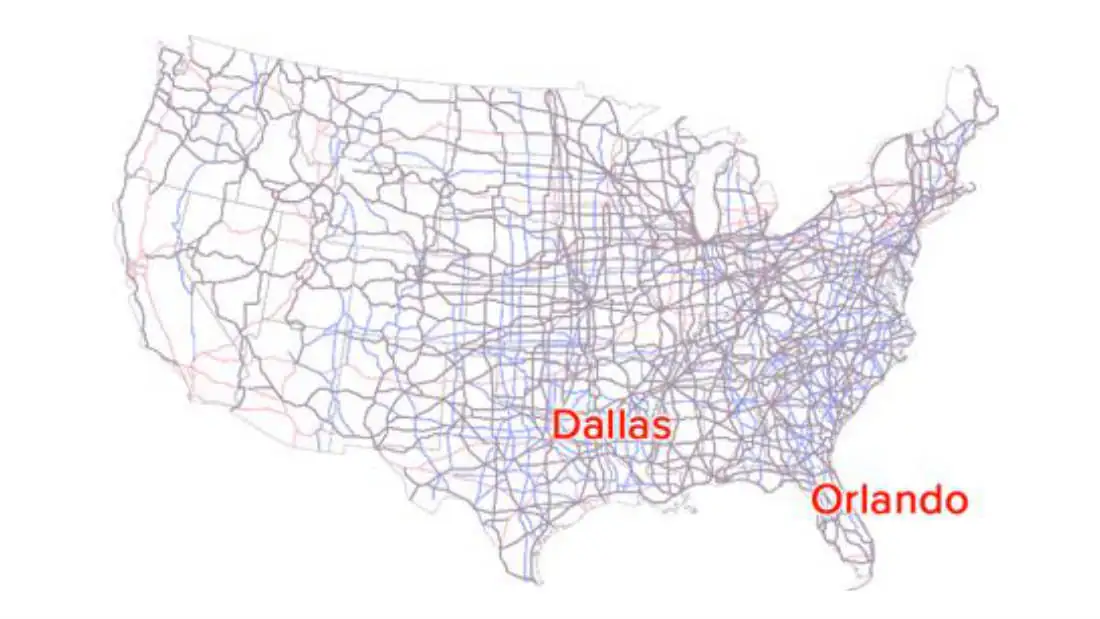
- What’s the best way to drive from Dallas, Texas to Orlando, Florida?
We have been given some information to answer any of
- these questions.
For example, a family tree of the royal family of Britain
- would show the connections between people who were directly related. Prince William is the son of Charles Philip Arthur Windsor. Charles is the son of Queen Elizabeth II. The problem is to find a short chain on the family tree connecting Prince William and William III, using these direct connections.
- As you can see from the tree below, it might take a few connections.
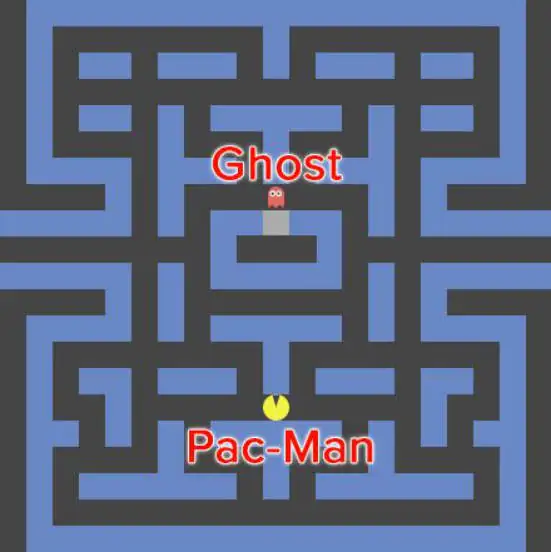
- For Pac-Man we need a map of the maze.
This map shows
- connections between adjacent open squares in the maze- or lack of connections, if there is a wall in between- and the problem is to find a path along black squares that leads the ghost to Pac-Man
In order to find a driving route from Dallas to Orlando,
- we might use a map of United States, showing connections, roads between nearby cities.
No single road directly connects Dallas to Orlando, but
- several sequences of roads do.
Exploring a maze
- Maze games are fun, so let’s delve deeper into one.
- In our game, the main character can navigate to destinations in a maze.
- As the human player, you control the main character by clicking on the next destination in the maze, and the computer figures out how to move the character there.
The destination is marked with a red rectangle labeled ‘GOAL’,
- and the character starts off on their first destination, the start square.
Try playing at: https://www.khanacademy.org/computing/computer-science/algorithms/intr o-to-algorithms/a/route-finding
Notice how the character moved to the goal?
- To make that happen, the program needs to determine the precise set
- of movements that the character should follow to get where the user clicked and then animate those movements. There may be multiple paths for the character to follow, and the program needs to choose the best of those paths.
- Before deciding on an algorithm, the movement rules first need to be established: walls are made of gray squares and legal locations to travel are empty.
- In each step, the character can move from one square to an adjacent square. This character, like a chess rook, cannot move diagonally.
- Here’s the idea behind the algorithm that this program uses:
- Move 1 square closer to the goal- the place where the user clicked on - in each step.
But what does “closer to the goal” mean? Traveling in a
- straight line toward the goal will often cause the character to smack into a wall.
- The algorithm needs to determine which of the surrounding squares are indeed “closer to the goal”, and we can do that by assigning a “cost” to each square that represents the minimum number of steps the character would have to take to get from that vertex to the goal.
- Here’s an algorithm for assigning a cost to each square:
-
Start on the goal square. How far is the goal from the goal? Zero steps, mark the goal with number 0.
-
Find all squares in the maze that are exactly one step away from the goal. Mark them with the number 1. In this maze, if the goal is the exit square, then there is only one square that is exactly one step away.
-
Now find all squares in the maze that are exactly two steps from the goal. These squares are one step away from those marked 1 and have not yet been marked. Mark these squares with the number 2.
-
Mark all squares in the maze that are exactly three steps away from the goal. These squares are one step away from those marked 2 and have not yet been marked. Mark these squares with the number 3.
-
Keep marking squares in the maze in order of increasing distance from the goal. After marking square with number k, mark with the number k + 1 all squares that are one step from those marked k and have not yet been marked.
Eventually, the algorithm marks the square where the
- character starts.
The program can then find a path to the goal by choosing
- a sequence of squares from the start such that numbers on the squares always decrease along the path. If you view the number as the height of the square, it would be like going downhill.
- What if the user were trying to get from the start square to the goal?
- Using the square-marking algorithm, the start square is 13 steps away from the goal.
Here’s a picture showing the connections between possible
- locations for the character, the start, the goal and the shortest distance of each location from the goal:
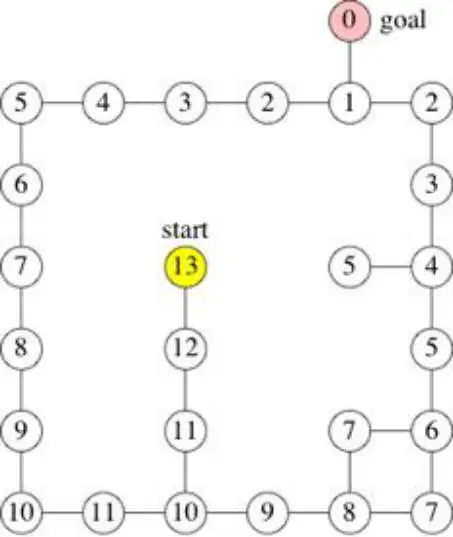
- There’s a square immediately to the south of the start that is only 12 steps from the goal. So the first move is “south”.
- South of that square is an 11. South again. South again to a
- Then east twice to an 8.North
- to a 7, east to a 6, then north four times to a 2. Finish up by going west once, to a 1, and finally north once, to the goal.
Binary search
Binary search is an efficient algorithm for finding an
- item from a sorted list of items. It works by repeatedly dividing in half the portion of the list that could contain the item, until you’ve narrowed down the possible locations to just one. We used binary search in the guessing game.
- One of the most common ways to use binary search is to find an item in an array.
- For example, the Tycho-2 star catalog contains information about the brightest 2,539,913 stars in our galaxy.
Suppose that you want to search the catalog for a
- particular star, based on the star’s name. If the program examined every star in the star catalog in order starting from the first, an algorithm called linear search, the computer might have to examine all 2,59,913 stars to find the star you were looking for, in the worst case.
- If the catalog were sorted alphabetically by star names, binary search would not have to examine more than 22 stars, even in the worst case.
Describing binary search
When describing an algorithm to a fellow human being an
- incomplete description is often good enough.
Some details may be left out of a recipe for a cake; the
- recipe assumes that you know how to open the refrigerator to get the eggs out and that you know how to crack the eggs.
- People might intuitively know how to fill in the missing details, but computer programs do not.
- That’s why we need to describe the algorithms completely.
In order to implement an algorithm in a programming
- language, you will need to understand an algorithm down to the details.
What are the inputs to the problem? The outputs? What
- variables should be created, and what initial values should they have? What intermediate steps should be taken to compute other values and to ultimately compute the output? Do these steps repeat instructions that can be written in simplified form using a loop?
Let’s look of how to describe binary search carefully.
- The main idea of binary search is to keep track of the
- current range of reasonable guesses.
Let’s say that I’m thinking of a number between one and
-
- If you’ve already guessed 25 and I told you my number was higher, and you’ve already guessed 81 and I told you number was lower, then the numbers in the range from 26 to 80 are the only reasonable guesses.
- Here, the red section of the number line contains the reasonable guesses, and the black section shows the guesses that we’ve ruled out.
- In each turn, you choose a guess that divides the set of reasonable guesses into two ranges of roughly the same size.
- If your guess is not correct,then I tell you whether it’s too high or too low, and you can eliminate about half of the reasonable guesses.
- For example, if the current range of reasonable guesses is 26 to 80, you would guess the halfway point, (26+80)/2, or 53. If I then tell that 53 is too high, you can eliminate all numbers from 53 to 80, leaving 26 to 52 as the new range of reasonable guesses, halving the size of the range.
For the guessing game, we can keep track of the set of
- reasonable guesses using a few variables.
Let the variable min be the current minimum reasonable
- guess for this round,and let the variable max be the current maximum reasonable guess.
The input to the problem is the number n, the highest
- possible number that your opponent is thinking of.
- We assume that the lowest possible number is one, but it would be easy to modify the algorithm to take the lowest possible number as the second input.
Implementing binary search of an array
Let's see how to think about binary search on a sorted
- array.
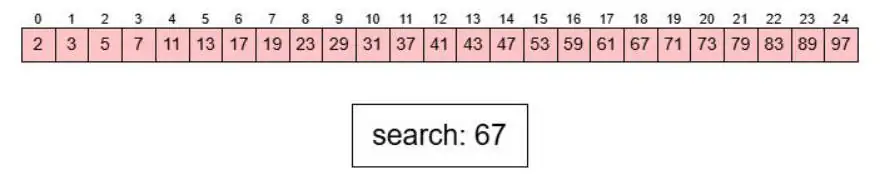
Here's an array of the first 25 prime numbers, in order:
- var primes = [2, 3, 5, 7, 11, 13, 17, 19, 23, 29, 31, 37,
- 41, 43, 47, 53, 59, 61, 67, 71, 73, 79, 83, 89, 97];
- Suppose we want to know whether the number 67 is prime. If 67 is in the array, then it's prime.
We might also want to know how many primes are smaller
- than 67. If we find the position of the number 67 in the array, we can use that to figure out how many smaller primes exist.
- The position of an element in an array is known as its index.
- Array indices start at 0 and count upwards. If an element is at index 0 then it is the first element in the array. If an element is at index 3, then it has 3 elements which come before it in the array.
- Looking at the example below, we can read the array of prime numbers from left to right, one at a time, until we find the number 67 (in the pink box) and see that it is at array index
- Looking through the numbers in order like this is a linear search.
- Once we know that the prime number 67 is at index 18, we can identify that it is a prime. We can also quickly identify that there are 18 elements which come before 67 in the array, meaning that there are 18 prime numbers smaller than 67.
- Did you see how many steps that took?
- A binary search might be more efficient. Because the array primes contains 25 numbers, the indices into the array range from 0 to 24.
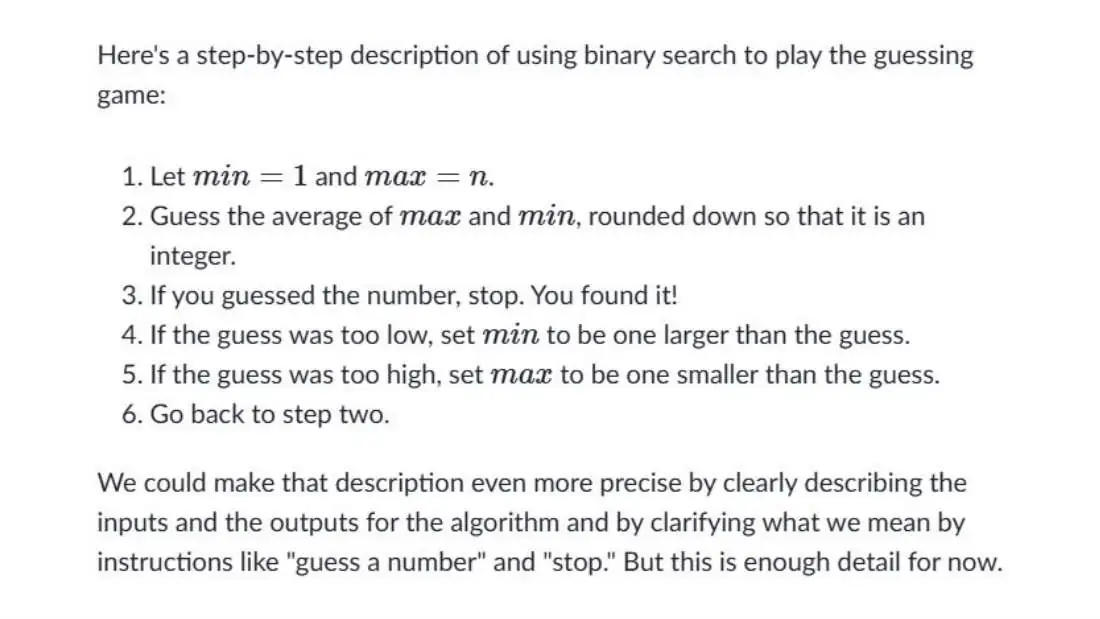
Using the step-by-step instructions from the previous article,
- we start by letting min = 0 and max = 24.
- The first guess in the binary search would therefore be at index 12 (which is (0 + 24) / 2). Is primes[12] equal to 67? No, primes[12] is 41.

Is the index we are looking for higher or lower than 12?
- Since the values in the array are in increasing order,
- and 41 < 67, the value 67 should be to the right of index
- In other words, the index we are trying to guess should
- be greater than 12. We update the value of min to 12 + 1, or 13, and we leave max unchanged at 24.

What's the next index to guess?
- The average of 13 and 24 is 18.5, which we round down to
- 18, since an index into an array must be an integer. We find that primes[18] is 67.

The binary search algorithm stops at this point, since it
- has found the answer.
It took only two guesses, instead of 19 guesses that
- linear search would have taken.
Visualization:
- https://www.khanacademy.org/computing/computer-science/al gorithms/binary-search/a/implementing-binary-search-of-an -array
Pseudocode
- We just described the binary search algorithm in English, stepping through one example.
- That’s one way to do it, but a human language explanation can vary in quality. It can be too short or too long, and most importantly, it’s not always as precise as it should be.
We could jump to showing you binary search in programming language
- like JavaScript or Python, but programs contain lots of details- due to requirements imposed by the programming language, or because programs have to handle errors caused by bad data, user error, or system faults- and those can make it hard to understand the underlying algorithm from just studying the code.
That’s why we prefer to describe algorithms in something called
- pseudocode, which mixes English with features that you see in programming language.
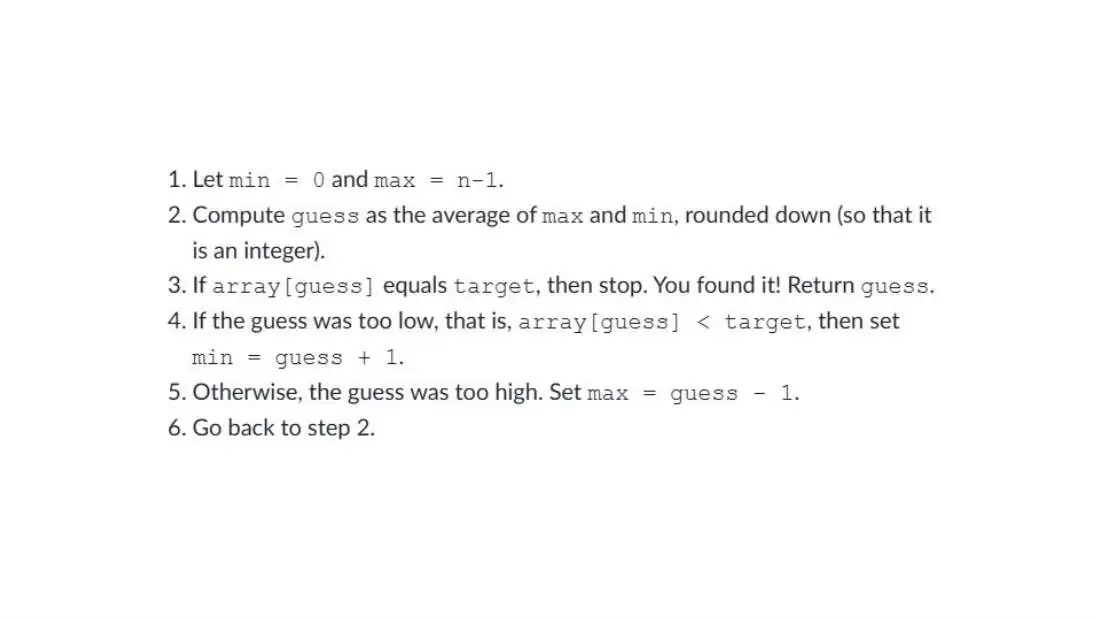
Here's the pseudocode for binary search, modified for
- searching in an array.
The inputs are the array, which we call array; the number
- n of elements in array; and target, the number being searched for. The output is the index in array of target:
Implementing pseudocode
How would we turn that pseudo code into a JavaScript or
- Python program?
We should create a function, because we’re writing code
- that accepts an input and returns an output, and we want that code to be reusable for different inputs.
The parameters to the function
- let’s call it
- binarySearch- will be the array and target value, and the return value of the function will be the index of the location where the target value was found.
- Now let's go into the body of the function, and decide how to implement that. Step 6 says to go back to step 2. That sounds like a loop. Should it be a for-loop or a while-loop? If you really wanted to use a for-loop, you could, but the indices guessed by binary search don't go in the sequential order that a for-loop makes convenient. First we might guess the index 12, and then 18, based on some computations. So a while-loop is the better choice.
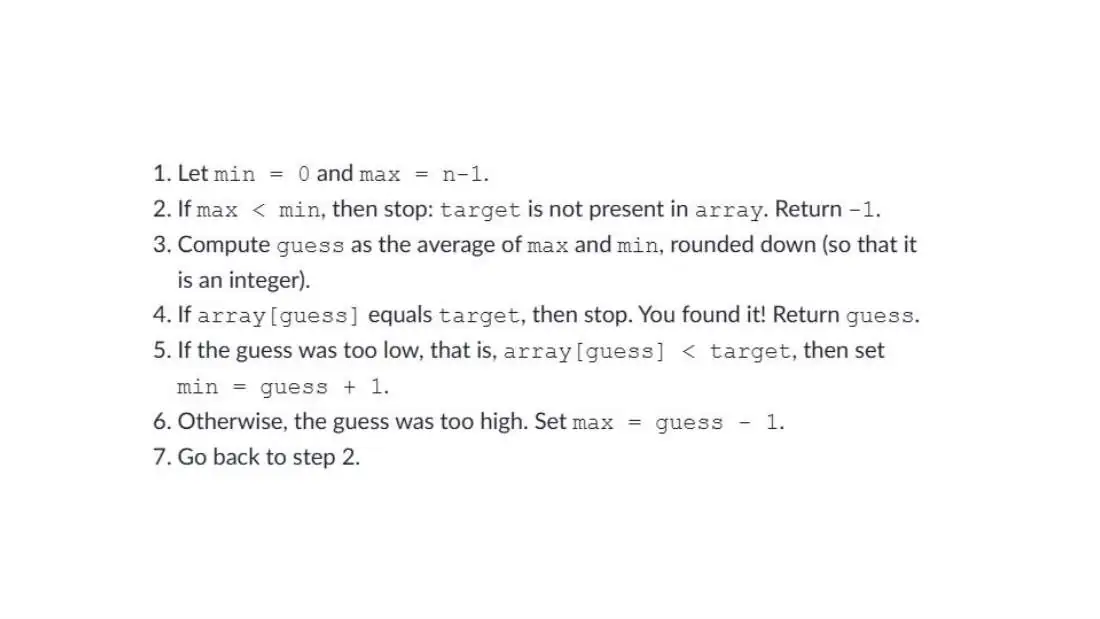
There's also an important step missing in that pseudocode that didn't
- matter for the guessing game, but does matter for the binary search of an array. What should happen if the number you are looking for is not in the array? Let's start by figuring out what index the binarySearch function should return in this case. It should be a number that cannot be a legal index into the array. We'll use -1, since that cannot be a legal index into any array. (Actually, any negative number would do.)
- The target number isn't in the array if there are no possible guesses left. In our example, suppose that we're searching for the target number 10 in the
- primes array. If it were there, 10 would be between the values 7 and 11, which are at indices 3 and 4.
- If you trace out the index values for min and max as the binarySearch function executes, you would find that they eventually get to the point where min equals 3 and max equals 4. The guess is then index 3 (since (3 + 4) / 2 equals 3.5, and we round down), and primes[3] is less than 10, so that min becomes 4.
- With both min and max equaling 4, the guess must be index 4, and primes[4] is greater than 10. Now max becomes 3.
What does it mean for min to equal 4 and max to equal 3? It means that the only
- possible guesses are at least 4 and at most 3. There are no such numbers! At this point, we can conclude that the target number, 10, is not in the primes array, and the binarySearch function would return -1.
- In general, once max becomes strictly less than min, we know that the target number is not in the sorted array. Here is modified pseudocode for binary search that handles the case in which the target number is not present:
Running time of binary search
- We know that linear search on an array of n elements might have to make as many as n guesses.
- You probably already have an intuitive idea that binary search makes fewer guesses than linear search.
- You even might have perceived that the difference between the worst-case number of guesses for linear search and binary search becomes more striking as the array length increases.
Let's see how to analyze the maximum number of guesses that binary search
- makes.
- The key idea is that when binary search makes an incorrect guess, the portion of the array that contains reasonable guesses is reduced by at least half. If the reasonable portion had 32 elements, then an incorrect guess cuts it down to have at most 16. Binary search halves the size of the reasonable portion upon every incorrect guess.
If we start with an array of length 8, then incorrect guesses
- reduce the size of the reasonable portion to 4, then 2, and then 1.
- Once the reasonable portion contains just one element, no further guesses occur; the guess for the 1-element portion is either correct or incorrect, and we're done.
- So with an array of length 8, binary search needs at most four guesses.
What do you think would happen with an array of 16 elements? If you
- said that the first guess would eliminate at least 8 elements, so that at most 8 remain, you're getting the picture. So with 16 elements, we need at most five guesses.
- By now, you're probably seeing the pattern. Every time we double the size of the array, we need at most one more guess.
Suppose we need at most m guesses for an array of length n. Then,
- for an array of length 2n, the first guess cuts the reasonable portion of the array down to size n, and at most m guesses finish up, giving us a total of at most m + 1 guesses.
- Let's look at the general case of an array of length n.
- We can express the number of guesses, in the worst case, as "the number of times we can repeatedly halve, starting at n, until we get the value 1, plus one." But that's inconvenient to write out.
- Fortunately, there's a mathematical function that means the same thing as the number of times we repeatedly halve, starting at n, until we get the value 1: the base-2 logarithm of n.
- That's most often written as log2n, but you may also see it written as lg n in computer science writings.
| n | lg n |
|---|---|
| 1 | 0 |
| 2 | 1 |
| 4 | 2 |
| 8 | 3 |
| 16 | 4 |
| 32 | 5 |
| 64 | 6 |
| n | lg n |
|---|---|
| 128 | 7 |
| 256 | 8 |
| 512 | 9 |
| 1024 | 10 |
| 1,048,576 | 20 |
| 2,097,152 | 21 |
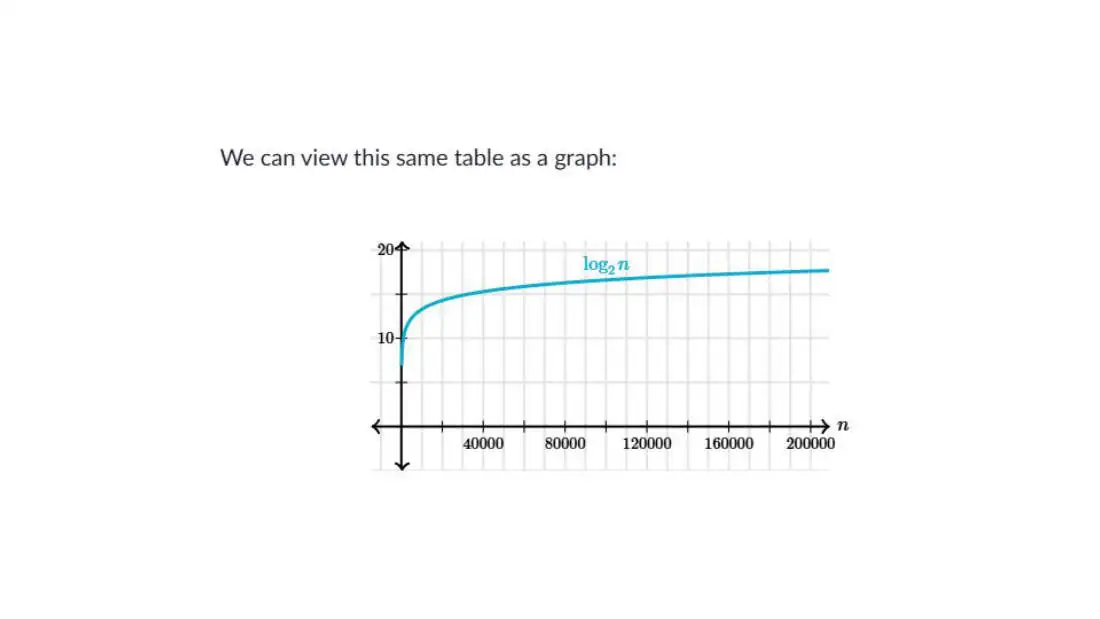
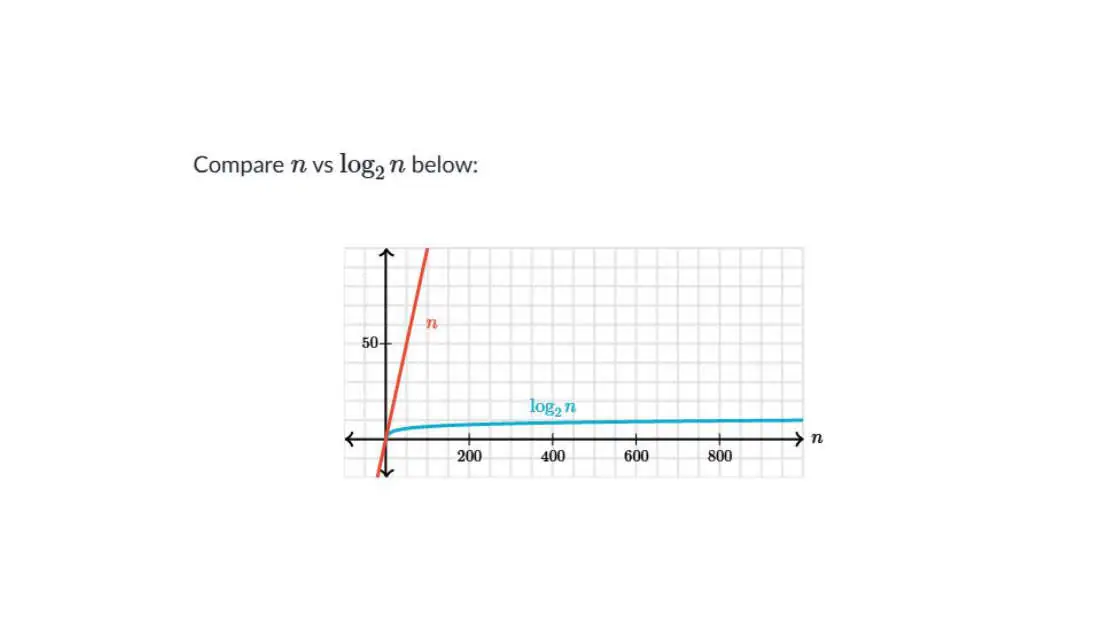
The logarithmic function grows very slowly.
- Logarithms are the inverse of exponentials, which grow very rapidly, so that if log2n = x, then n = 2x.
- For example, because log2128 = 7, we know that 27=128 That makes it easy to calculate the runtime of a
- binary search algorithm on an n that’s exactly a power of 2.
If n is 128, binary search will require at most 8
- (log2128+1) guesses
- What if n isn't a power of 2?
- In that case, we can look at the closest lower power of 2. For an array whose length is 1000, the closest lower power of 2
- is 512, which equals 29. We can thus estimate that log21000 is a number greater than 9 and less than 10, or use a calculator to see that it's about 9.97. Adding one to that yields about 10.97.
- In the case of a decimal number, we round down to find the actual number of guesses. Therefore, for a 1000-element array, binary search would require at most 10 guesses.
- For the Tycho-2 star catalog with 2,539,913 stars, the closest lower power of 2 is 221 (which is 2,097,152), so we would need at most 22 guesses. Much better than linear search!
Exercises
- What is log2(32), the base-2 logarithm of 32
a.
b.
c.
d.
Exercises
Answer:
That took 7 guesses, so the answer is
- You have an array containing the prime numbers from 2 to 311 in sorted order:[2,3,5,7,11,13,...,307,311].
Instead of counting the number of There are 64 items in the array.
guesses like that, you could also About how many times of the array calculate the answer.
would binary search have to examine before concluding that 52 is not in Since there are n items in the array, the array, and therefore not prime?
then the number of guesses would be
| a. b. c. | 1 64 22 |
|---|---|
| d. | 128 |
| e. | 32 |
| f. | 7 |
| g. | 11 |
log2n + 1, rounded down to log264 is exactly 6, so the answer would still be 7.
- In 2013, there were 193 member states in the United Nations. If the names of these states were sorted alphabetically in an array, about how many names would binary search examine to locate a particular name in the array, in
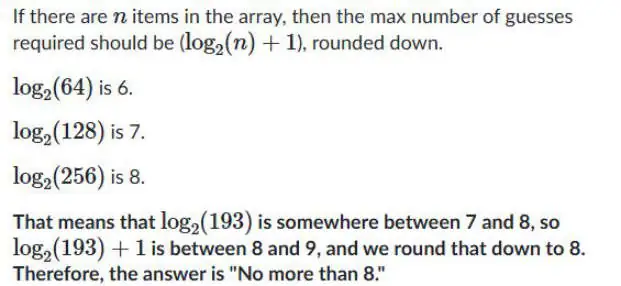
the worst case?
a.
No more than 193 b.
No more than 128 c.
No more than 4 d.
No more than 8 e.
No more than 64
- The 2014 “Catalogue of Life” contains about 1580000 names of species. If these names were sorted in an array, in the worst
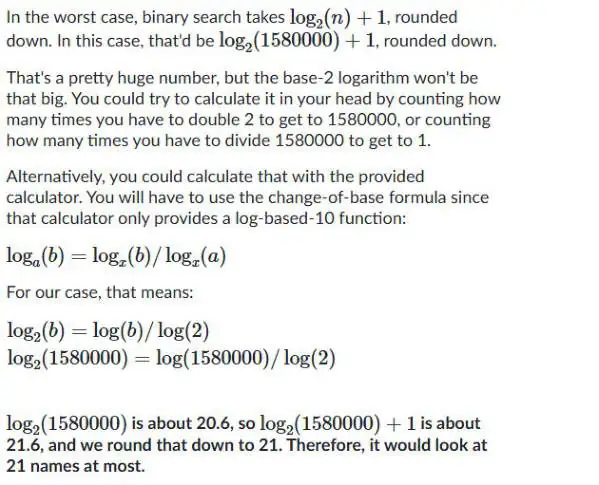
case, how long would it take to use binary search to find the name of a particular species in the array?
a.
At most, it would look at 1580000 names b.
At most, it would look at 790000 names c.
At most, it would look at 21 names d.
At most, it would look at 6 names
Exercises
- 32 teams qualified for the 2014 World Cup. If the names f the teams were arranged in sorted order (an array), how many times in the array would binary search have to examine to find the location of a particular team in the array, in the worst case?
a.
At most, 32 b.
At most, 1 c.
At most,16 d.
At most,6
Abstract data type (ADT)
An Abstract Data Type (ADT) is a logical description of how data is organized and the operations that can be performed on it — without worrying about how it is implemented.
In short: ADT tells you what you can do with the data, not how it's done.
Key Characteristics of ADT:
- Focuses on operations, not implementation.
- Hides internal details (encapsulation).
- Provides a contract of what behavior to expect.
Imagine a vending machine:
- You insert money, press buttons, and get snacks.
- You don’t care how it works inside — just what you can do with it.
That’s what ADT is — like a vending machine interface for data!
| Common ADTs with examples and applications | ||||
|---|---|---|---|---|
| ADT | Description | Real-world analogy | ||
| List | Ordered collection of elements | Grocery shopping list | File lists, Data batches, logs, event sequences | |
| Stack | Last-in, First-out (LIFO) | Stack of plates | Function call stack, Undo operations, Backtracking | |
| Queue | First-in, First-out(FIFO) | People in line | Print Queue, CPU Scheduling, BFS algorithm, Packet handling | |
| Deque | Double-ended queue(add/remove from both ends) | Checkout counter | Real-time intrusion detection buffering |
| Common ADTs with examples and applications | ||||
|---|---|---|---|---|
| ADT | Description | Real-world analogy | ||
| Hash Table | Stores key-value pairs | Dictionary (word and meaning) | Fast lookup of model data, password storage (hashed) | |
| Set | Unordered collection of unique items | Bag of unique access cards | Unique labels in classification, access control list | |
| Tree | Hierarchical structure | Family tree or folder system | File systems, decision trees, role-based access hierarchy | |
| Graph | Nodes connected by edges | City map or network | Social networks, routing, knowledge graphs, |
- ADTs are like blueprints — they define how data should behave, not how it's built.
- They help you write modular, clean, and reusable code.
- Mastering ADTs is essential for algorithms, system design, interviews, and real-world problem solving.
Rules for writing ADT
- Define the ADT Abstractly — Not How It's Implemented
- Rule: Focus on what operations the ADT supports, not how they work internally.
Example: For a Stack, define operations like push(), pop(), isEmpty() — without
- saying whether it uses arrays or linked lists.
- Specify the Operations Clearly
- Rule: Every operation should be clearly named and described with:
- Its purpose
- Input parameters
- Return value
- Any preconditions or postconditions
- Example (Stack ADT):
- push(x): Add item x to the top.
pop(): Remove and return the top item.
- isEmpty(): Return true if the stack is empty.
- Use Mathematical Notation or Structured Format Stack:
create(): Stack (Optional)
push(s: Stack, x: Element): Stack
- Rule: ADTs can be described using structured pop(s: Stack): Element pseudocode or notation.
top(s: Stack): Element isEmpty(s: Stack): Boolean Example: Stack ADT (in structured notation)
- Avoid Language-Specific Syntax
- Rule: Keep the ADT description language-independent.
- Don’t use Java or Python syntax.
- Use plain terms or pseudocode so that the ADT can be implemented in any language.
- Respect Encapsulation
- Rule: Hide internal details from the user.
- Users should not know how data is stored or manipulated internally.
- They should only interact via the defined operations.
- Include Constraints and Conditions
- Rule: Define any limitations or special behaviors.
Example: In a Queue, dequeue() should not be called on an empty queue.
- Ensure Logical Consistency
- Rule: Operations should behave consistently and predictably.
Example: A pop() from a stack should always remove the last pushed item.
Sample adt
ADT: Queue
Operations:
create(): Queue enqueue(q: Queue, x: Element): Queue dequeue(q: Queue): Element isEmpty(q: Queue): Boolean front(q: Queue): Element
Constraints:
- dequeue() and front() cannot be called on an empty queue
- FIFO order: First item in is the first item out
summary
Rule Description
Abstract Definition Focus on what it does, not how
Clear operations Define name, input, output, behavior
Language-independent Use pseudocode or plain text
Encapsulation Hide implementation details
Logical consistency Maintain expected behavior
Preconditions Specify when operations can or cannot be used
Reusability Design ADTs to be implemented in multiple ways
Basic conceptual questions
-
What is an Abstract Data Type (ADT)? How is it different from a data structure?
-
List some common ADTs and briefly describe their operations.
-
Why is abstraction important in ADTs?
-
Explain the key operations of a Stack ADT.
-
What are the differences between Stack and Queue ADTs?
-
What is the role of encapsulation in ADTs?
-
Can you use arrays or linked lists to implement a Queue? Explain how.
-
How does the Set ADT differ from the List ADT?
-
What do you mean by FIFO and LIFO? Which ADTs follow these principles?
-
Give an example of a real-world scenario where you would use a Stack.
application-based/Real-world scenario questions
-
As a Cyber Security analyst, which ADT would you use to monitor and handle incoming data packets in real-time? Why?
-
In an AI application for pathfinding, which ADT would you use to perform Breadth-First Search (BFS) and Depth-First Search (DFS)?
-
In an IT infrastructure system, how would a Queue ADT be useful in print job scheduling?
-
How can a Hash Table ADT help in securing user passwords in Cyber Security applications?
-
Design an ADT for a Browser History system. What operations would it support?
Implementation and design-based questions
-
Describe how you would implement a Stack ADT using an array.
-
What are the advantages and disadvantages of using a linked list over an array to implement a Queue ADT?
-
How would you implement a priority queue ADT? Give an example use case.
-
What are the key operations of a Graph ADT, and how is it useful in network security?
-
Describe the design of a Playlist ADT for a music player application.
Behavioral and high-order thinking questions
-
Suppose you're working on a Machine Learning model that processes unique labels. Which ADT would be best suited and why?
-
Imagine you’re designing a firewall. How would you use ADTs to keep track of allowed and blocked IPs?
-
How do ADTs improve code maintainability and modularity in large-scale applications?
-
Give an example where choosing the wrong ADT leads to inefficient algorithm performance.
-
If you're asked to design your own ADT, what steps would you follow and what rules would you consider?