Linear list
Prof. Madonna Lamin
topics
-
Array
-
Stack
-
Queue
-
Linked List
array
Arrays are simple data structure for storing lots of similar items.
They exist in all programming languages, and are used as the basis for most other data structures.
On their own, arrays can be used to solve many interesting problems.

Array - A dvd box
Suppose you had a bunch of DVDs at home that you wanted
- to arrange neatly. What would be the ideal choice for storing such a thing?
- You can find a cardboard box (or some other box) big enough to arrange all of the DVDs neatly, right?
- However, you might want to add a new DVD to the box, or you might want to get rid of the old ones that you’ve watched a million times over the past.
- An important consideration for this box would that you would only place DVDs in it and nothing else; you wouldn’t place your clothes in it, for example.
Array - A dvd box
The box would contain multiple items, but all of them
- would of the same type.
In this case, that type is DVD. Items of the same type
- share properties.
For DVDs, those properties include:
- All the DVDs would be inside a plastic cover
- The cover would have the name of the movie, the cast and all sorts of other details.
All the covers would be of exactly the same size and would contain
- just one, and only one, DVD
Array - A dvd box
You might not actually name the DVD box, but when you
- want your sister to fetch a DVD, you’d tell her that the DVD is inside your “DVD box”, and she would instantly know where to find the box.
This is a very simple yet realistic scenario that is easy
- to understand and relate to.
Array - A dvd box
- Suppose you were told that you needed to build some software to keep track of all the DVDs in an inventory. This is the exact same scenario that we just described above, but on a much larger scale.
- Let’s imagine the DVD box as a virtual DVD library. For each DVD, you would have certain properties that would be specific attributes of the movies themselves.
Array - A dvd box
In addition to the properties of a DVD, you’re also told
- the maximum number of DVDs that can be stored in the inventory.
Obviously, you wouldn’t want to store ancient movies from
- 1990s unless they are popular ones, right?
Say you were told that the requirement is to maintain a
- maximum inventory of just 100 DVDs.
- This is an important piece of information because without this, you wouldn’t be able to find the perfectly sized box to fit all the DVDs easily.
Array - A dvd box
- How could we find a box of a particular size that would be able to fit a maximum of 100 DVDs?
- Well, lucky us, we don’t need to physically find a cardboard box or anything - there’s a programming construct for this purpose. That programming construct is known as an Array.
What is an array?
- An array is a collection of items. The items could be integers, strings, DVDs, games, books- anything really.
- The items are stored in neighbouring (contiguous) memory locations.
Because they’re stored together, checking
- through the entire collection of items is straightforward.
Creating an array
- On a computer, arrays can hold up to N items.
- The value N is decided by you, the programmer, at the time you create the array.
- This is the same as when we found a big enough cardboard box for the DVDs.
Additionally, you also need to specify the type
- of item that will be going into the array.
#include <stdio.h>
#include <string.h>
// Definition of a DVD
typedef struct {
char title[100];
char director[50];
int year;
} DVD;
int main() { // Create an array to hold up to 15 DVDs DVD collection[15];
// Example: Initialize some DVDs strcpy(collection[0].title, "The Matrix");
strcpy(collection[0].director, "Lana Wachowski, Lilly Wachowski"); collection[0].year = 1999;
strcpy(collection[1].title, "Inception");
strcpy(collection[1].director, "Christopher Nolan");
collection[1].year = 2010;
// Print stored DVDs printf("DVD Collection:\n");
for (int i = 0; i < 2; i++) { // change 2 to the number of DVDs added printf("Title: %s\n", collection[i].title);
printf("Director: %s\n", collection[i].director);
printf("Year: %d\n\n", collection[i].year);
}
return 0;
}
Creating an array
- After running the above code, we now have an array called collection with 15 places in it.
- Each place can hold one DVD. At the start there are no DVDs in the array; we’ll have to actually put them in.
The array can hold up to 15 DVDs. If we get a 16th
- DVD, we’ll need to make a new array (we’ll see later).
- Why not just make it hold 100000 DVDs so that we know for sure we’ll always have enough space?
Creating an array
- Well, the reason is the same as it is for the physical box of DVDs. Do you really want to find a box that could hold 1000000 DVDs when you currently only have 15 DVDs and, in fact, never expect to own more than 100 of them?
- Is it even worth getting a box that could hold 100 DVDs right now, when you only expect to get a few new ones each year? It will take up a lot more space in your home in the meantime.
- It is exactly the same with the array, where the space in your home is analogous to memory on the computer.
- If you make an array with 1000000 spaces, the computer will reserve memory to hold 1000000 DVDs, even if you only put 15 DVDs into it. That memory can be used for anything else in the meantime - just like the space in your house that has been taken over by that huge cardboard box!
Accessing elements in an array
- The two most primitive array operations
are:
writing elements into them, and
- reading elements from them.
- - All other array operations are built on
top of these two primitive operations.
Writing items into array
- To put a DVD into the array, we need to decide which of the 15 places we’d like to go in.
Each of the places is identified using a number
- in the range of 0 to N - 1.
- The 1st place is 0, the 2nd place is 1, the 3rd place is 2,... and all the way up to the 15th place which is 14. We call these numbers that identify each place indexes.
Let’s put the DVD for The Avengers into the eighth place of the array we created above.
#include <stdio.h> #include <string.h>
// Definition of a DVD typedef struct { char title[100];
char director[50];
int year;
} DVD;
int main() { // Create an array to hold up to 15 DVDs DVD collection[15];
// Example: Initialize some DVDs strcpy(collection[0].title, "The Matrix");
strcpy(collection[0].director, "Lana Wachowski, Lilly Wachowski"); collection[0].year = 1999;
strcpy(collection[1].title, "Inception");
strcpy(collection[1].director, "Christopher Nolan");
collection[1].year = 2010;
// Place "The Avengers" in the 8th slot (index 7)
strcpy(collection[7].title, "The Avengers");
strcpy(collection[7].director, "Joss Whedon");
collection[7].year = 2012;
// Print stored DVDs printf("DVD Collection:\n");
printf("1. Title: %s\n Director: %s\n Year: %d\n\n", collection[0].title, collection[0].director, collection[0].year);
printf("2. Title: %s\n Director: %s\n Year: %d\n\n", collection[1].title, collection[1].director, collection[1].year);
printf("8. Title: %s\n Director: %s\n Year: %d\n", collection[7].title, collection[7].director, collection[7].year);
return 0;
}
Let’s put a few more DVD’s in:
- IncrediblesDVD
- findingDoroDVD
- lionKingDVD
- Over writing of content, when will it happen?
Reading items from an array
Print out what's in indexes 0, 1, 7, 10
- The Matrix
- Inception
- The Avengers
- Have got to handle
Writing items into an array with a loop
- We commonly use a loop to put lots of values into an array.
Create an array of ints and put in the first 10
- square numbers into it.
#include <stdio.h>
int main() { // Create an array of size 10 to store the first 10 square numbers int squares[10];
// Fill the array with square numbers for (int i = 0; i < 10; i++) { squares[i] = (i + 1) * (i + 1); // since i starts from 0 }
// Print the array printf("First 10 square numbers:\n");
for (int i = 0; i < 10; i++) { printf("squares[%d] = %d\n", i, squares[i]);
}
return 0;
}
Reading items from an array with a loop
#include <stdio.h>
int main() { // Create and fill an array with the first 10 square numbers int squares[10];
for (int i = 0; i < 10; i++) { squares[i] = (i + 1) * (i + 1);
}
// Read and print items from the array using a loop printf("Reading items from the array:\n");
for (int i = 0; i < 10; i++) { printf("squares[%d] = %d\n", i, squares[i]);
}
return 0;
}
Array capacity versus length
If somebody asks you how long the DVD array is, what would your answer be?
There are two different answers you might have given:
The number of DVDs the box could hold, if it was full, or
- The number of DVDs currently in the box.
- Both answers are correct, and both have very different meanings!
The first one is the capacity The second one is the length of the array
Array capacity
Let’s say we’ve created a new array like this:
DVD collection[6];
Is it valid operation to insert an element at collection[6]? What about at collection[10]?
Nope, either of these are valid. When we created the array, we specified that it can hold up to 6 DVDs. This is the array’s capacity.
Array capacity
Remembering that indexing starts at 0, we can only insert items at array[0], array[1], array[2], array[3], array[4], and array[5].
Trying to put an element anywhere else, such as array[-3], array[6], or array[100] will cause your code to crash with an ArrayIndexOutOfBoundsException! (in Java) but in C it is the programmer’s responsibility to check for bounds.
Array capacity
- The array’s capacity must be decided when the array is created.
- The capacity cannot be be changed later.
- Going back to our DVDs-in-a-cardboard-box analogy, changing the capacity of an array would be akin to trying to make a cardboard box bigger.
- Trying to make a fixed-size cardboard box bigger is impractical, and it’s the same as an array on a computer.
Array capacity
- So, what do we if we get a 7th DVD and we’d like all our DVDs in the same array?
Well, unfortunately it’s the same as it is with
- our cardboard box. We’ll need to go get a larger one, and then move all the existing DVDs into it, along with the new one.
- The capacity of an array in C can be checked using malloc (dynamic arrays)
Array length
- The other definition of length is the number of DVDs, or other items, currently in the array.
- This is something you’ll need to keep track of yourself, and you won’t get any errors if you overwrite an existing DVD, or if you leave a gap in the array.
#include <stdio.h> int lengthOfArray(int* arr, int n){ int count = 0;
for(int i = 0; i < n; i++ ){ if(arr[i] != 0)
count++;
} return count;
} int main() { int numbers[6] = {10, 20, 30, 40, 50};
// Find capacity (capacity of numbers)
int capacity = sizeof(numbers) / sizeof(numbers[0]);
printf("The array has %d capacity.\n", capacity); int len = lengthOfArray(numbers, 6);
printf("Length = %d ",len);
return 0;
}
Maximum consecutive ones
Given a binary array nums, return the maximum number of consecutive 1’s in the array.
Example 1:
Input: nums = [1,1,0,1,1,1] Output: 3 Explanation: The first two digits or the last three digits are consecutive 1’s. The maximum number of consecutive is 3. Example 2:
Input : nums = [1,0,1,1,0,1] Output: 2 Constraints:
- 1 <= nums <= 105 Nums[i] is either 0 or 1
Pseudocode to maximum consecutive ones
FUNCTION findMaxConsecutiveOnes(nums, n):
SET maxCount = 0 SET currentCount = 0
FOR i = 0 TO n-1:
IF nums[i] == 1:
currentCount = currentCount + 1 IF currentCount > maxCount:
maxCount = currentCount ELSE:
currentCount = 0 // reset streak when encountering
ENDIF ENDFOR
RETURN maxCount END FUNCTION
#include <stdio.h> int findMaxConsecutiveOnes(int nums[], int size) { int maxCount = 0; // maximum streak int currentCount = 0; // current streak
for (int i = 0; i < size; i++) { if (nums[i] == 1) { currentCount++; // extend current streak if (currentCount > maxCount) { maxCount = currentCount; // update max if needed } } else { currentCount = 0; // reset streak when we hit a 0 } }
return maxCount;
}
int main() { int nums[] = {1, 1, 0, 1, 1, 1}; // example binary array int size = sizeof(nums) / sizeof(nums[0]);
int result = findMaxConsecutiveOnes(nums, size);
printf("Maximum consecutive 1's: %d\n", result);
return 0;
}
Find numbers with even number of digits
Given an array nums of integers, return how many of them contain an even number of digits.
Example 1:
Input: nums = [12,345,2,6,7896] Output: 2 Explanation:
12 contains 2 digits (even number of digits).
345 contains 3 digits (odd number of digits).
2 contains 1 digit (odd number of digits).
6 contains 1 digit (odd number of digits).
7896 contains 4 digits (even number of digits).
Therefore only 12 and 7896 contain an even number of digits.
Find numbers with even number of digits
Example 2:
Input: nums = [555,901,482,1771] Output: 1 Explanation:
Only 1771 contains an even number of digits.
Constraints:
- 1 <= nums.length <= 500
- 1 <= nums[i] <= 105
Pseudocode
FUNCTION countEvenDigits(nums, n):
SET count = 0
FOR i = 0 TO n-1:
SET number = nums[i] SET digitCount = 0
// Count digits in the current number WHILE number > 0:
number = number DIV 10 // integer division digitCount = digitCount + 1 ENDWHILE
// Check if digit count is even IF digitCount MOD 2 == 0:
count = count + 1 ENDIF ENDFOR
RETURN count END FUNCTION
#include <stdio.h> #include <stdlib.h> // for abs()
// Function to count digits in a number int countDigits(int num) { if (num == 0) return 1; // special case: 0 has 1 digit num = abs(num); // handle negative numbers int count = 0;
while (num > 0) { count++;
num /= 10;
} return count;
}
// Function to count numbers with even digit length int findNumbersWithEvenDigits(int nums[], int size) { int countEvenDigits = 0;
for (int i = 0; i < size; i++) { int digits = countDigits(nums[i]);
if (digits % 2 == 0) { countEvenDigits++;
} }
return countEvenDigits;
}
int main() { int nums[] = {12, 345, 2, 6, 7896};
int size = sizeof(nums) / sizeof(nums[0]);
int result = findNumbersWithEvenDigits(nums, size);
printf("Count of numbers with even number of digits: %d\n", result);
return 0;
}
Squares of a sorted array
Given an integer array nums sorted in non-decreasing order, return an array of the squares of each number sorted in non-decreasing order.
Example 1:
Input: nums = [-4,-1,0,3,10] Output: [0,1,9,16,100] Explanation: After squaring, the array becomes [16,1,0,9,100]. After sorting, it becomes [0,1,9,16,100].
Example 2:
Input: nums = [-7,-3,2,3,11] Output: [4,9,9,49,121] Constraints:
- 1 <= nums.length <= 104
- -104 <= nums[i] <= 104
- nums is sorted in non-decreasing order
This is a well-known two-pointer array problem (often seen in coding interviews).
Since the input array is already sorted:
- The largest square will come from either the leftmost negative or rightmost positive number.
- Use two pointers (left at start, right at end).
Compare absolute values, fill results array from the
- back.
FUNCTION sortedSquares(nums, n):
CREATE result array of size n
SET left = 0 SET right = n - 1 SET position = n - 1 // fill result from end
WHILE left <= right:
IF ABS(nums[left]) > ABS(nums[right]):
result[position] = nums[left] * nums[left] left = left + 1 ELSE:
result[position] = nums[right] * nums[right] right = right - 1 ENDIF position = position - 1 ENDWHILE
RETURN result END FUNCTION
#include <stdio.h> #include <stdlib.h>
void sortedSquares(int nums[], int size, int result[]) { int left = 0, right = size - 1;
int pos = size - 1; // position to fill in result array
while (left <= right) { int leftSquare = nums[left] * nums[left];
int rightSquare = nums[right] * nums[right];
if (leftSquare > rightSquare) { result[pos] = leftSquare;
left++;
} else { result[pos] = rightSquare;
right--;
} pos--;
} }
int main() { int nums[] = {-4, -1, 0, 3, 10};
int size = sizeof(nums) / sizeof(nums[0]); int result[size];
sortedSquares(nums, size, result);
printf("Sorted squares: ");
for (int i = 0; i < size; i++) { printf("%d ", result[i]);
} printf("\n");
return 0;
}
Time complexity: O(n) (single pass through the array) Space complexity: O(n) (result array)
Inserting ITEMS into an array
Basic Array Operation:
An array is a data structure, which means that it stores data in a specific format and supports certain operations on the data it stores. Consider the DVD inventory management software let’s look at some operations you might want to perform using this software: Insert a new DVD into the collection at a specific location.
- Delete a DVD from the existing collection if it doesn’t make sense to keep it in the inventory anymore.
- Search for a particular DVD in the collection. This is one of the most commonly executed operation on our collection, because our inventory management software would be used hundreds of times a day to look for a particular DVD asked for by the user.
Arrays insertions
Inserting a new element into an array can take many forms:
- Inserting a new element at the end of the array
- Inserting a new element at the beginning of the array
- Inserting a new element at any given index inside an array
Inserting at the end of an array
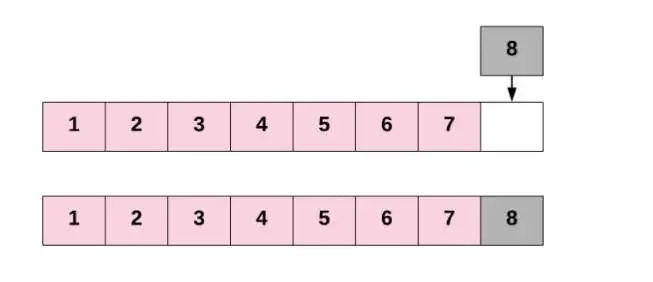
- At any point in time, we know the index of the last element of the array, as we’ve kept track of it in our length variable.
All we need to do for inserting an element at the end is
- to assign the new element to one index past the current last element.
Inserting at the start of an array
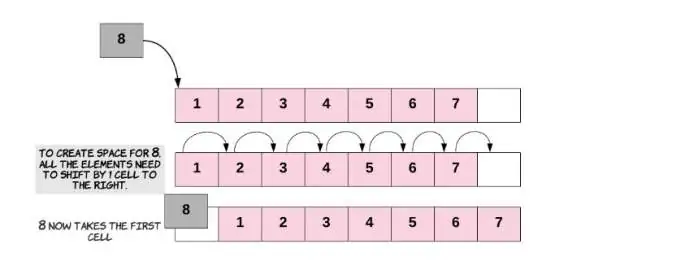
- To insert an element at the start of an array, we’ll need to shift all other elements in the array to the right by one index to create space for the new element.
- This is a very costly operation, since each of the existing elements has to be shifted one step to the right.
- The need to shift everything implies that this is not a constant time operation. In fact, the time taken for insertion at the beginning of an array will be
- proportional to the length of the array.
In terms of time complexity analysis, this is linear time complexity: O(N), where
- N is the length of the array.
Insert anywhere in the array
Similarly, for inserting at any given index, we first need to shift all the elements from that index onwards one position to the right.
Once the space is created for the new element, we proceed with the insertion. If you think about it, insertion at the beginning is basically a special case of inserting an element at a given index - in that case, the given index was
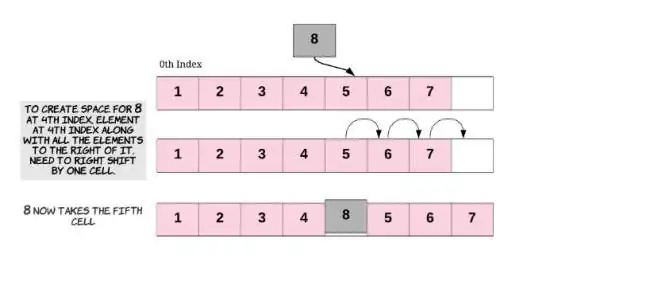
Again, this is also a costly operation since we could potentially have to shift almost all the other elements to the right before we actually inserting the new element.
As you saw above, shifting lots of elements one place to the right adds to the time complexity of the insertion task.
Pseudocode for insertion at the end of array
Idea: Place the element at the next available index.
Algorithm InsertAtEnd(arr, n, element):
Input: arr → array, n → current size of array, element → new value Output: arr with element inserted at the end
if n == capacity of arr then print "Array is full. Insertion not possible" return
arr[n] ← element // Place element at next free position n ← n + 1 // Increase size of array return arr
Pseudocode for insertion at the beginning of array
Idea: Shift all existing elements one position to the right, then insert at index 0.
Algorithm InsertAtBeginning(arr, n, element):
Input: arr → array, n → current size of array, element → new value Output: arr with element inserted at the beginning
if n == capacity of arr then print "Array is full. Insertion not possible" return
for i from n-1 down to 0 do arr[i+1] ← arr[i] // Shift elements right
arr[0] ← element // Insert at first position n ← n + 1 return arr
Pseudocode for inserting a new element at any given index in the array
Idea: Shift all elements from that index onward one position to the right, then insert.
Algorithm InsertAtIndex(arr, n, index, element):
Input: arr → array, n → current size, index → position to insert, element → new value Output: arr with element inserted at given index
if n == capacity of arr then print "Array is full. Insertion not possible" return
if index < 0 or index > n then print "Invalid index" return
for i from n-1 down to index do arr[i+1] ← arr[i] // Shift elements right
arr[index] ← element // Place element n ← n + 1 return arr
Duplicate zeros
Given a fixed-length array arr, duplicate each occurrences of zero, shifting the remaining elements to the right.
Note that elements beyond the length of the original array are not written. Do the above modifications to the input array in place and do not return anything. Example 1:
Input: arr = [1,0,2,3,0,4,5,0] Output: [1,0,0,2,3,0,0,4] Explanation: After calling your function, the input array is modified to: [1,0,0,2,3,0,0,4] Example 2:
Input: arr = [1,2,3] Output: [1,2,3] Explanation: After calling your function, the input array is modified to: [1,2,3] Constraints:
- 1 <= arr.length <= 104
- 0 <= arr[i] <= 9
Pseudocode for duplicate zeroes
Algorithm DuplicateZeros(arr):
Input: arr → fixed-length array of size n Output: arr modified in place (no return)
n ← length(arr)
possibleDups ← 0 // Count of zeros that can be duplicated lastIndex ← n - 1
// STEP 1: Count how many zeros can actually be duplicated for i from 0 to lastIndex - possibleDups do if arr[i] == 0 then // Edge case: zero at boundary if i == lastIndex - possibleDups then // Put single zero at the end arr[lastIndex] ← 0 lastIndex ← lastIndex - 1 break end if possibleDups ← possibleDups + 1 end if end for
Pseudocode for duplicate zeroes
// STEP 2: Start backward shifting and duplicating zeros last ← lastIndex - possibleDups
for i from last down to 0 do if arr[i] == 0 then arr[i + possibleDups] ← 0 // Write duplicated zero possibleDups ← possibleDups - 1 arr[i + possibleDups] ← 0 // Original zero else arr[i + possibleDups] ← arr[i] // Shift non-zero elements end if end for
Merge sorted Array
- You are given two arrays nums1 and nums2, sorted in non-decreasing order, and two integers m and n, representing the number of elements in nums1 and nums2 respectively.
- Merge nums1 and nums2 into a single array sorted in non-decreasing order.
- The final sorted array should not be returned by the function, but instead be stored inside the array nums1. To accommodate this, nums1 has a length m + n where the first m elements denote the elements that should be merged, and the last n elements are set to 0 and should be ignored. nums2 has a length of n.
Example 1:
Input: nums1 = [1,2,3,0,0,0], m = 3, nums2 = [2,5,6], n = 3 Output: [1,2,2,3,5,6] Explanation: The arrays we are merging are [1,2,3] and [2,5,6]. The result of the merge is [1,2,2,3,5,6] with the underlined elements coming from nums1.
Example 2:
Input: nums1 = [1], m = 1, nums2 = [], n = 0 Output: [1] Explanation: The arrays we are merging are [1] and [].
The result of the merge is [1].
Example 3:
Input: nums1 = [0], m = 0, nums2 = [1], n = 1 Output: [1] Explanation: The arrays we are merging are [] and [1].
The result of the merge is [1].
Note that because m = 0, there are no elements in nums1. The 0 is only there to ensure the merge result can fit in nums1.
Constraints:
nums1.length == m + n nums2.length == n 0 <= m, n <= 200 1 <= m + n <= 200 -109 <= nums1[i], nums2[j] <= 109
This is a classic array merge problem (similar to LeetCode 88: Merge Sorted Array).
We need to merge two sorted arrays nums1 and nums2 in place, storing the final result inside nums1.
Best approach: Start from the end of both arrays so we avoid overwriting elements in nums1.
Pseudocode for merging arrays
Algorithm MergeSortedArrays(nums1, m, nums2, n):
Input: nums1 → array of length m+n (first m elements valid, rest 0s) nums2 → array of length n m → number of valid elements in nums1 n → number of elements in nums2 Output: nums1 modified in-place (merged sorted array)
i ← m - 1 // Pointer for last valid element in nums1 j ← n - 1 // Pointer for last element in nums2 k ← m + n - 1 // Pointer for last position in nums1 (merge position)
while i >= 0 and j >= 0 do if nums1[i] > nums2[j] then nums1[k] ← nums1[i] // Place larger element at end i ← i - 1 else nums1[k] ← nums2[j] j ← j - 1 end if k ← k - 1 end while
// If any elements remain in nums2, copy them while j >= 0 do nums1[k] ← nums2[j] j ← j - 1 k ← k - 1 end while
// No need to copy remaining nums1 elements, they are already in place
void merge(int nums1[], int m, int nums2[], int n) { int i = m - 1; // Last valid element in nums1 int j = n - 1; // Last element in nums2 int k = m + n - 1; // Last position in nums1 // Merge in reverse order while (i >= 0 && j >= 0) { if (nums1[i] > nums2[j]) { nums1[k] = nums1[i];
i--;
} else { nums1[k] = nums2[j];
j--;
} k--;
} // Copy any remaining elements of nums2 while (j >= 0) { nums1[k] = nums2[j];
j--;
k--;
} }
int main() { int nums1[10] = {1, 3, 5, 7, 0, 0, 0, 0, 0, 0}; // m=4, n=3 int nums2[] = {2, 4, 6};
int m = 4, n = 3;
merge(nums1, m, nums2, n);
printf("Merged array: ");
for (int i = 0; i < m + n; i++) { printf("%d ", nums1[i]);
} printf("\n");
return 0;
}
Deleting items from array
Deleting in an array works in a similar manner to insertion, and has the same three different cases:
- Deleting the last element of the array
- Deleting the first element of the array
- Deleting at any given index
Deleting from the end of an array
- Deletion at the end of an Array is similar to people standing in a line, also known as a queue.
- The person who most recently joined the queue (at the end) can leave at any time without disturbing the rest of the queue.
Deleting from the end of an Array is the least time consuming of the three
- cases.
- Recall that insertion at the end of an Array was also the least time-consuming case for insertion.
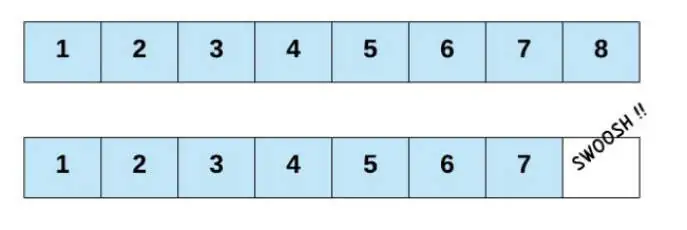
- Yup, that's it! Even though we call it a deletion, it's not like we actually freed up the space for a new element, right?
- This is because we don't actually need to free up any space.
- Simply overwriting the value at a certain index deletes the element at that index.
- Seeing as the length variable in our examples tells us the next index where we can insert a new element, reducing it by one ensures the next new element is written over the deleted one.
- This also indicates that the Array now contains one less element, which is exactly what we want programmatically.
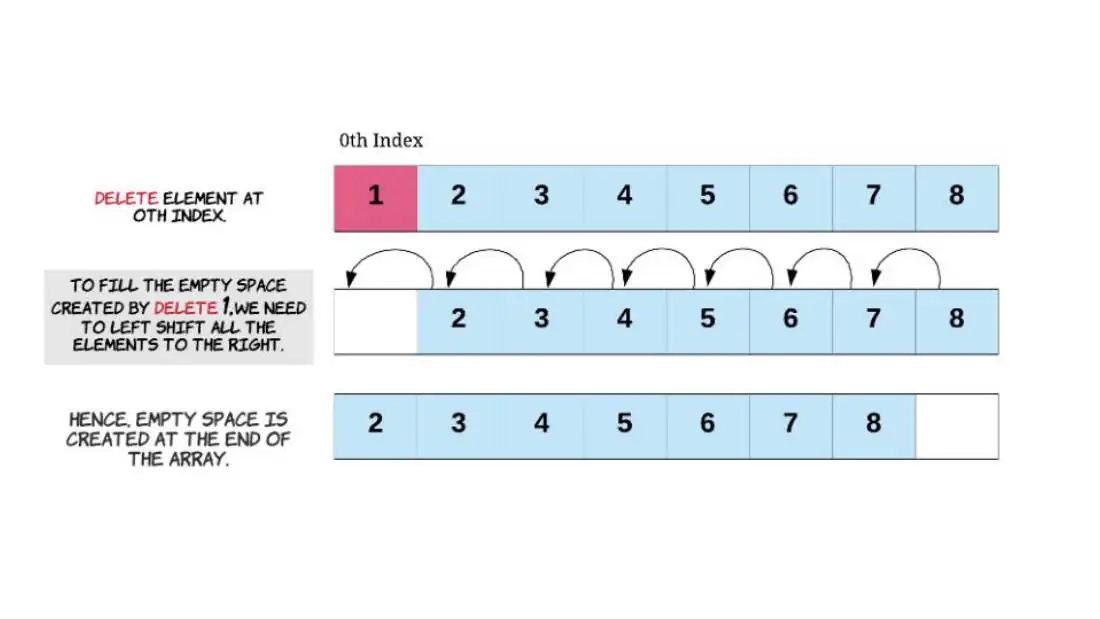
Deleting from the start of an array
Next comes the costliest of all deletion operations for
- an array - deleting the first element.
If we want to delete the first element of the array, that
- will create a vacant spot at the 0th index.
To fill that spot, we shift the element at index 1 one
- step to the left.
- Going on by the ripple effect, every element all the way to the last one will be shifted one place to the left.
- This shift of elements takes O(N) time, where N is the number of elements in the array.
Deleting from anywhere in the array
For deletion at any given index, the empty space
- created by the deleted item will need to be filled.
- Each of the elements to the right of the index we're deleting at will get shifted to the left by one.
- Deleting the first element of an Array is a special case of deletion at a given index, where the index is
- This shift of elements takes O(K) time where K is the number of elements to the right of the given index.
- Since potentially K = N we say that time complexity of this operation is also O(N).
Pseudocode deleting at beginning of array
Algorithm DeleteAtBeginning(arr, n):
Input: arr → array, n → current size Output: arr with first element removed
if n == 0 then print "Array is empty. Deletion not possible" return
for i from 0 to n-2 do arr[i] ← arr[i+1] // Shift elements left
n ← n - 1 // Reduce size by 1 return arr
Pseudocode deleting at END of array
Algorithm DeleteAtEnd(arr, n):
Input: arr → array, n → current size Output: arr with last element removed
if n == 0 then print "Array is empty. Deletion not possible" return
n ← n - 1 // Ignore the last element return arr
Pseudocode deleting at any given index of array
Algorithm DeleteAtIndex(arr, n, index):
Input: arr → array, n → current size, index → position of element to delete Output: arr with element removed at index
if n == 0 then print "Array is empty. Deletion not possible" return
if index < 0 or index >= n then print "Invalid index" return
for i from index to n-2 do arr[i] ← arr[i+1] // Shift elements left
n ← n - 1 // Reduce size by 1 return arr
Remove element
Given an integer array nums and an integer val, remove all occurrences of val in nums in-place. The order of the elements may be changed. Then return the number of elements in nums which are not equal to val.
Consider the number of elements in nums which are not equal to val be k, to get accepted you need to do the following things:
- Change the array nums such that the first k elements of nums contain the elements which are not equal to val. The remaining elements of nums are not important as well as the size of nums.
- Return k
Example 1:
Input: nums = [3,2,2,3], val = 3 Output: 2, nums = [2,2,,] Explanation: Your function should return k = 2, with the first two elements of nums being 2.
It does not matter what you leave beyond the returned k (hence they are underscores).
Example 2:
Input: nums = [0,1,2,2,3,0,4,2], val = 2 Output: 5, nums = [0,1,4,0,3,,,_] Explanation: Your function should return k = 5, with the first five elements of nums containing 0, 0, 1, 3, and 4.
Note that the five elements can be returned in any order. It does not matter what you leave beyond the returned k (hence they are underscores).
Constraints:
- 0 <= nums.length <= 100
- 0 <= nums[i] <= 50
- 0 <= val <= 100
Solution
This is a classic in-place array modification problem that can be solved efficiently using the two-pointer approach. The idea is:
We want to remove all occurrences of a given value val
- from the array nums
- The first k elements of nums should contain the elements that are not equal to k
- We don’t care about the order of the elements beyond k
- Return k (count the element not equal to val)
Two-pointers approach:
- Pointer 1(i): iterate through the array
- Pointer 2 (k): keeps track of the next position to place a non-val element
Remove duplicates from sorted array
Given an integer array nums sorted in non-decreasing order, remove the duplicates in-place such that each unique element appears only once. The relative order of the elements should be kept the same. Then return the number of unique elements in nums.
Consider the number of unique elements of nums to be k, to get accepted, you need to do the following things:
- Change the array nums such that the first k elements of nums contain the unique elements in the order they were present in nums initially. The remaining elements of nums are not important as well as the size of nums.
Return k.
Example 1:
Input: nums = [1,1,2] Output: 2, nums = [1,2,_] Explanation: Your function should return k = 2, with the first two elements of nums being 1 and 2 respectively. It does not matter what you leave beyond the returned k (hence they are underscores).
Example 2:
Input: nums = [0,0,1,1,1,2,2,3,3,4]
Output: 5, nums = [0,1,2,3,4,,,,,_]
Explanation: Your function should return k = 5, with the first five elements of nums being 0, 1, 2, 3, and 4 respectively.
It does not matter what you leave beyond the returned k (hence they are underscores).
Constraints:
- 1 <= nums.length <= 3 * 104
- -100 <= nums[i] <= 100
- nums is sorted in non-decreasing order.
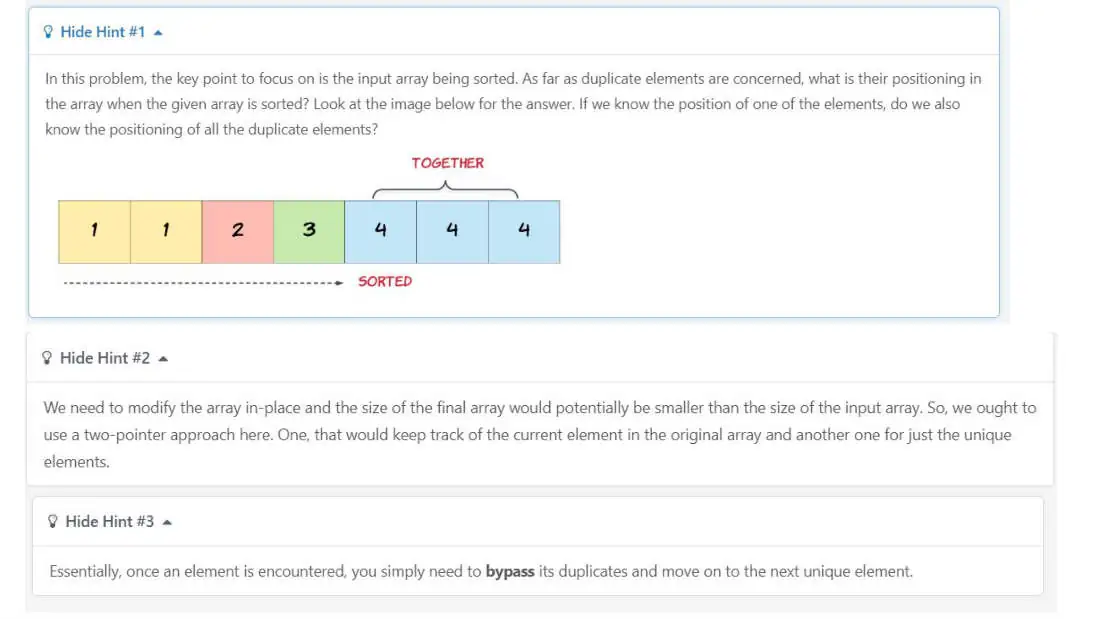
Since the array is already sorted, duplicates will always be next to each other. We can solve this with two-pointer technique.
Since the array is sorted, duplicates will always be next
- to each other.
We use:
- i (slow pointer) - tracks the position of the last unique element
- J (fast pointer) - scans through the array
- When nums[i] != nums[j], we found a new unique element -> move i forward and copy the value
- At the end, i + 1 gives the count of the unique elements. Time Complexity: O(n) (single pass).
Space Complexity: O(1) (in-place)
Search in an array
- There’s more than one way of searching in an array, but for now, we’re going to focus on the simplest way.
- Searching means to find an occurrence of a particular element in the array and return its position.
We might need to search an array to find out whether or not an
- element is present in the array.
- We might also want to search an array that arranged in a specific fashion to determine which index to insert a new element at.
- If we know the index in the array that may contain the element we’re looking for, then the search becomes a constant time operation - we simply go to the given index and check whether or not the element is there.
Linear search
If the index is not known which is the case most of the
- time, then we can check every element in the array. We continue checking elements until we find the element
- we’re looking for, or we reach the end of the array. This technique for finding an element by checking through
- all elements one by one is known as the linear search algorithm.
- In the worst case, a linear search ends up checking the entire array.
- Therefore,the time complexity for a linear search is O(N)
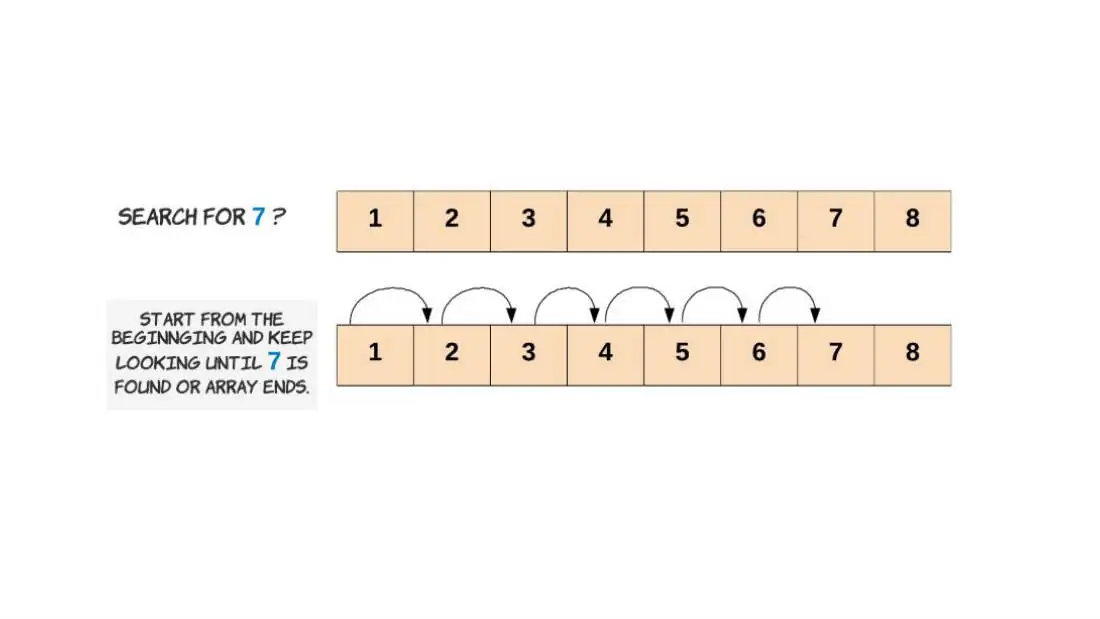
Let’s see the linear algorithm in action, with all the
- edge cases handled properly.
When we say edge cases, we basically mean scenarios that
- you wouldn’t expect to encounter.
- For example, the element you’re searching for might not even exist in the array.
- Or, an even rarer, but possible, scenario is that the input array doesn’t contain any elements at all, or perhaps it is null.
- It’s important to handle all of these edges cases within code.
Two dimensional arrays
A two-dimensional array is a collection of elements arranged in a table or matrix format with rows and columns. Each element can be accessed using two indices: one for the row and one for the column.
Characteristics:
Homogeneous elements: All elements are of the same data type.
- Fixed size: The number of rows and columns is defined at declaration.
- Contiguous memory allocation: Elements in a row are stored in adjacent memory locations.
- Indexed access: Elements are accessed using row and column indices.
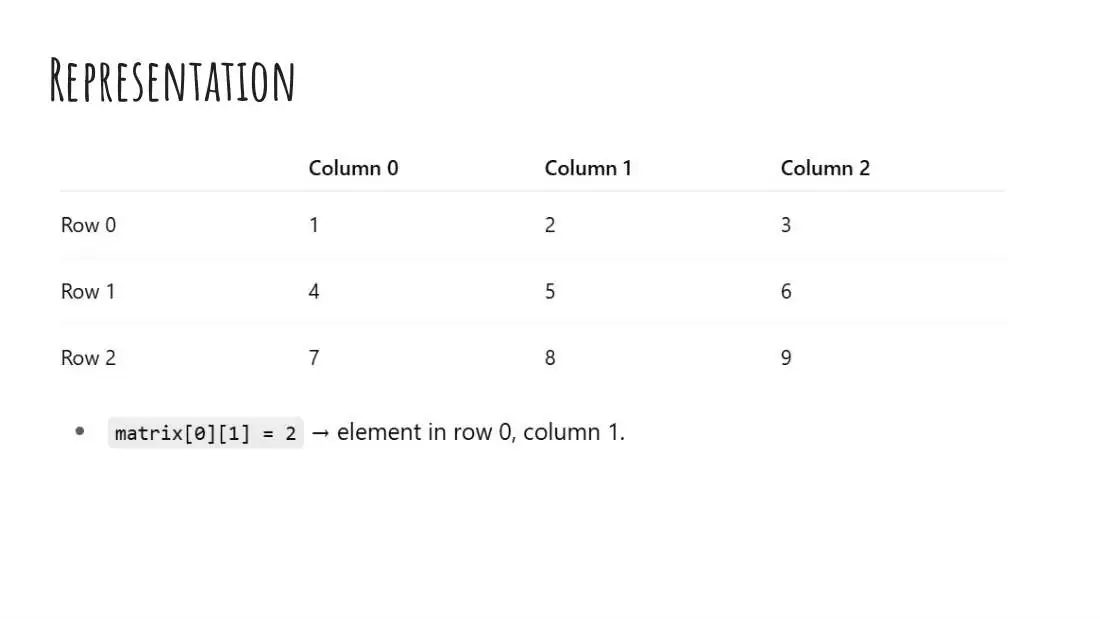
Operations on 2d arrays or matrices
- Traversal - Visiting every element in the array.
for(int i = 0; i < rows; i++)
for(int j = 0; j < cols; j++)
print(matrix[i][j]);
Operations on 2d arrays or matrices
- Insertion - Assigning a value to a specific position:
matrix[i][j] = value;
- Deletion - Conceptually, “deleting” is replacing an element with a default value (like 0).
matrix[i][j] = 0;
- Searching -Finding a particular element using row and column iteration.
Operations on 2d arrays or matrices
- Summation Sum of all elements: Loop through every element and
- accumulate.
- Sum of rows/columns: Use nested loops to calculate individual sums.
- Sum of diagonals: Use indices (i,i) for main diagonal and (i,n-1-i) for secondary diagonal.
Operations on 2d arrays or matrices
- Transpose - Interchange rows and columns:
transpose[j][i] = matrix[i][j];
- Multiplication -
- Multiply two matrices A (rowsA × colsA) and B (rowsB × colsB) to get matrix C (rowsA × colsB).
- Ensure colsA = rowsB.
Applications of 2d arrays
- Mathematical computations: Representing matrices, performing matrix addition, subtraction, multiplication, and finding determinants.
Image processing: Each pixel of an image can be stored in a 2D
- array (grayscale or RGB values).
- Games: Board games like Chess, Tic-Tac-Toe, Sudoku can be represented using 2D arrays.
- Database storage: Tabular data like student marks, employee records, or seating arrangements.
- Graphs and adjacency matrices: Representing graphs for algorithms.
- Scientific simulations: Representing grids in physics, weather models, or finite element analysis.
Advantages of 2d Arrays
- Structured representation of data.
- Easy indexing using row and column.
- Efficient for operations like matrix computations.
limitations
Fixed size (cannot dynamically resize).
- Insertion or deletion of rows/columns is costly.
- Only stores homogeneous data types.
summary
A two-dimensional array is a powerful data structure for representing tabular data. By using rows and columns, it allows easier storage, access, and manipulation of elements. They form the foundation for matrices, tables, images, and many real-world computational problems.
Sum of elements in a 2d array
Algorithm Sum2DArray(matrix, rows, cols): Input: matrix[rows][cols] → 2D array rows → number of rows cols → number of columns Output: sum of all elements
sum ← 0
for i from 0 to rows - 1 do for j from 0 to cols - 1 do sum ← sum + matrix[i][j]
print "Sum of all elements = ", sum
Transpose of a matrix
Transpose Definition: Swap rows with columns.
- Element at position (i, j) in the original becomes (j, i) in the transpose.
- Loop through all elements of the original matrix.
- Assign each element to its new position in the transpose matrix.
- Print the new matrix.
Transpose of a matrix
Algorithm TransposeMatrix(matrix, rows, cols):
Input: matrix[rows][cols] → 2D array rows → number of rows cols → number of columns Output: transpose[cols][rows] → 2D array containing the transpose
// Step 1: Create a new matrix to store transpose transpose ← new 2D array of size [cols][rows]
// Step 2: Loop through each element and assign to transpose for i from 0 to rows - 1 do for j from 0 to cols - 1 do transpose[j][i] ← matrix[i][j]
// Step 3: Print or return the transpose matrix print "Transpose of the matrix:" for i from 0 to cols - 1 do for j from 0 to
Matrix multiplication
Algorithm MultiplyMatrices(A, B, rowsA, colsA, rowsB, colsB): Input:
A → 2D array of size rowsA × colsA B → 2D array of size rowsB × colsB Output:
C → 2D array of size rowsA × colsB containing the product
// Step 1: Check if multiplication is possible if colsA != rowsB then print "Matrix multiplication not possible" return
// Step 2: Initialize the result matrix C with zeros C ← new 2D array of size rowsA × colsB for i from 0 to rowsA - 1 do for j from 0 to colsB - 1 do C[i][j] ← 0
// Step 3: Multiply matrices for i from 0 to rowsA - 1 do for j from 0 to colsB - 1 do for k from 0 to colsA - 1 do C[i][j] ← C[i][j] + (A[i][k] * B[k][j])
// Step 4: Print the result print "Product of matrices is:" for i from 0 to rowsA - 1 do for j from 0 to colsB - 1 do print C[i][j], " " print new line
Sum of diagonals in a square matrix
Algorithm SumDiagonals(matrix, n):
Input: matrix[n][n] → square matrix of size n × n Output: mainDiagonalSum, secondaryDiagonalSum
mainDiagonalSum ← 0 secondaryDiagonalSum ← 0
for i from 0 to n - 1 do mainDiagonalSum ← mainDiagonalSum + matrix[i][i] // Top-left to bottom-right secondaryDiagonalSum ← secondaryDiagonalSum + matrix[i][n-1-i] // Top-right to bottom-left
print "Sum of Main Diagonal =", mainDiagonalSum print "Sum of Secondary Diagonal =", secondaryDiagonalSum
Reference
https://leetcode.com/explore/learn/card/fun-with-arrays/521/ introduction/3240/