Basics of Java & Array & String
UNIT 01
- An introduction to fundamental programming structures, memory manipulation, and standard class APIs in Java.
Prepared By: Asst. Prof. Jeeten Dave
- class JavaBasics {
- public static void main(String[] args) {
- // Fundamental building blocks
- String unit = "Basics of Java";
- String[] topics = {"Array", "String"};
- System.out.println(unit);
- }
- }
Topics in this Unit
Basics of Java
- Features of Java
- Byte Code and Java Virtual Machine
- Java Development Kit (JDK)
- Data Types & Operators
- Control Statements (if-else, switch, loops, break, continue)
Array & String
- Single & Multidimensional Arrays
- String & String Buffer Classes
- Operations on Strings
- Command Line Arguments
- Use of Wrapper Classes
History & Evolution of Java
UNIT 01
A journey through the architectural shifts, language lineage, and core design principles that shaped the world's most robust programming language.
C
1972 Efficiency
- Direct hardware manipulation and modular programming.
C+
1983 Object Orientation
- Introduced classes, encapsulation, and abstractions.
J
1995 Platform Independence
- "Write Once, Run Anywhere" via the JVM.
More than a Coffee Bean
Introduction to Java
While the name literally translates to a coffee bean, Java is a powerful, robust programming language. Its creation was fueled by two fundamental drivers of technological innovation.
Language Evolution
Why Computer Languages Evolve
01. Environmental Adaptation
- To adopt to changing environments and uses.
02. Architectural Refinement
- To implement refinements and improvements in the art of programming.
Java’s Lineage
LINEAGE & INFLUENCE
The creation of Java was rooted in the continuous process of refinement and adaptation, inheriting its core character from its predecessors.
01. Direct Descent
- Java is closely related to C++, which is a direct descendant of the C language.
02. Character Inheritance
- It inherits much of its fundamental character and syntax from C and C++.
03. Object-Oriented Influence
- Java's robust Object-Oriented features were heavily shaped as responses to C++.
The Birth of C
THE FOUNDATION
C fundamentally changed how programming was approached. It emerged from the critical need for a structured, efficient, and high-level language to replace assembly when creating system programs.
ASSEMBLY VS. C
Bridging the Hardware Gap
Assembly language communicates directly with computer hardware. C replaces complex low-level statements with cleaner, structured equivalents.
ASSEMBLY CODE
- add a, b, c
C LANGUAGE Equivalent
- a = b + c;
The Trade-offs
Language Design
- Prior to C, programmers had to choose between languages that optimized one set of traits over another, forcing critical compromises.
- ➔Ease-of-use vs. Power
- ➔Safety vs. Efficiency
- ➔Rigidity vs. Extensibility
Historical Limitations
FORTRAN
- Efficient for scientific applications, but unsuitable for system-level code.
BASIC
- Easy to learn, but lacks power and structured programming models.
Assembly Language
- Highly efficient, but extremely difficult to learn, write, and debug.
Spaghetti Code
Historical Challenges
Early computer languages like BASIC, COBOL, and FORTRAN were not designed around structured principles, creating immense maintenance hurdles.
➔The GOTO Reliance: Relied upon GOTO as a primary means of program control.
- ➔Tangled Logic: Produced tangled jumps that made code virtually impossible to understand.
The Pascal Limitation
Structured but Inefficient
- While Pascal adopted structured programming models, it was severely limited by performance constraints and lack of language features.
Efficiency Issues
- Failed to include crucial features necessary to make it applicable to a wide range of programs.
System-Level Barrier
- Given standard dialects at the time, it was impractical to use Pascal for writing operating systems or system-level code.
A Pressing Need
Historical Context
- By the 1970s, the computer revolution was at its peak. Software demand rapidly outpaced programmers' ability to produce it.
- ➔ Unreconciled Traits: No single language had successfully combined efficiency, power, and structure.
Language Evolution
The Lineage of C
BCPL Language
- Created by Martin Richards, starting the development process of system languages.
B Language
- Invented by Ken Thompson, directly influenced by BCPL and leading to C in the 1970s.
C Language & Unix
- First implemented by Dennis Ritchie on Unix, combining efficiency with high-level power.
A Programmer's Language
Language Philosophy
C marked the beginning of the modern age of computer languages, successfully synthesizing conflicting attributes into a powerful, efficient, and structured tool.
➔ UNIX Standard: For years, the de facto standard was UNIX-supplied.
➔ ANSI Adoption: Formally standardized in December 1989.
The Design Legacy
Built for Working Developers
Unlike earlier languages designed as academic exercises or by bureaucratic committees, C was built, implemented, and developed by real, working programmers.
Honed by Real Use
- Its features were honed, tested, and constantly rethought by the actual people who used the language to solve real-world problems.
Java's Heritage
- C is truly a language designed by and for programmers. Java directly inherited this legacy.
C++: The Next Step
Language Evolution
Throughout computing history, rising program complexity has driven the need for better management. C++ emerged as a direct response to this challenge.
- ➔ Structured Roots: Building on C's 1960s legacy to push past the limits of structured programming.
Milestones
Handling Complexity
1. Binary Toggling
- Manual input of binary machine instructions. Only viable for very small programs.
2. Assembly Language
- Introduced symbolic representations, helping programmers manage growing applications.
3. High-Level Structured Code
- FORTRAN and C introduced advanced tools and structured paradigms to handle complex logic.
Breaking Limits
Language Evolution
- C++ added features that enabled the complexity threshold to be broken, allowing programmers to comprehend and manage much larger systems.
- ➔ C Foundation: Built on C, retaining all of its original features, attributes, and structural benefits.
- ➔ An Enhancement: Not an attempt to create a completely new language, but to enhance a highly successful one.
Milestones
The Birth of C++
1. Bjarne Stroustrup (1979)
- Invented while working at Bell Laboratories in Murray Hill, New Jersey.
2. "C with Classes"
- The original name given to the language during its early development stage.
3. Official Shift (1983)
- The name was formally changed to C++, bringing object-oriented programming to the main stage.
Limits of Complexity
Language Evolution
While structured languages enabled programmers to write moderately complex programs, software eventually reaches a threshold where its size exceeds what can be managed.
- ➔ The OOP Solution: A new programming methodology invented in the early 1980s to organize complex code.
Milestones
Organizing Complex Programs
1. Inheritance
- Allows code reuse and hierarchical classification, streamlining system development.
2. Encapsulation
- Binds code and data together to keep them safe from outside interference.
3. Polymorphism
- Enables a single interface to control access to a general class of actions.
The Genesis of Java
Language Origin
Conceived in 1991 at Sun Microsystems, Java arose not from the Internet, but from a need for architecture-neutral software for consumer devices.
- ➔ The Core Problem: C/C++ programs require expensive, time-consuming compiler targets for every specific CPU.
- ➔ Platform-Independent: An easier, cost-efficient solution was needed to support diverse embedded electronic systems.
Milestones
Evolutionary Timeline
1. Conception (1991)
- Conceived by James Gosling and team at Sun Microsystems. Development took 18 months.
2. Initially "Oak"
- The language was originally named Oak, but later renamed to Java in 1995.
3. Consumer Devices & Beyond
- Initially designed to run embedded software within target electronic systems like microwave ovens.
The Web Synergy
Language Catalyst
- James Gosling and his team designed a portable, platform-independent language to run code across differing environments.
- ➔ Consumer Phase: Without the Web, Java may have remained an obscure consumer electronics language.
- ➔ The Internet Boom: The rapid rise of the World Wide Web perfectly matched Java's unique portable nature.
Milestones
Propelled to the Forefront
1. Portable Foundations
- Engineered to yield platform-independent code capable of running across highly diverse CPU architectures.
2. The Web Emerges
- The World Wide Web took shape simultaneously as the language was being actively implemented by its creators.
3. Forefront of Design
- The massive digital push for portable applications propelled Java straight into internet programming dominance.
The Internet Shift
Language Pivot
By 1993, the Java team realized that the same portability challenges faced in embedded controllers were exactly what the emerging Internet needed to solve.
- ➔ The Embedded Link: Portability issues in controller code mirrored the programming demands of the early Web.
- ➔ The Great Pivot: This profound realization shifted Java's focus entirely from consumer devices to Internet programming.
Milestones
Propelled to Success
1. The Portability Spark
- The urgent desire for an architecture-neutral programming language provided the initial development spark.
2. Internet Expansion
- A problem originally addressed on a small scale was seamlessly scaled up to meet massive web demands.
3. Massive Adoption
- Aligning Java with the growth of the Internet ultimately transformed it and secured its monumental, large-scale success.
C/C++ Foundation
Language Heritage
- Java intentionally derives much of its character from C and C++ to ensure instant appeal to experienced developers.
- ➔ Familiar Syntax: Designed to echo C/C++ features to appeal to legions of programmers.
- ➔ Shared Success: Incorporates the same fundamental attributes of its predecessors.
Milestones
A Programmer's Language
1. Real-World Refinement
- Grounded in the core needs, challenges, and practical experiences of real, working programmers.
2. Cohesive & Logical
- Provides complete logical consistency and full structural control directly to the developer.
3. No Training Wheels
- An uncompromising environment engineered specifically for professional application design.
Not a Upgrade
Language Relationship
- While Java shares significant syntax with C++, it is not an enhanced version or a direct replacement. They operate in parallel.
➔ Incompatible: Java is neither upwardly nor downwardly compatible with C++.
- ➔ Familiarity: C++ programmers will feel right at home due to strong similarities.
Coexistence
Different Problem Spaces
1. Java's Design Domain
- Java was specifically designed from the ground up to solve a unique set of network and portability problems.
2. C++'s Design Domain
- C++ was built to tackle a completely different set of engineering challenges, primarily focusing on system-level control.
3. Shared Future
- Neither language replaces the other; both are destined to coexist productively for many years to come.
Internet &Evolution
The Catalyst
- The environmental change that prompted Java was the need for platform-independent programs destined for distribution on the Internet.
- ➔ Shift in Paradigm: Java embodies fundamental changes in the way programmers approach writing software.
- ➔ A Global Force: Java became to Internet programming what C was to system programming: a force that changed the world.
Core Advancements
- Key Feature Innovations
1. Refined OOP Paradigm
- Java enhanced and polished the object-oriented structure originally inherited from C++.
2. Built-in Multithreading
- Integrated, native support for multithreaded execution to handle concurrent processing easily.
3. Simplified Networking
- Provided an extensive, robust standard library designed specifically to streamline global Internet access.
Uses of Java
Versatility & Power
- From mobile devices to enterprise servers, Java provides the robust foundation for modern digital ecosystems.
➔ Ubiquitous: Powering billions of active devices worldwide.
➔ Scalable: The trusted choice for enterprise-level server environments.
Application Domains
- Where Java Thrives
1. Mobile & Android Apps
- Used for developing Android Apps and a wide range of mobile Java applications.
2. Enterprise & Server-Side
- Helps create Enterprise Software and powers Server-Side Technologies like Apache, JBoss, and GlassFish.
3. Science, Big Data & Hardware
- Utilized in Scientific Computing, Big Data Analytics, and hardware device programming.
OOP v/s POP Paradigm Comparison
Procedural Oriented (POP)
-
- Program Division:Programs are divided into small, sequential parts called functions.
-
- Core Focus:Importance is given to the sequence of actions and procedures rather than data.
3. Structural Flow:Follows a strict Top-Down approach for program execution.
-
- Security & Access:Does not have any access specifiers or built-in data hiding.
-
- Data Movement:Data can move freely from function to function across the system.
Object Oriented (OOP)
1. Program Division:Programs are structured into autonomous, reusable objects.
-
- Core Focus:Primary importance is given to data protection and modeling real-world logic.
3. Structural Flow:Employs a highly modular, scalable Bottom-Up approach.
-
- Security & Access:Secures data using specifiers named Public, Private, & Protected.
-
- Data Movement:Objects securely communicate with each other through member functions.
OOP v/s POP (Contd.) Paradigm Comparison
Procedural Oriented (POP)
1. Extension: Adding new data and functions is not easy.
-
- Data Access: Most functions share global data, which can be accessed freely across the system.
3. Security: No proper way of hiding data, making it less secure.
4. Overloading: Feature overloading is not possible in POP systems.
5. Key Examples: C, VB, FORTRAN, Pascal
Object Oriented (OOP)
1. Extension: Provides an easy way to add new data and functions.
-
- Data Access: Data can be public or private to control access, preventing free movement.
3. Security: Provides strong Data Hiding for enhanced and robust security.
4. Overloading: Supports both Function Overloading and Operator Overloading.
5. Key Examples: C++, JAVA, VB.NET, C#.NET
Components of Java Programming
- To convert source code to machine-executable code, Java utilizes three interconnected core components:
01JDK
Java Development Kit
- Used to write, compile, and build Java applications and applets.
- Contains the complete JRE alongside essential development tools.
- Includes the compiler (javac), debugger, and documentation generators.
02JRE
Java Runtime Environment
- Provides the execution environment to run compiled Java applications.
- Packages class libraries, class loaders, and the virtual machine (JVM).
- Required by end-users who only need to execute Java programs.
03JVM
Java Virtual Machine
- An abstract computing machine that runs the compiled Java bytecode.
- Converts bytecode into platform-specific machine language instructions.
- Achieves platform independence ("Write Once, Run Anywhere").
Java Development Kit (JDK)
- A comprehensive software development environment used for building Java applications and applets.
- Contains essential tools required to write Java programs and the JRE to execute them. Multiple JDK versions can coexist on the same system.
- 01 / PROCESSOR
- Compiler
- Translates human-readable Java source code (.java files) into platform-independent bytecode (.class files).
- 02 / ENVIRONMENT
- Runtime (JRE)
- Provides the necessary libraries, class loaders, and the Java Virtual Machine (JVM) to execute compiled applications.
- 03 / UTILITIES
- Dev Tools
- Includes highly essential debugging packages, build automation utilities, and documentation generators (javadoc).
EXECUTION FLOW:The Compiler converts source code into bytecode. Subsequently, the Application Launcher initializes the JRE, loads the required classes, and executes the application's main method.
Java Runtime Environment (JRE)
- A software layer designed to execute Java applications by providing class libraries and the virtual machine.
- 01 / ENVIRONMENT
- Execution Purpose
- Designed strictly to run other software. It packages essential class libraries, loader classes, and the JVM required for execution.
- 02 / LIBRARIES
- Package Support
- Does not include dev tools like compilers or debuggers. Uses standard packages like math, swing, util, lang, and awt.
- 03 / COMPONENTS
- Core Architecture
Class Library: Core API packages to run Java apps.
JVM: Converts bytecode to machine-specific code.
- DEVELOPMENT VS RUNTIME:For developing Java programs, you need the JDK. However, to run compiled Java programs, only the JRE is required.
Working of JRE
- A step-by-step mechanism of how JRE execution enables write-once, run-anywhere capability.
- 01 / INTEGRATION
- Code & Libraries
- Combines your custom Java code (compiled via JDK) with built-in system libraries to prepare for execution.
- 02 / INSTANTIATION
- JVM Creation
- Creates a local JVM instance (or active copy) that dynamically loads, verifies, and runs the Java application.
- 03 / UNIVERSAL RUN
- Multi-OS Support
- Runs a single compiled copy of your Java code across diverse, platform-specific JVMs built for different OS.
PLATFORM INDEPENDENCE: In this way, the JRE facilitates absolute platform independence for Java applications. You can write your code once and run it anywhere.
Java Virtual Machine (JVM)
- An engine within the JRE that provides a runtime environment to drive and execute Java applications.
- 01 / RUNTIME
- Execution Engine
- Serves as the core engine providing a virtual environment to load, verify, and run Java code.
- 02 / BYTECODE
- Binary Translation
- Converts intermediate bytecode into hardware-readable binary machine code for execution on host systems.
- 03 / OPTIMIZATION
- JIT Compilation
- Utilizes JIT (Just-In-Time) compilers to translate bytecode into highly optimized low-level machine language.
NOTE ON DEPENDENCY: Although JVM enables platform-independent execution of Java source code, the JVM software itself is platform-dependent and handles memory allocation.
Bytecode: Computer object code that an interpreter converts into binary machine code so it can be read by a computer’s hardware processors.
Java Virtual Machine (JVM) Architecture
- A complete blueprint of loading, memory allocation, and execution subsystems.
- 01 / SUBSYSTEM DIAGRAM
- Architecture Flow
- 02 / CLASS LOADER
- Loading, Linking & Initialization
- Dynamically loads class files into the JVM memory and handles security checks and linking.
- 03 / RUNTIME DATA AREAS
- JVM Memory Allocation
- Allocates distinct memory regions for Method Area, Heap, JVM Stacks, and PC Registers.
- 04 / EXECUTION ENGINE
- Execution & Native Interfaces
- Translates intermediate bytecode to native instructions using JIT compilers and interpreters.
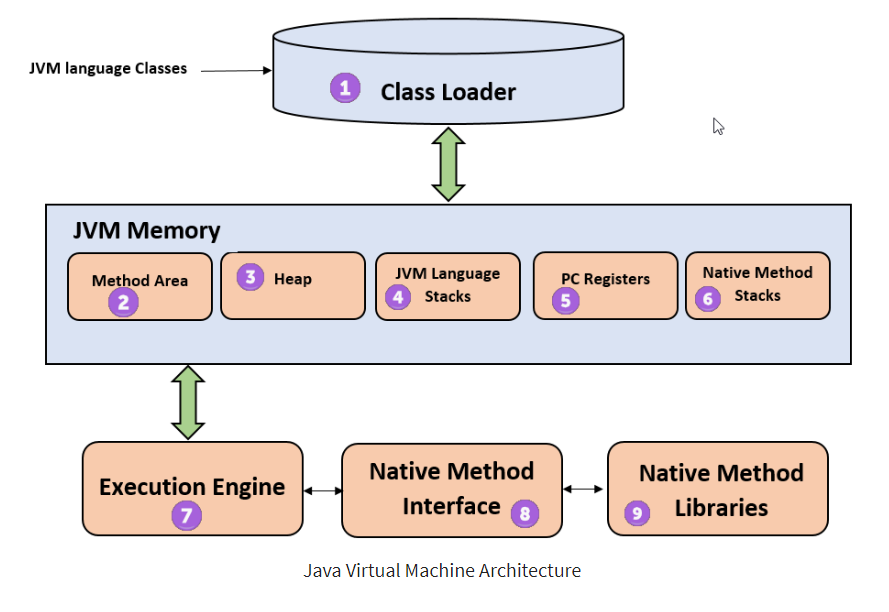
Program Counter (PC) Register - a small, dedicated runtime memory area within the Java Virtual Machine (JVM) that stores the memory address of the bytecode instruction currently being executed
JVM Architecture (Contd.)
- A deep dive into class loading, memory layout, registers, and execution sub-systems.
- 01 / SUBSYSTEM
- Class Loader
- The class loader is a subsystem used for loading class files. It performs three major functions viz. Loading, Linking, and Initialization.
- 02 / MEMORY AREA
- Method Area
- JVM Method Area stores class structures like metadata, the constant runtime pool, and the code for methods.
- 03 / SHARED MEMORY
- Heap
All the Objects, their related instance variables, and arrays are stored in the heap. This memory is common and shared across multiple threads.
- 04 / THREAD MEMORY
- JVM Language Stack
- Stores local variables and partial results. A thread has its own JVM stack, creating frames on invocation and deleting them on completion.
- 05 / EXECUTION STATE
- Program Counter (PC) Registers
PC registers store the address of the executing JVM instruction. In Java, every active thread maintains its own independent, separate PC register.
- 06 / EXECUTION
- Execution Engine
Native method stacks hold instructions of native code which depend on native libraries, and are typically written in languages other than Java.
JVM Architecture (Contd.) (cont.)
- A deep dive into execution subsystems, native interfaces, and library integrations.
- 07 / SUBSYSTEM
- Execution Engine
It is a type of software used to test hardware, software, or complete systems. The test execution engine never carries any information about the tested product.
- 08 / INTERFACE
- Native Method Interface
The Native Method Interface is a programming framework. It allows Java code which is running in a JVM to call by libraries and native applications.
- 09 / LIBRARIES
- Native Method Libraries
- Native Libraries is a collection of the Native Libraries(C, C++) which are needed by the Execution Engine.
JVM Memory Management
- An overview of how Java handles object allocation, self-maintenance, and reclamation.
- 01 / PROCESS
- Memory Allocation
- The process of allocating space for new objects and removing unused objects to make room for subsequent allocations.
- 02 / AUTOMATION
- Self-Maintenance
- Java automatically manages memory in the background, requiring no explicit assistance or manual tracking from the programmer.
- 03 / RECLAMATION
- Garbage Collection
- Guarantees that memory is automatically released when no longer needed, ensuring that unused space is cleanly recycled.
JDK vs. JRE vs. JVM Understanding the core components, runtime relationships, and development tools in the Java ecosystem.
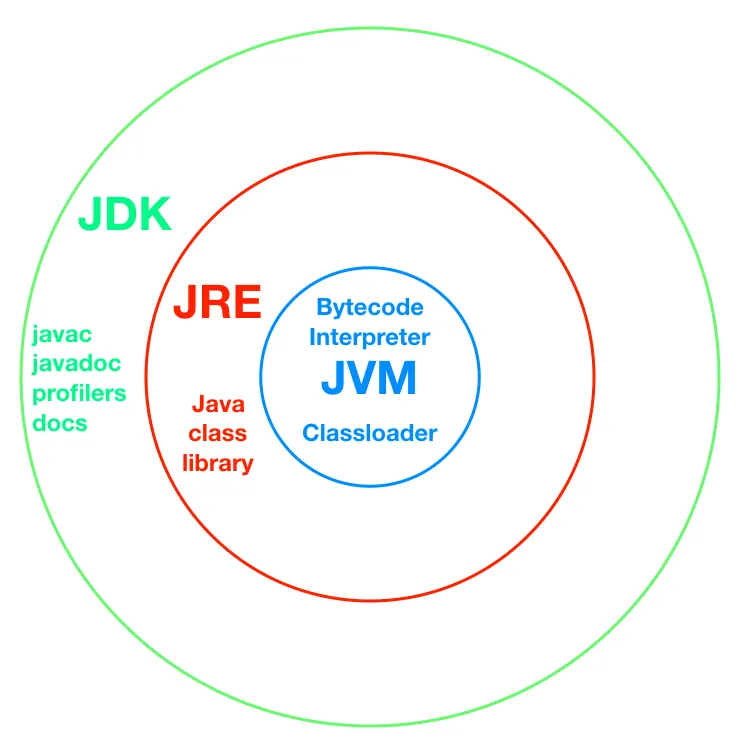
JDK vs. JRE vs. JVM
- Understanding the core components, runtime relationships, and development tools in the Java ecosystem.
- 01 / RUNTIME ENGINE
- JVM
- The Java Virtual Machine is the core execution engine that runs compiled Java bytecode on any device or OS.
- Key Components:
- Bytecode Interpreter
- Classloader Subsystem
- Garbage Collector
- 02 / ENVIRONMENT
- JRE
- The Java Runtime Environment provides the minimum requirements to execute a Java application.
- Key Components:
JVM (Execution Engine)
- Java Class Libraries
- Support Files & Resources
- 03 / DEVELOPMENT
- JDK
- The Java Development Kit is a full software development environment used to build and compile Java programs.
- Key Components:
JRE (Runtime Environment)
- Compiler (javac)
- Tools (javadoc, debugger)
Features of Java
- Core design principles that make Java a versatile, powerful, and enduring programming language.
- 01 / ACCESSIBLE
- Simple
- Learning & practicing Java is easy because of its strong resemblance to C & C++.
- 02 / PARADIGM
- OOP
- Java is designed as a purely object oriented programming language from the ground up.
- 03 / NETWORKED
- Distributed
- Designed for internet environments. Handles TCP/IP protocols and supports Remote Method Invocation (RMI).
- 04 / STABLE
- Robust
- Java programs prevent crashes through strict built-in exception handling & active memory management.
Features of Java (Contd.)
- Exploring portability, bytecode interpretation, and JIT-compiled execution performance.
- 05 / INDEPENDENT
- Portable
- Java does not have implementation dependent aspects and yet yields or gives the same result on any machine.
Platform Independent
- Write Once, Run Anywhere (WORA) philosophy guarantees code runs identically across all supporting operating systems.
- 06 / EFFICIENT
- Interpreted & High Performance
- Java programs are compiled to intermediate bytecode, which is dynamically downloaded and interpreted by the JVM.
- Execution Enhancements:
- JIT Compiler: Enhances speed by compiling hot code paths into native machine instructions.
- JVM Interpreter: Direct execution of byte code via a highly optimized execution loop.
Features of Java (Contd.) (cont.)
- Understanding concurrency, network adaptability, and architectural independence.
- 07 / COMPATIBLE
- Architectural Neutral
- Java byte code is not machine dependent. It can run on any machine with any processor and with any operating system.
- 08 / CONCURRENT
- Multithreaded
- Executing different parts of programs simultaneously. This is an essential feature to design robust server-side programs.
- 09 / ADAPTIVE
- Dynamic
- Develop programs in Java which dynamically change on the Internet, such as Applet-based web execution environments.
Java Platforms
- Exploring the distinct runtime environments and frameworks of the Java ecosystem.
- 01 / EMBEDDED
- J2ME
- Micro Edition
- Specifies libraries for devices with limited storage, display, and power capacities like mobile devices, PDAs, and embedded systems.
- 02 / ENTERPRISE
- J2EE
- Enterprise Edition
- Extends Java SE with various robust APIs designed useful for multi-tier client–server enterprise applications.
- 03 / CORE
- J2SE
- Standard Edition
- The foundational framework for general-purpose use on desktop PCs, servers, and similar computing hardware environments.
- 04 / GRAPHICS
- Java FX
- Rich UI Platform
- A lightweight user-interface platform for developing and deploying rich internet applications with high performance visual assets.
Basic Program Syntax
- The fundamental structural blueprint for writing executable Java applications.
class Classname {
public static void main(String args[]) {
System.out.println();
- }
- }
The main() Method
- The foundational entry point and execution mechanism in Java programming.
- 01 / EXECUTION
- Program Entry
- JVM Entry Point
- Acts as the execution starting point. While not required for compilation, the JVM searches for this exact method to initiate execution.
- 02 / KEY MODIFIERS
- Public & Static
- Access & Lifecycle
- Must be public so the JRE can access it globally. Must be static so the JVM can invoke it without instantiating the class.
- 03 / SIGNATURE
- Void & Args
- Return & Input
- Does not return any value (void) and accepts a String[] array parameter to receive command-line arguments.
The main() Method rules
- Key behaviors, compiler traits, and structural conventions of Java's entry point.
- 01 / MODIFIERS
- Modifier Order
- Syntax Convention
- The modifiers public and static can be written in either order, but the standard convention is public static.
- 02 / JVM ENTRY
- Strict Rules
- Execution Match
- Any access modifier is compiled, but the JRE requires the exact signature to serve as the active entry-point.
- 03 / PARAMETERS
- Args Naming
- Array Argument
- You can name the array argument anything you want, but most Java developers choose "args" or "argv".
- 04 / EXECUTION
- Runtime Error
- No Compile Errors
- Programs compile cleanly without a main() method, but execution triggers a "Main method not found" runtime error.
The main() Method Modifiers
- Understanding how public accessibility and static lifecycle control Java's entry point.
- 01 / ACCESS SPECIFIER
- Public Access
- Global JRE Accessibility
- The main() method must have a public access specifier so that the Java Runtime Environment (JRE) can call it from outside of your class.
- Without this public exposure, strict access restrictions will prevent the JVM from executing your program entirely.
- 02 / LIFECYCLE
- Static Modifier
- Instance-Free Invocation
- Must be declared as static so that it can be invoked directly by the JVM without needing to instantiate the class first.
- This provides a clean, predictable starting point for application execution before any objects actually exist in memory.
The main() Method
- Understanding the void return type and the fixed method identifier.
- 01 / RETURN TYPE
- Void Return Type
- No Return Value Requirement
- The main() method in Java is declared with a return type of void to indicate that it does not return any value.
- Its purpose is simply to serve as the entry point for the Java program, invoked by the JVM to start execution.
- 02 / IDENTIFIER
- Main Method Name
- Fixed Starting Signature
- It's just the name of the method. This name is fixed because it is called by the JVM as the entry point for an application.
- Note that while the name is strictly required by the launcher, main is not a keyword in Java.
Structure of System.out.println()
- System.out.println() is a core Java statement used to display messages, data, or strings on the screen as output.
- 01 / CLASS
- System
- Standard System Class
- This is the final class defined in the java.lang package, providing access to system resources.
- 02 / INSTANCE
- out
- PrintStream Object
- An instance of the PrintStream type. Its access specifiers are defined as both final and public.
- 03 / METHOD
- println()
- Output Function
- A public method in the PrintStream class used to output values followed by a clean newline.
- Alternative: You can also use the print() method to output arguments without adding a new line at the end.
Anatomy of System.out.println()
- Visualizing how the System class, out instance, and println() method orchestrate console output.
- 01 / SYSTEM CLASS
- java.lang.System
A final class providing standard resources. Contains the static member out.
- 02 / PRINTSTREAM CLASS
- java.io.PrintStream
The class defining output features. Implements the println() method.
- 03 / STATEMENT PIPELINE
System.out.println()
- Invokes the println() output method on the static out PrintStream object hosted within the System class.
Simple Program
- The foundational anatomy of a Java application and its command-line execution.
- class Classname {
- public static void main(String args[]) {
- System.out.println("Hello World");
- }
- }
- PROGRAM EXECUTION
- Console Output
- To run a Java program, compile the source file into bytecode, then launch it using the Java Virtual Machine.
Java Code Execution
- Java Source code
- Java compiler
(javac)
-
Byte code
-
Java Interpreter
-
JVM
-
Byte code loaded into JVM
-
Host System
-
The lifecycle of a Java program from raw source code to machine execution.
Java Code Execution (cont.)
- The lifecycle of a Java program from raw source code to machine execution.
- 01 / SOURCE
Source Code
- The developer writes human-readable program files containing raw Java code.
- 02 / COMPILER
Java Compiler
The javac compiler translates code into a platform-independent format.
- 03 / BYTECODE
Bytecode
Universal bytecode is successfully generated and loaded into the JVM.
- 04 / JVM EXECUTION
Interpreter
- The Java Interpreter translates and executes bytecode directly on the target Host System.
DATA TYPES
- Understanding specifiers, static typing, and core categories in Java.
- 01 / SPECIFIERS
Core Definition
Data types act as specifiers that allocate different memory sizes and define the types of values that can be stored in a variable or identifier.
- 02 / STATIC TYPING
Compile-Time
- Java is a static-typed language. This means the data type of every variable must be declared and is validated at compile time.
- 03 / CLASSIFICATION
- Categorization
- Java data types are divided into two fundamental groups:
Primitive: basic predefined types (e.g., int, char).
Non-Primitive: user-defined reference types.
Data Types in Java
- The fundamental classification of variables into predefined primitives and reference-based non-primitive types.
- 01 / Predefined Values
Primitive Data Types
- Predefined in the language and directly store independent values in memory.
Logical: boolean (true/false)
Textual: char (single 16-bit Unicode character)
Integers: byte, short, int, long
Floating-Point: float, double
- 02 / Reference Types
- Non-Primitive Types
- Created by the programmer (except String) and store references to memory objects.
Arrays: Collect multiple values of the same type
Classes: Blueprints defining objects and behaviors
Interfaces: Outline specifications to be implemented
Strings: Built-in sequences of characters
Enums: Predefined sets of strict constant values
Data Types in Java (cont.)
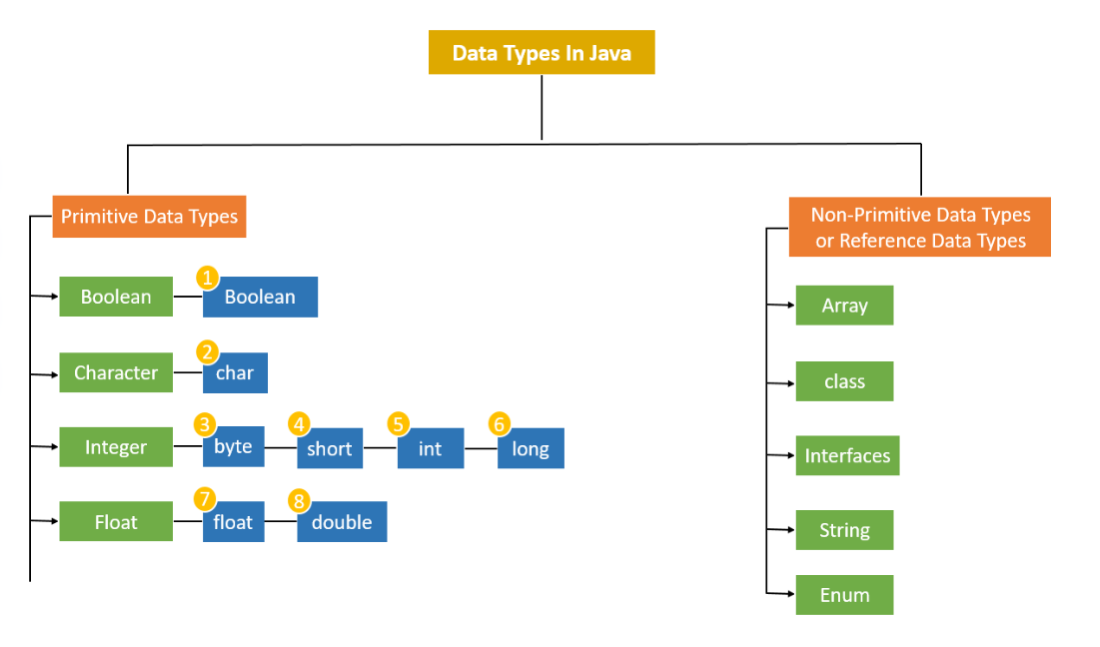
- The fundamental classification of variables into predefined primitives and reference-based non-primitive types.
PRIMITIVE DATA TYPES
- Primitive data types are predefined in Java and do not share state with other values.
- 01 / INTEGRAL
Integers
- Stores whole numbers without decimals.
Available Types:
byte
short
int
long
- 02 / FRACTIONAL
Floats
- Stores fractional numbers with decimals.
Available Types:
float
double
- 03 / LOGICAL
Boolean
- Stores truth values representing states.
Available Types:
boolean
- 04 / TEXTUAL
Character
- Stores single characters or ASCII/Unicode values.
Available Types:
char
Primitive Data Type: byte
-
01 / Integral Type
-
Overview & Properties
The byte is the smallest data type among all the integer data types in Java.
Memory Size
1 Byte (8-bit signed)
Value Range
-128 to 127
- It is implemented as an 8-bit signed two’s complement integer.
- Memory Efficiency
Highly space-efficient for large arrays where memory savings are critical. It can serve as a direct replacement for int when the values strictly stay within its range limits.
Syntax & Example
byte bytevariable; // Syntax
byte b = 10; // Example
Primitive Data Type: short
-
01 / Integral Type
-
Overview & Properties
-
The short data type is a 16-bit signed two's complement integer, being twice as small as a standard integer.
Memory Size
2 Bytes (16-bit signed)
Value Range
-32,768 to 32,767
- Memory Efficiency
Highly space-efficient for large arrays where memory savings are critical. It acts as an optimal choice to conserve memory compared to int when the values strictly stay within its range limit.
- Syntax & Example
short shortvariable; // Syntax
short s = 234; // Example
Primitive Data Type: int
-
01 / Integral Type
-
Overview & Properties
-
The int data type is a 32-bit signed two's complement integer, serving as the standard choice for whole numbers.
Memory Size
4 Bytes (32-bit signed)
Value Range
-2³¹ to 2³¹ - 1
- It is widely used for storing general integer values, unless memory optimization is extremely critical.
- Standard Integer Use
Designed for general-purpose arithmetic and array indexing. The int type is the default choice for integer values in Java, balancing memory use and processing performance.
- Syntax & Example
int intvariable; // Syntax
int i = 2037437; // Example
Primitive Data Type: long
-
01 / Integral Type
-
Overview & Properties
-
The long data type is a 64-bit signed two's complement integer, designed for storing very large whole numbers.
Memory Size
8 Bytes (64-bit signed)
Value Range
-2⁶³ to 2⁶³ - 1
- Huge Numeric Storage
Useful when you need to store values wider than what int can provide. It acts as the standard choice for system timestamps, high-range counters, and heavy scientific calculations.
- Syntax & Example
long longvariable; // Syntax
long l = 372036854775; // Example
Primitive Data Type: float
-
02 / Floating Point Type
-
Overview & Properties
The float data type is a single-precision 32-bit IEEE 754 floating-point, designed for saving memory in large arrays of floating-point numbers.
- Memory Size
4 Bytes (32-bit floating-point)
- Value Range
- -3.40282347 × 10³⁸ to +3.40282347 × 10³⁸
- Precision & Usage Limit
Provides approximately 7 decimal digits of precision. It is not recommended for precise calculations such as currency, financial transactions, or critical research data.
- Syntax & Example
float floatVariable; // Syntax
float f = 3.97f; // Example (default value = 0.0f)
Primitive Data Type: double
-
03 / Floating Point Type
-
Overview & Properties
-
The double data type is a double-precision 64-bit IEEE 754 floating-point, representing twice the precision of float.
-
Memory Size
8 Bytes (64-bit floating-point)
- Value Range
- -1.7976931348623157 × 10³⁰⁸ to 1.7976931348623157 × 10³⁰⁸
- Precision & Usage Limit
Provides approximately 15 decimal digits of precision. While it is the default floating data-type in Java, it is still not recommended for precise calculations like currency.
- Syntax & Example
double doubleVariable; // Syntax
double d = 873.98343; // Example (default = 0.0d)
Primitive Data Type: char
-
04 / Character Type
-
Overview & Properties
-
The char data type is useful for storing single value characters. Java uses Unicode format to support international character sets.
-
Memory Size
2 Bytes (16-bit unsigned integer)
- Value Range
- '\u0000' (0) to '\uffff' (65,535)
- Unicode vs ASCII
Unlike older languages using 8-bit ASCII, Java uses Unicode. This allows it to represent written characters from almost all of the world's languages natively.
- Syntax & Example
char charVariable; // Syntax
char ch = 'D'; // Example
Primitive Data Type: boolean
-
01 / Logical Type
-
Overview & Properties
The boolean data type is a special primitive type designed solely to store logical flags. It has no standard size definition in the JVM, but is commonly represented using 1 byte.
- Memory Size
1 Byte (or 1 bit inside arrays)
- Default Value
false
- Values & Flag Usage
Can only represent two possible states: true and false. It is widely used to track conditional states, control program flow, and manage binary flags.
- Syntax & Example
boolean boolvariable; // Syntax
boolean flag = true; // Example
Primitive Data Types: Defaults & Sizes
-
02 / Summary Table
-
DATA TYPE
-
DEFAULT VALUE
-
DEFAULT SIZE
boolean
false
- 1 bit
char
'\u0000'
- 2 byte
byte
- 1 byte
short
- 2 byte
int
- 4 byte
long
0L
- 8 byte
float
0.0f
- 4 byte
double
0.0d
- 8 byte
Primitive Data Types: Points to Remember
-
03 / Core Characteristics
-
PROPERTY 01
-
Signed Numerics
All numeric data types in Java are signed (+/-). There are no unsigned keyword variations for numeric primitives, ensuring consistent arithmetic behavior.
- PROPERTY 02
- Platform Standard
The size of primitive data types remains identical across all platforms. This strict standardization forms the backbone of Java's "Write Once, Run Anywhere" promise.
- PROPERTY 03
- Unicode Character Set
The char type is 2 bytes because Java utilizes the UNICODE standard. This enables full internationalization support, covering almost all active scripts worldwide.
Understanding Variables in Java
- 04 / Language Fundamentals
A variable is a named memory location that acts as a data container during Java program execution. Every variable must have an assigned data type which defines the type and quantity of value it can hold.
- TYPE 01
- Local Variables
Variables defined inside methods, constructors, or blocks are called local variables. They are only accessible within the scope they are declared.
- TYPE 02
- Instance Variables
- Variables declared within a class but outside any method. These variables are associated with class instances and objects.
- TYPE 03
- Static Variables
- Class variables declared within a class, outside any method, prefixed with the static keyword to share a single copy.
Variables: Declaration & Initialization
-
05 / Language Fundamentals
-
PHASE 01
-
Variable Declaration
-
Specifies the name and data type of the variable to allocate memory before usage.
SYNTAX & EXAMPLE
type identifier;
int a;
- PHASE 02
- Variable Initialization
- Assigns a specific initial value to the variable. Can be done separately or inline.
METHOD A (SPLIT)
int a;
a = 5;
METHOD B (COMBINED)
int a = 5;
Variables: Code Demonstration
- 05 / Language Fundamentals
class demo {
static int a = 1; // static variable
int data = 99; // instance variable
void method() {
int b = 90; // local variable
- }
- }
-
- Static Variable (static int a)
- Declared with the static keyword inside the class. It creates a single shared copy across all class instances.
-
- Instance Variable (int data)
- Declared inside the class but outside any method. It is unique to each instantiated object of the class.
-
- Local Variable (int b)
- Declared inside the body of a method. It is only accessible and active within that specific method's scope.
Rules for Variable Declaration
-
05 / Language Fundamentals
-
01 / Allowed Characters & Syntax
-
Character Set: Can consist of uppercase (A-Z), lowercase (a-z), digits (0-9), and special characters _ (underscore) and $ (dollar sign).
First Character: Must not begin with a digit.
Case Sensitivity: Variable names in Java are strictly case-sensitive.
Positioning: Must always exist on the left-hand side of assignment operators.
- 02 / Constraints & Conventions
No Blank Spaces: Spaces are strictly prohibited within variable names.
Reserved Keywords: Java keywords cannot be used as variable identifiers.
- Length Convention: There is no official limit on length, but by convention, it should be kept between 4 and 15 characters for readability.
Type Conversion & Type Casting
-
06 / Language Fundamentals
-
01 / THE CHALLENGE
Data Play
A significant part of programming involves playing around with data. Situations often arise where the data type has to be changed from one type to another to perform tasks.
- 02 / PRACTICAL CASE
Real-world Example
When calculating a circle's area using Pi, we get a decimal. This needs to be converted to an integer format if we desire to obtain the final answer as an integer.
- 03 / JAVA SOLUTION
Strong Typing
Since Java is strongly typed, type conversion is crucial. The programmer or compiler can easily manage this using type casting and type conversion concepts.
07 / Language Fundamentals Type Conversion
- 01 / AUTOMATIC PROCESS
Implicit Action
Type conversion is a process in which the data type is automatically converted into another data type. The compiler does this automatic conversion at compile time.
- 02 / MANDATORY RULE
Size Requirement
For type conversion to take place, the destination data type must be larger than the source type, ensuring there is enough capacity to hold the value.
- 03 / SAFE WIDENING
No Data Loss
Also called Widening Type Conversion, Implicit Conversion, or Casting Down. As smaller types are converted to larger ones, there is absolutely no chance of data loss.
07 / Language Fundamentals Type Conversion (cont.)


Implicit Type Conversion
-
07 / Language Fundamentals
-
CODE EXAMPLE
-
class Main {
-
public static void main(String[] args) {
-
int a = 10;
-
float b = a; // Implicit Conversion (int to float)
-
System.out.println("value of a after type conversion: " + b);
-
}
-
}
-
EXECUTION OUTPUT
Type Casting
-
07 / Language Fundamentals
-
Concept & Operator
Manual conversion controlled by the programmer.
- Type casting is required when you need to explicitly convert a value into a different data type that is smaller in size.
Uses the explicit casting operator ()
The source type must be larger than the destination type
- Behavior & Risk
Narrowing with potential loss of data.
Also known as Narrowing Type Casting, Explicit Conversion, or Casting Up.
Converting to a smaller size introduces a risk of data loss
Because of this risk, Java never performs this automatically
Type Casting (cont.)

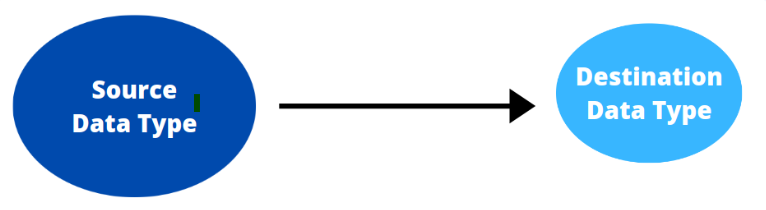
- 07 / Language Fundamentals
Type Casting (cont.)
-
07 / Language Fundamentals
-
Main.java
class Main {
public static void main(String[] args) {
float a = 10.56f;
int b = a; // Compilation Error without explicit cast
- System.out.println("value of a after type casting:" + b);
- }
- }
- ANALYSIS
Type Mismatch Risk
- Compilation Failure:
- Assigning a float directly to an int causes a "possible loss of precision" error.
- Correct Syntax Required:
int b = (int) a;
- Terminal - Output
Reserved Words / Keywords
- 07 / Language Fundamentals
Core Concept
- Reserved words or keywords are pre-defined words that hold special significance within the programming language.
They have a specific meaning to the compiler.
They cannot be used as identifiers (names for variables, methods, or classes).
How the Compiler Interprets
- When the compiler encounters a keyword, it triggers specific grammatical rules:
class MyProgram {
- // compiler expects "MyProgram"
- // to be the name of the class
}
- The keyword class informs the compiler that the following word is the unique class identifier.
- ➔ Next Up: Below are the key reserved words used to define structures, data types, and control flows in Java.
Reserved Words / Keywords (cont.)
- 07 / Language Fundamentals
| abstract | continue | for | new | switch |
|---|---|---|---|---|
| assert | package | synchronized | default | goto |
| boolean | do | if | private | this |
| break | else | import | public | throw |
| byte | enum | implements | protected | throws |
| case | double | instanceof | return | transient |
| catch | extends | int | short | try |
| char | final | interface | static | void |
| class | finally | long | strictfp | volatile |
| const | float | native | super | while |
Comments in Java
- 07 / Language Fundamentals
Single-Line Comments
// comment
Preceded by // at the start or middle of a line.
- The compiler ignores all text from the slashes to the end of that specific line.
Multi-Line Comments
/ comment /
Enclosed between / and /.
Can span across one or multiple lines.
- The compiler scans for the closing tag and ignores everything in between.
➔ Inline Documentation: Comments are completely ignored by the compiler, serving solely as documentation to make code readable and maintainable.
Access Modifiers
- 07 / Language Fundamentals
private
- The most restrictive access level. Only visible within its own class.
Scope:
Inside the class only
- No access from outside
default
- Active when no modifier is specified. Package-private visibility.
Scope:
Inside the package
- No access from external packages
protected
- Tailored for inheritance. Visible to subclasses across packages.
Scope:
Same package
Subclasses in other packages
public
- The most permissive level. Open access across the entire project.
Scope:
Everywhere
- All classes and packages
Operators in Java
-
07 / Language Fundamentals
-
An operator is a symbol that performs an operation on variables called operands. Java categorizes these operators into six primary groups:
calculateArithmetic
- Performs basic mathematical operations like addition, subtraction, and multiplication.
compare_arrowsRelational
- Compares two values and determines equality or difference, returning boolean values.
memoryBitwise
- Manipulates individual bits of integer types to perform low-level logical calculations.
alt_routeLogical
- Combines multiple conditions using AND, OR, and NOT logic to control program flow.
inputAssignment
- Assigns values to variables, supporting both simple and shorthand compound operations.
auto_awesomeSpecial
- Includes advanced Java-specific operators like ternary (?:) and instanceof.
Arithmetic Operators
- 07 / Language Fundamentals
+
- Addition
3 + 4
Result: 7
-
- Subtraction
5 - 7
Result: -2
- Multiplication
5 * 5
Result: 25
/
- Division (gives quotient)
14 / 7
Result: 2
%
- Modulus (gives remainder)
20 % 7
Result: 6
Assignment Operators
- 07 / Language Fundamentals
+=
- Addition Assignment
x = x + y
Equivalent: x += y
-=
- Subtraction Assignment
x = x - y
Equivalent: x -= y
*=
- Multiplication Assignment
x = x * y
*Equivalent: x = y
/=
- Division Assignment
x = x / y
Equivalent: x /= y
Unary Operators
- 07 / Language Fundamentals
-
- Unary Minus
j = -k;
Negates the value of k and stores it in j.
++
- Increment
b++;
++b;
Post-increment: Increments b after its value is evaluated.
Pre-increment: Increments b before its value is evaluated.
--
- Decrement
b--;
--b;
Post-decrement: Decrements b after its value is evaluated.
Pre-decrement: Decrements b before its value is evaluated.
Relational Operators
- 07 / Language Fundamentals
==
- Equal to
Example: x == 3
!=
- Not equal to
Example: x != 3
<
- Less than
Example: x < 3
>
- Greater than
Example: x > 3
<=
- Less than or equal to
Example: x <= 3
Logical / Short Circuit Operators
- 07 / Language Fundamentals
&&
- And Operator
if(a > b && a > c)
System.out.print("yes");
- If a value is greater than b and c then only "yes" is displayed.
||
- Or Operator
if(a == 1 || b == 1)
System.out.print("yes");
- If either a value is 1 or b value is 1 then "yes" is displayed.
!
- Not Operator
if(!(a == 0))
System.out.print("yes");
- If a value is not equal to zero then only "yes" is displayed.
Bitwise Operators
- 07 / Language Fundamentals
&
- Bitwise AND
- Multiplies the individual bits of operands
|
- Bitwise OR
- Adds the individual bits of operands
^
- Bitwise XOR
- Performs Exclusive OR operation
<<
- Left shift
- Shifts the bits of the number left a specified number of positions
>>
- Right shift
- Shifts the bits right a specified number of positions and preserves the sign bit
>>>
- Zero fill right shift
- Shifts the bits right and stores 0 (Zero) in the sign bit
~
- Bitwise complement
- Gives the complement form of a number by changing 0's to 1's and vice versa
Ternary / Conditional Operators
- 07 / Language Fundamentals
?:
- Ternary Operator
- Takes three operands to evaluate conditions efficiently.
- Syntax:
Variable = Expression1 ? Expression2 : Expression3;
- Execution Logic
First, Expression1 is evaluated (must return boolean).
If true, the value of Expression2 is assigned.
If false, the value of Expression3 is assigned.
- Practical Example
max = (a > b) ? a : b;
- If the variable a is greater than b, a is assigned to max; otherwise, b is assigned.
Special Operator: instanceof
- 07 / Language Fundamentals
instanceof
- Object Reference Operator
- Tests whether an object is an instance of a specific class or interface type at runtime.
- Syntax:
object instanceof ClassName
- Execution Logic
- Evaluates the left-hand side object reference against the right-hand side type.
Returns true if the object belongs to or can be cast to the specified class.
Returns false if the object reference is null or of an incompatible type.
- Practical Example
person instanceof student
- If the variable person refers to an object of class student, it evaluates to true; otherwise, it is false.
Operator: Example
- 07 / Language Fundamentals
codeJava Source Code
terminalConsole Output
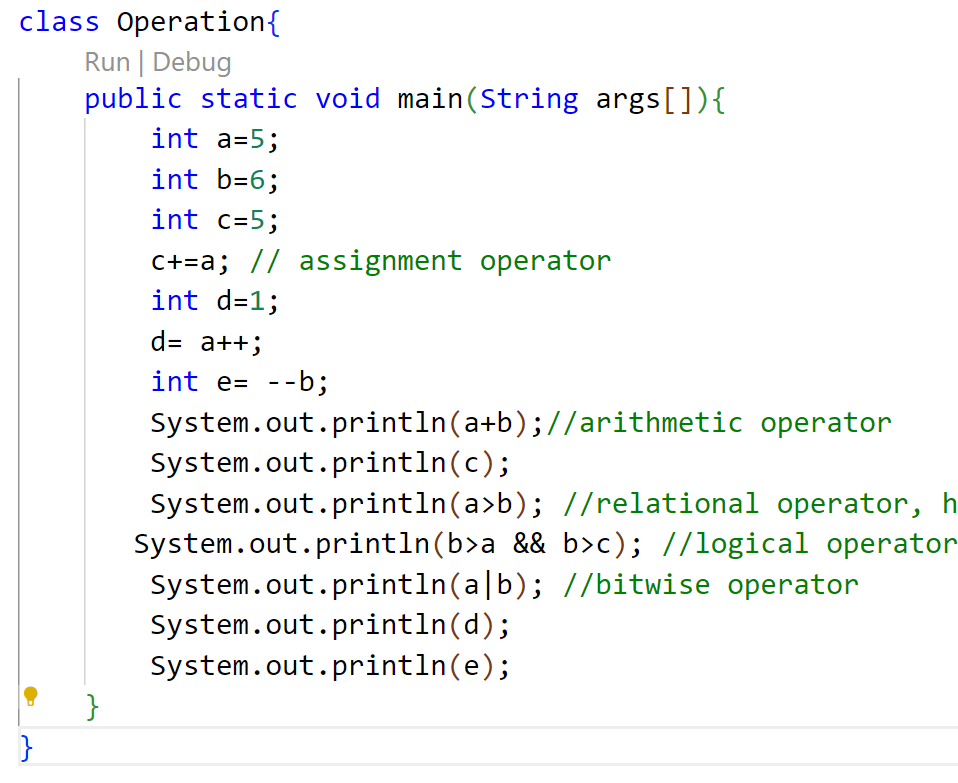
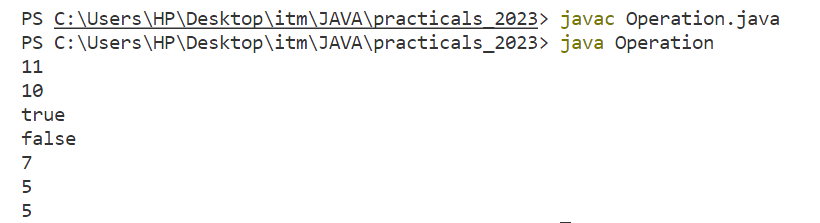
Control Statements
-
08 / Language Fundamentals
-
Definition
Control statements are the statements which alter the flow of execution and provide better control to the programmer on the flow of execution.
Selection
- Decision making control statements that direct program flow based on conditional evaluations.
Iteration
- Looping control statements designed to repeat execution blocks efficiently while conditions are met.
Jump
- Unconditional branching statements that immediately transfer control flow to other sections of code.
Selection Statements
-
09 / Language Fundamentals
-
Definition
Decision-making statements decide which statement to execute and when. They evaluate Boolean expressions and control the program flow depending upon the result of the condition provided.
If Statements
Executes a block of code based on whether a condition is true or false. Includes standard if, if-else, if-else-if, and nested if statements.
Switch Statement
- A multi-way branch control statement that evaluates an expression and routes program execution to multiple matching options cleanly.
If Statement
-
09 / Language Fundamentals
-
Definition
The if statement is a decision-making control statement that performs a task depending on whether a given condition evaluates to true or false.
SYNTAX
if (condition) {
- // statements to execute
- }
EXAMPLE
int a = 5;
if (a > 10) {
// False (5 > 10)
- System.out.println("Condition is true");
- }
- ➔ NOTE: Since the condition is false, no output is displayed.
If-Else Statement
-
09 / Language Fundamentals
-
Definition
The if-else statement is a decision-making control statement that performs a task depending on whether a given condition evaluates to true or false.
SYNTAX
if (condition) {
- // statements to execute if true
} else {
- // statements to execute if false
- }
EXAMPLE
int a = 5;
if (a > 10) {
- System.out.println("Condition is true");
} else {
- System.out.println("Condition is false");
- }
- ➔ NOTE: Since 5 > 10 is false, the else block executes.
Else-If Statement
-
09 / Language Fundamentals
-
Definition
-
The else if statement is used to specify a new condition if the first condition is false.
SYNTAX
if (condition1) {
- // statements
} else if (condition2) {
- // statement
} else {
- // statements
- }
EXAMPLE
int a = 5;
if (a > 10) {
- System.out.println(...);
} else if (a == 10) {
- System.out.println(...);
} else {
- System.out.println("Given condition is false");
- }
- ➔ NOTE: Since first two conditions are false, else executes.
Nested if statement
-
09 / Language Fundamentals
-
Definition
-
If the inner condition satisfies then only outer if will be executed. Along with if conditions we can write else conditions also.
SYNTAX
if (condition) {
- //statements
if (condition) {
- //statement
- }
} else {
- //Statements
- }
EXAMPLE
int a = 5;
if (a > 10) {
- System.out.println("Value of a: " + a);
} else if (a == 10) {
- System.out.println("Value of a: " + a);
} else {
- System.out.println("Given condition is false");
- }
- ➔ NOTE: Since a = 5, the else block executes.
Switch Statement
-
09 / Language Fundamentals
-
Definition
-
The switch statement is used to choose and execute only one option from multiple available choices based on an expression's value.
SYNTAX
switch (expression) {
case value1:
- // statements
break;
case value2:
- // statements
default:
- // default statements
- }
KEY CONCEPTS
Expression: Evaluated once and compared with each case value.
- Break: Terminates the switch block execution. If omitted, execution falls through to subsequent cases.
Default Case: Optional block that runs if no matching case is found.
Switch Case: Example 1
- 09 / Language Fundamentals
SOURCE CODE
class Switchcase {
public static void main(String args[]) {
char color = 'r';
switch (color) {
case 'r': System.out.println("red");
break;
case 'y': System.out.println("yellow");
break;
case 'w': System.out.println("white");
break;
case 'b': System.out.println("black");
break;
default: System.out.println("No color selected");
- }
- }
- }
TERMINAL OUTPUT
- PS C:\Users\HP\Desktop\itm\JAVA\practicals_2023> javac Switchcase.java
- PS C:\Users\HP\Desktop\itm\JAVA\practicals_2023> java Switchcase
red
Switch Case: Example 2 (Without Break)
- 09 / Language Fundamentals
SOURCE CODE
import java.util.Scanner;
class Switchcase {
public static void main(String args[]) {
Scanner sc = new Scanner(System.in);
- System.out.println("Enter the day: ");
- String day = sc.nextLine();
switch (day) {
case "Saturday", "Sunday" ->
- System.out.println("Holiday");
case "Monday", "Tuesday", "Wednesday",
"Thursday", "Friday" ->
- System.out.println("Working Day");
default ->
- System.out.println("Wrong input");
- }
- }
- }
KEY FEATURES
Arrow Syntax (->):Introduced in modern Java. Only the expression or block to the right of the arrow is executed. No fall-through occurs, completely eliminating the need for explicit break; statements.
Multiple Case Labels:Allows grouping multiple comma-separated constants within a single case block, making the syntax highly compact and clean.
Switch Case: Example 2 (Outputs)
- 09 / Language Fundamentals
TEST RUN 01
- PS C:...\practicals_2023> java Switchcase
- Enter the day:
Sunday
OUTPUT
Holiday
TEST RUN 02
- PS C:...\practicals_2023> java Switchcase
- Enter the day:
Monday
OUTPUT
Working Day
TEST RUN 03
- PS C:...\practicals_2023> java Switchcase
- Enter the day:
xyz
OUTPUT
Wrong input
Looping/Iteration Statements
-
09 / Language Fundamentals
-
01 / Types
Java Loop Types
- Iteration statements in java are:
for
while
do-while
- 02 / Purpose
Repetitive Execution
- These statements are used to repeat same set of instructions specified number of times called loops.
- 03 / Control
Termination
- A loop repeatedly executes the same set of instructions until a termination condition is met.
While Loop
-
09 / Language Fundamentals
-
01 / REPETITION
Loop Condition
- A while loop repeats a group of statements as long as the specified condition remains true.
- 02 / TERMINATION
Loop Exit
- Once the condition evaluates to false, the loop is immediately terminated and control exits.
- 03 / CONTROL FLOW
Entry Control Loop
- The condition is tested first. Statements are executed only if the condition is true.
SYNTAX STRUCTURE
while (condition)
- {
- // Statements;
- }
09 / Language Fundamentals While Loop: Example
- 01 / CODE
Java Implementation
- 02 / OUTPUT
Console Execution
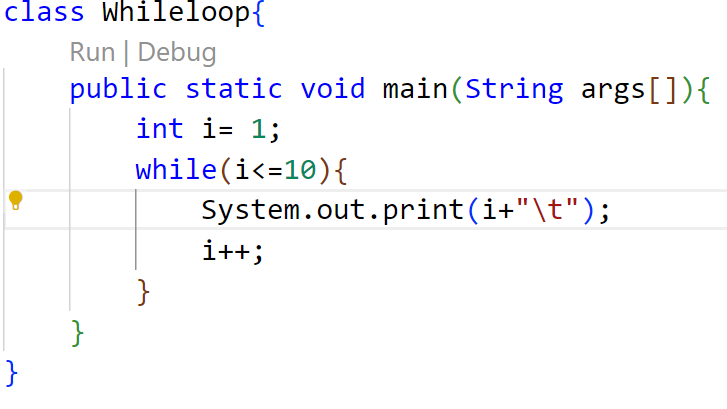
do-while Loop
-
09 / Language Fundamentals
-
01 / REPETITION
Loop Condition
- A do...while loop repeats a group of statements as long as the specified condition remains true.
- 02 / EXECUTION
First Execution
- In a do...while loop, the statements are executed first, and then the loop condition is tested.
- 03 / CONTROL FLOW
Exit Control Loop
- Because it evaluates the condition at the end of the loop, it is commonly referred to as an exit control loop.
SYNTAX STRUCTURE
do
- {
- // Statements;
} while (condition);
do-while Loop: Example
-
09 / Language Fundamentals
-
01 / CODE
Java Implementation
- 02 / OUTPUT
Console Execution
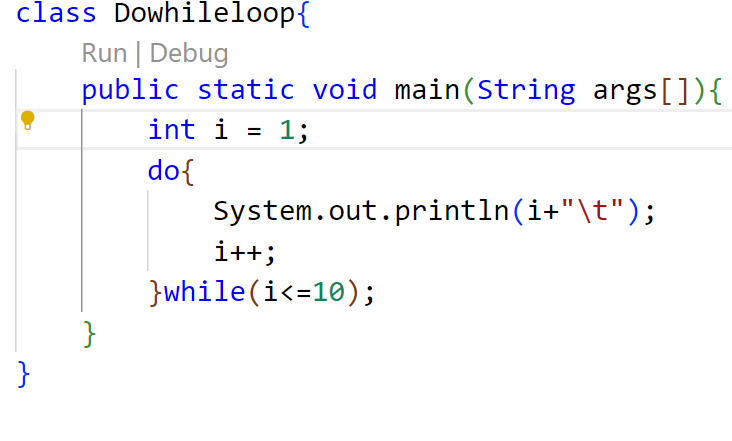
for Loop
-
09 / Language Fundamentals
-
01 / SYNTAX
Compact Structure
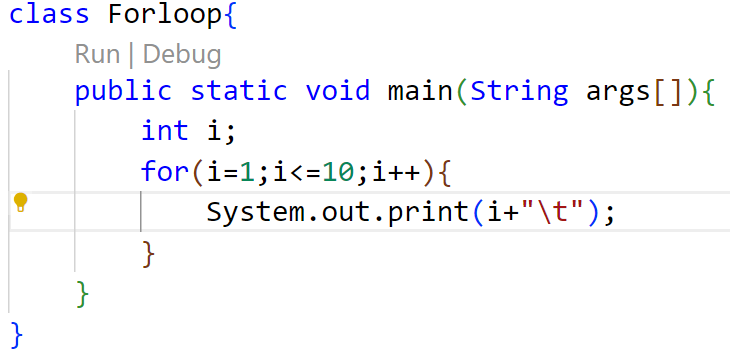
- The for loop is also same as do…while or while loop, but it is more compact syntactically.
- 02 / EXECUTION
Conditional Execution
- The for loop executes a group of statements as long as a condition is true.
SYNTAX STRUCTURE
for (initialisation; condition; inc/dec)
- {
- // Statements;
- }
for Loop: Example
-
09 / Language Fundamentals
-
01 / CODE
Java Implementation
- 02 / OUTPUT
Console Execution
Jump Statement
-
09 / Language Fundamentals
-
01 / Overview
Transferring Control
- Java supports three jump statements that immediately redirect the execution flow of your code.
- These statements unconditionally transfer control to another part of the program.
Supported Statements
break
- Exits the innermost loop or switch block immediately.
continue
- Skips the current loop iteration and proceeds to the next.
return
- Exits from the current method back to the caller.
Break Statement
-
09 / Language Fundamentals
-
01 / Core Concept
Exiting Execution Blocks
-
- Loop Termination
- Used inside loops (for, while, do-while) to immediately break loop execution and jump to the next statement.
-
- Switch Escape
- Used inside a switch block to exit the block immediately once a matching case is handled, preventing fall-through.
-
- Nested Break
- Used in nested blocks to transfer control to the very end of an outer labeled block structure.
02 / Syntax Structure
break;
- Standard syntax used to exit the innermost enclosing loop or switch block directly.
break label;
- Labeled break statement used to transfer control out of a deeply nested block to the end of the named target block.
09 / Language Fundamentals Break: Example
forloop.java
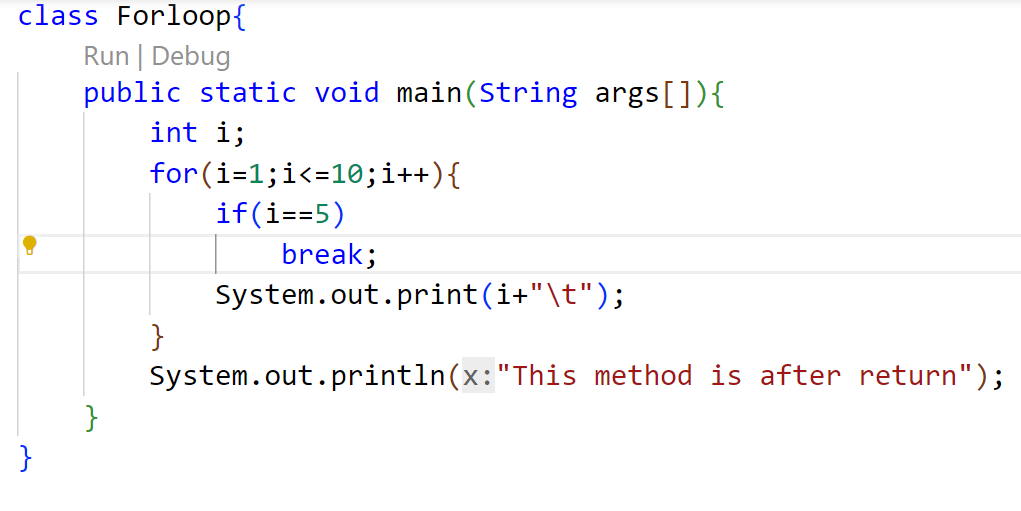
How it works
The loop is initialized with i=1 and set to run up to 10.
When i reaches 5, the break condition is met, and the break; statement terminates the loop execution immediately, transferring control to the statement after the loop.
- Output
Continue Statement
-
09 / Language Fundamentals
-
01 / Core Concept
Skipping Loop Iterations
-
- Loop Continuation
- This statement is useful to continue the next repetition of a loop/ iteration.
-
- Conditional Skip
- When continue is executed, subsequent statements inside the loop are not executed.
02 / Syntax Structure
continue;
- Standard syntax used to immediately transfer control to the loop condition or update statement of the innermost enclosing loop.
Continue: Example
- 09 / Language Fundamentals
forloop.java
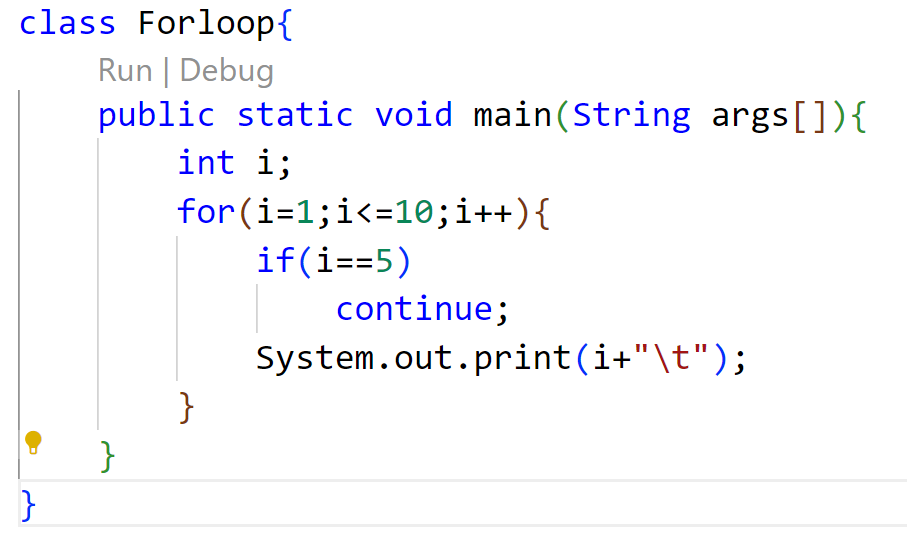
How it works
The loop is initialized with i=1 and set to run up to 10.
When i reaches 5, the condition is met, and the continue; statement skips the print statement, transferring control back to the update expression of the loop.
- Output
Return Statement
-
09 / Language Fundamentals
-
01 / Core Concept
Control Flow & Value Return
-
- Method Termination
- Useful to terminate a method and come back to the calling method.
-
- Application Exit
- Using the return statement in the main method terminates the application.
-
- Return Values
- Can be used to return some value from a method to a calling method.
02 / Syntax Structure
return;
- Terminates method execution without returning a value.
return value;
- Terminates method and passes a specified value back (may be of any type) to the caller.
Return: Example
- 09 / Language Fundamentals
forloop.java
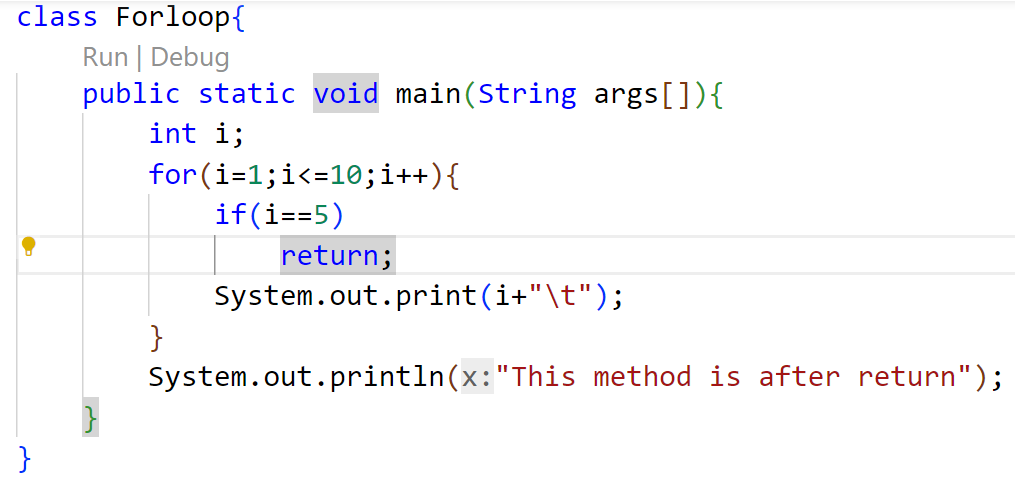
How it works
The loop is initialized with i=1 and runs up to 10.
- When i reaches 5, the condition is met and the return; statement terminates the entire main method, skipping all subsequent statements.
- Output
Array
-
09 / Language Fundamentals
-
01 / Core Concept
Understanding Arrays
- An array represents a group of elements of the same data type. Arrays are generally categorized into two main types:
-
- Single Dimensional Arrays
- Often referred to as 1-Dimensional arrays, representing a simple linear list of elements.
-
- Multi-Dimensional Arrays
- Includes 2-Dimensional, 3-Dimensional, or higher nested arrays for complex structures.
02 / Implementation Workflow
Creating an Array
Step 1: Declare the Array
- Introduce the array variable name and specify the type of data it holds.
Step 2: Create Memory Location
- Allocate the required block of memory using the 'new' keyword.
Step 3: Populate the Array
- Assign specific values to each individual memory location in the array.
Declaring Array Variable
-
09 / Language Fundamentals
-
To declare an array, write the data type, followed by a set of square brackets [], followed by the identifier name.
syntax.java
// 01 / Preferred syntax
datatype[] arrayRefVar;
// 02 / Alternative syntax
datatype arrayRefVar[];
declare.java
// 01 / Preferred way
double[] myList;
// 02 / Alternative way
double myList[];
Array Creation
- 09 / Language Fundamentals
To create an array, write the new keyword, followed by the square brackets [] containing the number of elements you want to have in the array.
twostep.java
// 01 / Declaration
int arr[];
// 02 / Object Creation
arr = new int[10];
onestep.java
// Single Step Combination
// declare & object creation
int arr[] = new int[10];
Array Creation (cont.)
-
09 / Language Fundamentals
-
Another way to create an array if the elements are known:
syntax.java
// 01 / Syntax
int arr[] = {/elements/};
// 02 / Inline Commented
int arr[ ] = {//comma operator};
example.java
// 01 / Array Initialization
int arr[] = {10, 20, 30, 40, 50};
Example 1
- 09 / Language Fundamentals
Arr.java
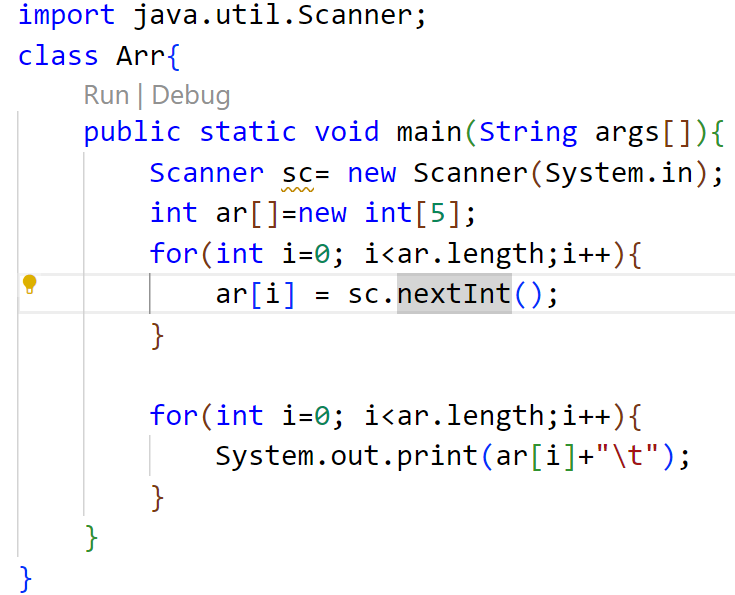
Example 1 (cont.)
-
09 / Language Fundamentals
-
Execution Output:
Terminal - Output
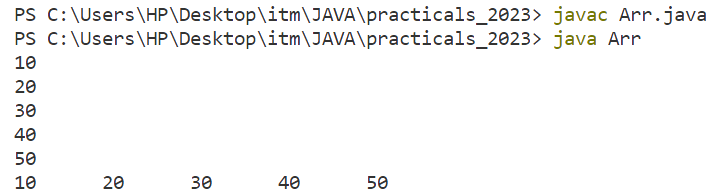
Example 2
- 09 / Language Fundamentals
Arr.java
Terminal - Output
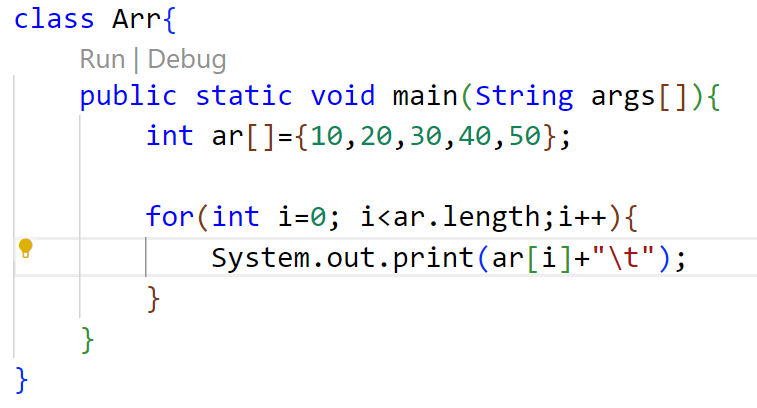
Array Length
- 09 / Language Fundamentals
Purpose
- To get the number of elements in an array, you can use the built-in length field.
- The length property dynamically returns the total size (or capacity) of the allocated array.
Syntax
arrayName.length
For-Each Loop
- 09 / Language Fundamentals
Purpose
The for-each loop is used to traverse arrays or collections in Java. It is easier to use than a simple for loop because you don't need to increment values or use subscript notation.
- It works on the basis of elements instead of indices, returning each element one by one into the defined variable.
Syntax
for(datatype var : arrayname) {
- // statement
}
Example: For-Each Loop
- 09 / Language Fundamentals
Arr.java
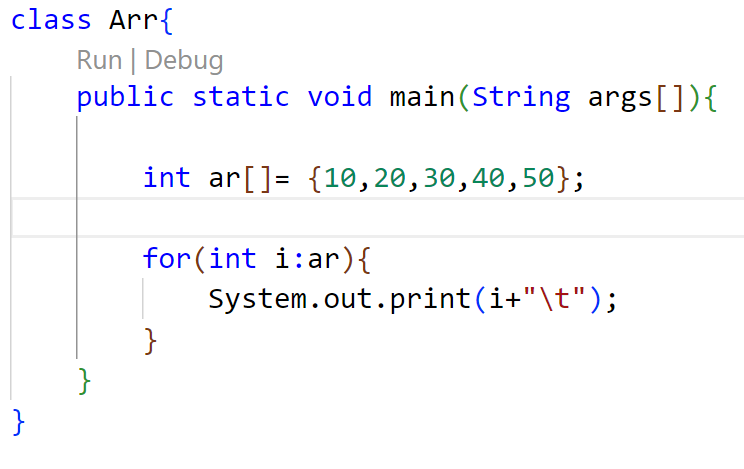
Terminal Output
Multi-dimensional Array
- 09 / Language Fundamentals
Concept
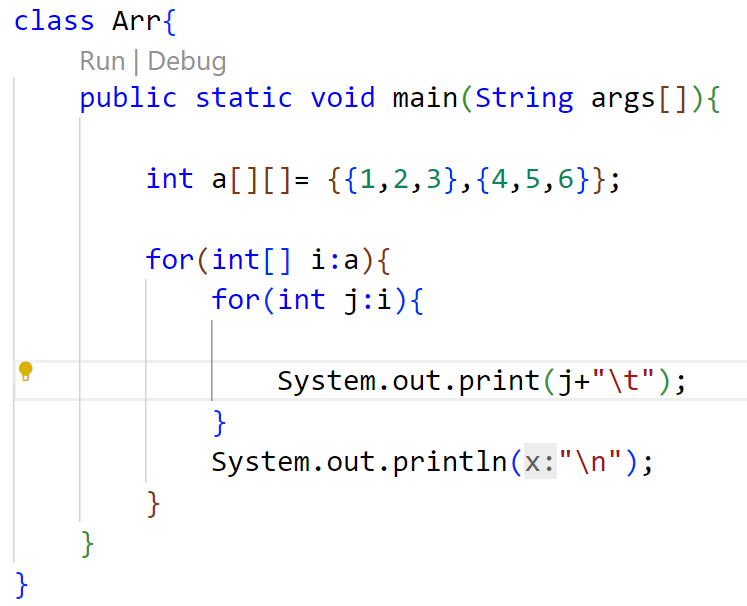
- A multidimensional array is an array of arrays. That is, each element of a multidimensional array is an array itself.
- To access the elements of the arr array, specify two indexes: one for the row array, and one for the element inside that array.
Declaration
- // Syntax & Initialization
int[][] arr = {
{1, 2, 3},
{4, 5, 6}
};
Multi-dimensional Array: For Loop
- 09 / Language Fundamentals
Arr.java
Terminal Output
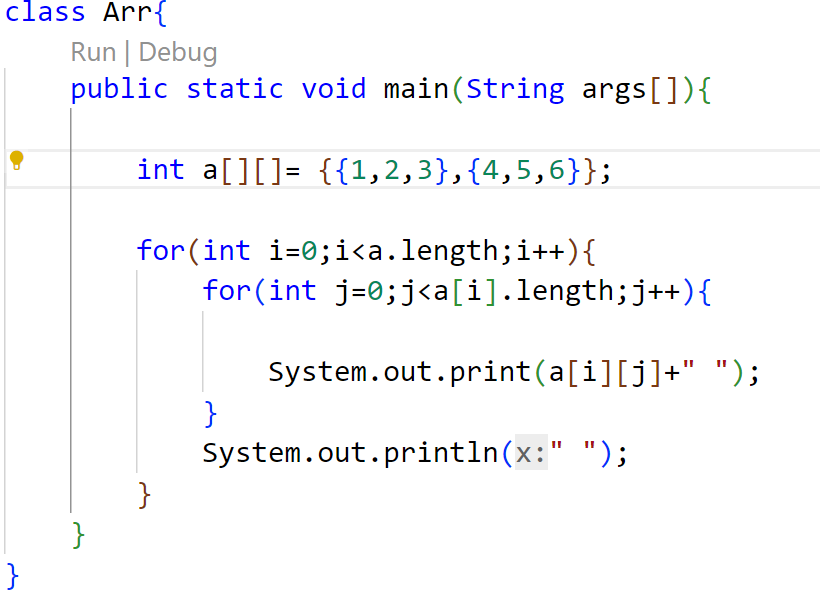
Multi-dimensional Array: For-Each Loop
- 09 / Language Fundamentals
Arr.java
Terminal Output

Jagged Array: Structure
-
09 / Language Fundamentals
-
Definition
-
A jagged array is a multi-dimensional array where the member arrays can be of different sizes and lengths.
-
KEY CHARACTERISTICS
-
✦Each row is an independent array
-
✦Optimizes memory for uneven datasets
-
✦Individually allocated row dimensions
Memory Visualization
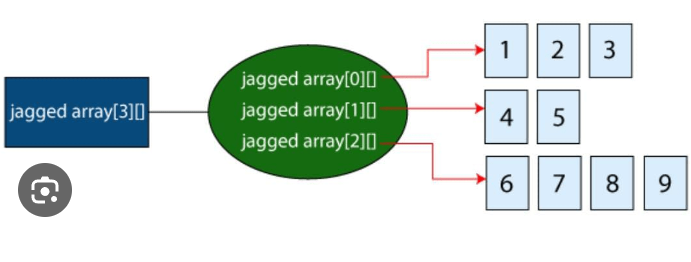
Jagged Array: Code Implementation
- 09 / Language Fundamentals
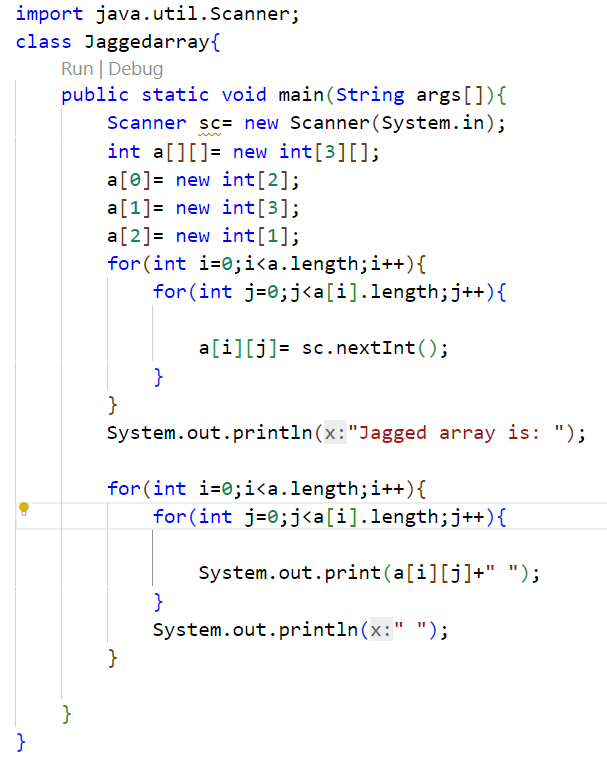
Jaggedarray.java
- Code Walkthrough
- The program demonstrates how to declare, allocate memory for, and traverse a jagged array in Java.
- KEY STEPS IN THE CODE
✦ Declaration: int a[][] = new int[3][] defines a 2D array with 3 rows.
✦ Row Allocation: Defines columns of sizes 2, 3, and 1 dynamically.
- ✦ Traversal: Employs nested loops using .length to handle varied row sizes safely.
Jagged Array: Output
- 09 / Language Fundamentals
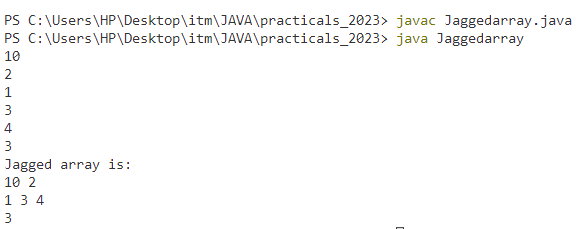
Terminal Output
- Execution & Results
- The console output confirms the compilation process and demonstrates the behavior of the dynamically allocated rows.
- KEY OBSERVATIONS
- ✦ Compilation & Run: The code is compiled with javac and run smoothly using the java command.
- ✦ Console Input: Values like row size and matrix inputs (10, 2, 1, 3, 4, 3) are provided sequentially.
- ✦ Formatted Display: The jagged array is printed back with uneven columns (2, 3, and 1 elements respectively).
Arrays: Advantages & Disadvantages
- 09 / Language Fundamentals
add_circleAdvantages
1. Code Optimization
- It makes the code optimized, allowing us to retrieve or sort the data with high efficiency.
2. Random Access
- We can instantly access or retrieve any data located at a specific index position.
remove_circleDisadvantages
1. Size Limit
- We can store only a fixed size of elements. Once initialized, the array cannot grow in size at runtime.
- Java Solution: Use the Collection Framework (like ArrayList) which dynamically grows automatically.
String: Fundamentals
- 09 / Language Fundamentals
codeOverview & Implementation
1. Fundamental Nature
Strings are very important in the world of programming languages as they are used to process long textual/symbolic information. They are considered fundamental data types in almost all languages.
2. Java Implementation
- In java, string class is provided to work with strings along with the facility of character arrays.
lock_clockCore Feature
Immutability
- The strings are immutable as once an object of the String class is created & initialized with some value, it cannot be changed.
Important Note: String objects are constant and read-only once instantiated.
String: Objects & Package
- 09 / Language Fundamentals
layersObjects & Packages
1. Handling String Data
- To handle string data in Java, we require objects of the String class.
2. Automatic Import
- The String class is included in the java.lang package. Therefore each class can use the String class without importing any package.
codeImplementation & Syntax
Syntax Example
- We can initialize a String by assigning a sequence of characters wrapped in double quotes.
Example: String str = “Hello”
Operation on String
- 09 / Language Fundamentals
settings Overview & Capabilities
The string class in java provides various methods that enable you to perform various tasks like character extraction, conversion, case shifting, and comparison.
Robust Manipulation
- These operations allow developers to handle text data with speed and high efficiency, ensuring data format consistency across applications.
format_list_numbered Common Tasks
- Convert a string into a character
- Convert numbers into strings
- Search strings
- Create substrings
- Change the case of string
- Get a string length
- Compare strings
String Method: length()
- 09 / Language Fundamentals
straightenMethod Overview
1. Character Calculation
- The length() method returns the length of a string. It calculates all the characters, symbols & numbers enclosed in double quotes (“”).
2. Whitespace Inclusion
- All spaces and punctuation marks inside the string literals are accurately counted towards the final total length.
codeReturn & Syntax
Output Value
- The method returns an integer value representing the total count.
Syntax Example
int length = str.length();
String Methods: Case Conversion
- 09 / Language Fundamentals
arrow_downwardtoLowerCase()
- The toLowerCase() method returns a string after converting all uppercase letters of the invoking string into lowercase.
Syntax
stringname.toLowerCase()
arrow_upwardtoUpperCase()
- The toUpperCase() method returns a string after converting all lowercase letters of the invoking string into Uppercase.
Syntax
stringname.toUpperCase()
String Method: substring()
- 09 / Language Fundamentals
content_cutMethod Overview
1. Single Parameter Form
- The substring(int begin) method returns a new String instance that is a substring of the original.
2. Extraction Range
- It begins at the index specified by the argument value and ends at the last character of the original string.
codeSyntax & Example
Syntax
str.substring(int beginIndex)
Code Example
String str = "EDUCATION";str.substring(4); // "ATION"
String Method: substring(begin, end)
- 09 / Language Fundamentals
content_cutMethod Overview
1. Two Parameter Form
- The substring(int begin, int end) method returns a new String containing a subset of the original characters.
2. Inclusive & Exclusive
- The start index is inclusive, while the end index is exclusive. The extracted string length is always end - begin.
codeSyntax & Example
Syntax
str.substring(int begin, int end)
Code Example
String str = "EDUCATION";
str.substring(3, 6); // "CAT"
String Method: concat()
- 09 / Language Fundamentals
add_circleMethod Overview
1. Addition (+) Operator
- The standard addition operator provides an intuitive and common way to concatenate multiple strings together.
2. concat() Method
- The explicit concat() method appends one string to the end of another, returning a newly combined string.
codeSyntax & Example
Syntax
str.concat(String str2)
Code Example
String str = "Hello";
String str1 = "Java";
str + str1; // "HelloJava"
str.concat(str1); // "HelloJava"
String Methods: equals() & equalsIgnoreCase()
- 09 / Language Fundamentals
swap_horizMethod Overview
1. Purpose
- These methods are used for comparing the content of two strings.
2. Case Sensitivity
equals() compares characters sequentially and requires exact case matches.
equalsIgnoreCase() performs the same comparison but ignores case differences.
codeSyntax & Example
Syntax
str.equals(String str2)str.equalsIgnoreCase(String str2)
Code Example
String str = "Java is oopl";
String str1 = "JAVA IS OOPL";
str.equals(str1); // false
str.equalsIgnoreCase(str1); // true
String Methods: Code Example
-
09 / Language Fundamentals
-
Stringop.java
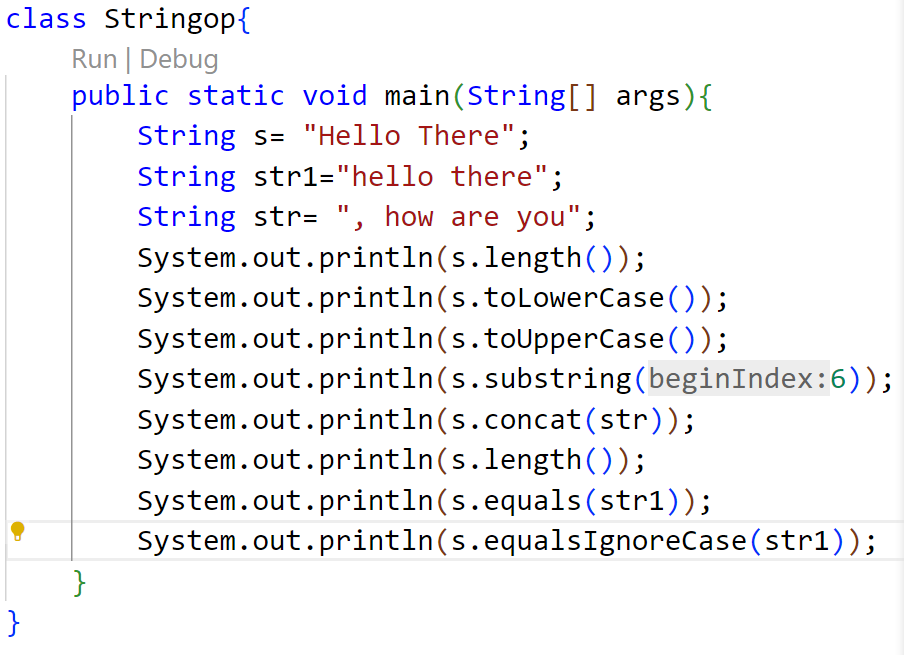
String Methods: Execution Output
-
09 / Language Fundamentals
-
Terminal — Output
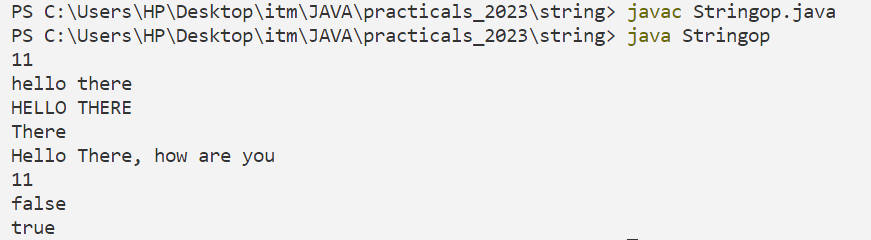
StringBuffer Class
-
09 / Language Fundamentals
-
OVERVIEW
The StringBuffer class provides the capability to create a sequence of characters with mutable (modifiable) attributes, offering an efficient alternative to immutable Strings.
SYNTAX EXAMPLE
- StringBuffer str = new StringBuffer();
COMMON METHODS
- 1.length()
- 2.capacity()
- 3.reverse()
- 4.append()
- 5.insert()
- 6.delete()
- 7.deleteCharAt()
- 8.replace()
StringBuffer: length()
- 09 / Language Fundamentals
METHOD OVERVIEW
- It defines the number of characters currently present in the StringBuffer.
RETURN VALUE
- int - the total character count
CODE EXAMPLE
StringBuffer str = new StringBuffer("ContentWriter");
int len = str.length();
System.out.println("Length : " + len);
// Output: Length : 13
StringBuffer: capacity()
- 09 / Language Fundamentals
METHOD OVERVIEW
- Defines the total allocated buffer space. This includes the reserved space and the length of the occupied string.
DEFAULT CAPACITY
- 16 characters
CAPACITY GROWTH FORMULA
- (oldCapacity * 2) + 2
CODE EXAMPLE
StringBuffer str = new StringBuffer("ContentWriter");
int cap = str.capacity();
System.out.println("Capacity : " + cap);
// Output: Capacity : 29
StringBuffer: append()
- 09 / Language Fundamentals
METHOD OVERVIEW
- The append() method is used to append the specified string or representation of data at the end of the existing string.
SUPPORTED TYPES
- String, char, int, double, boolean, etc.
CODE EXAMPLE
StringBuffer str = new StringBuffer("Hello");
- str.append("java");
System.out.println(str); // Hellojava
- str.append(0);
System.out.println(str); // Hellojava0
StringBuffer: insert()
- 09 / Language Fundamentals
METHOD OVERVIEW
- The insert() method is used to insert the string into the previously defined string at a particular indexed position.
REQUIRED PARAMETERS
- index — position to insert
- string — value to be inserted
CODE EXAMPLE
StringBuffer sb = new StringBuffer(" Welcome");
System.out.println(sb);
- // Output: Welcome
- sb.insert(8, " to java");
System.out.println(sb);
- // Output: Welcome to java
StringBuffer: reverse()
- 09 / Language Fundamentals
METHOD OVERVIEW
The reverse() method reverses all the characters of the object of the StringBuffer class. And, as an output, this method returns or gives the reversed String object.
CODE EXAMPLE
StringBuffer sb = new StringBuffer("Welcome to Java");
System.out.println("Original String: " + sb);
- // OUTPUT: Original String: Welcome to Java
sb.reverse();
System.out.println("Reversed String: " + sb);
- // OUTPUT: Reversed String: avaj ot emocleW
StringBuffer: delete()
- 09 / Language Fundamentals
METHOD OVERVIEW
- The delete() method deletes a sequence of characters from the StringBuffer object.
SYNTAX / PARAMETERS
- startIndex — start index (inclusive)
- endIndex — end index (exclusive)
CODE EXAMPLE
StringBuffer sb = new StringBuffer("welcometojava");
System.out.println(sb);
- // Output: welcometojava
sb.delete(0, 4);
System.out.println(sb);
- // Output: ometojava
StringBuffer: deleteCharAt()
- 09 / Language Fundamentals
Method Overview
- The deleteCharAt() method deletes only the character at the specified index.
Syntax
- sb.deleteCharAt(int index)
Code Example
StringBuffer sb = new StringBuffer("Welcome to java");
System.out.println(sb);
- // Output: Welcome to java
sb.deleteCharAt(7);
System.out.println(sb);
- // Output: Welcometo java
StringBuffer: replace()

- 09 / Language Fundamentals
METHOD OVERVIEW
- The replace() method replaces a sequence of characters with another sequence of characters.
SYNTAX / PARAMETERS
- startIndex — start index (inclusive)
- endIndex — end index (exclusive)
- str — replacement string
CODE EXAMPLE
StringBuffer sb = new StringBuffer("Welcome to java");
System.out.println(sb);
- // Output: Welcome to java
sb.replace(12, 15, "Tutorial");
System.out.println(sb);
- // Output: Welcome to jTutorial
StringBuffer: Comprehensive Example
- 09 / Language Fundamentals
CODE DEMONSTRATION
StringBuffer sb = new StringBuffer("Hello");
- // Demonstration of various methods
- sb.length(); // Returns 5
- sb.capacity(); // Returns 21
sb.append(" World");
sb.insert(11, ", welcome to java");
sb.delete(11, 27);
sb.deleteCharAt(5);
sb.replace(5, 9, "Diksha");
- sb.reverse();
CONSOLE OUTPUT
Length of String is: 5
Capacity of String is: 21
Appended String is: Hello World
String after insert is: Hello World, welcome to java
String after delete is: Hello Worlda
Use of deleteCharAt: HelloWorlda
String after replace is: HelloDikshada
Reversed String: adahskiDolleH
Command Line Arguments
- 09 / Language Fundamentals
KEY CONCEPT
- Sometimes we need to pass information into a program while it is running.
This is accomplished by passing arguments directly to the main() method.
STORAGE & EXECUTION
- The passed information is stored as strings in the command line's string array argument.
- Execution Detail:
- Arguments immediately follow the program's name on the command line during startup.
Command Line Arguments: Example 1
- 09 / Language Fundamentals
CODE DEMONSTRATION
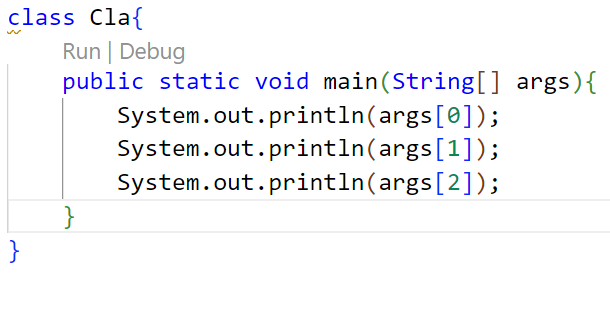
CONSOLE OUTPUT

Command Line Arguments: Example 2
- 09 / Language Fundamentals
CODE DEMONSTRATION
CONSOLE OUTPUT
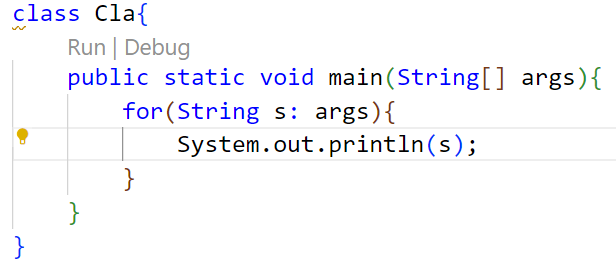
Variable Arguments (varargs)
- 09 / Language Fundamentals
Overview & Purpose
- Why use varargs?
If we don't know how many arguments we will have to pass in the method, varargs is the better approach. It allows the method to accept zero or multiple arguments.
- The Alternative
- Before varargs, we had to use overloaded methods or pass parameters as arrays, which was not considered ideal due to maintenance overhead.
Syntax & Structure
Method Declaration Syntax
returntype method_name(datatype... value)
- The ellipsis (...) identifies that an arbitrary number of arguments (including zero) can be passed.
09 / Language Fundamentals Rules for Defining Varargs
COMPILER CONSTRAINTS
- Strict Compilation Rules
- Single Varargs Parameter:There can be at most one variable argument parameter in any method signature.
- Must Be Last:The variable argument parameter (varargs) must always be the last argument in the method.
CODE VALIDATION
// ERROR: Multiple varargs
void xyz(String... a, String b...)
// ERROR: Varargs not last
void xyz(String... a, int b)
// VALID: Correct syntax
void xyz(int a, String... b)
Example-3 : CLA using varargs
- 09 / Language Fundamentals
SOURCE CODE
class Cla {
public static void main(String... args) {
for(String s: args) {
System.out.println(s);
}
}
}
CONSOLE OUTPUT
# Compile the program
$ javac cla.java
# Run with command line arguments
$ java Cla Hello 10 14.3
Hello
14.3
Wrapper Class
- 09 / Language Fundamentals
OBJECT CONVERSION
- Bridging Primitives & Objects
- Type Conversion:Used to convert primitive types into class objects to enable object-oriented features.
- Generics Compatibility:Generic classes only work with objects. Wrapper classes let you use primitives with generics.
SYSTEM INTEGRATION
- Type Mapping & Package
- One-to-One Mapping:Each primitive type in Java has a unique corresponding wrapper class (e.g., int to Integer).
- Standard Package:All wrapper classes belong to the java.lang package, meaning they are imported automatically.
Wrapper Class Mappings
- 09 / Language Fundamentals
| PRIMITIVE | WRAPPER CLASS |
|---|---|
| boolean | Boolean |
| char | Character |
| byte | Byte |
| short | Short |
| PRIMITIVE | WRAPPER CLASS |
|---|---|
| int | Integer |
| long | Long |
| float | Float |
| double | Double |
Need of Wrapper Class
- 09 / Language Fundamentals
OBJECT REPRESENTATION
- Bridging the Gap
- Primitive WrappingAllows primitive types to be used where objects are strictly required, such as in java.util utility classes.
- Bidirectional MethodsProvides built-in utility methods to easily wrap values into objects and unwrap them back.
COLLECTION FRAMEWORK
- Data Structures
- Object-Only StorageCollections like ArrayList only store object references, preventing direct use of primitives.
- String ParsingEnables robust object creation and conversion from alternative types like Strings.
CONCURRENCY
- Thread Control
Locking & SynchronizationRequired in multithreading synchronization to lock shared resources, as locking mechanisms natively require object references rather than primitive types.
Wrapper Class Creation
- 09 / Language Fundamentals
METHOD 01
Class Constructor
DEPRECATED
- Using wrapper class constructor to instantiate a wrapper object by passing the value.
METHOD 02
Direct Assignment
- Creating wrapper object directly by assigning values, using wrapper class only.
METHOD 03
valueOf() Method
- Using the static valueOf() factory method to efficiently obtain a wrapper class instance.
Using Wrapper Class Constructor
- 09 / Language Fundamentals
METHOD 01
Class Constructor
- We can create a wrapper object using the wrapper class and its constructor by passing the value to it.
Syntax:
ClassName object = new ClassName(argument);
Example:
Integer number = new Integer(58);
STATUS & WARNINGS
Usage Status
- DEPRECATED
- However, the way of creating an instance of wrapper classes using constructor is deprecated as of the latest version of JDK.
- This is because each time new memory is allocated in the heap when we create an object with the help of the constructor.
- Also, the constructor Character(char) has been deprecated since JDK version 9.
Using Wrapper Class
- 09 / Language Fundamentals
CONCEPT
Direct Assignment
We can create without using constructor as well by using the wrapper class instead of the primitive type to create a wrapper object without passing the value to the constructor.
Accessing Values
- To get the value, we can print the particular object.
CODE STRUCTURE
Syntax & Example
Syntax:
ClassName object = value;
Example:
Integer intValue = 10;
System.out.println(intValue);
Using valueOf() Method
- 09 / Language Fundamentals
METHOD 02
Static Factory Method
- By using valueOf Static method, a Wrapper object can be created.
CODE STRUCTURE
Syntax & Example
Syntax:
ClassName object = ClassName.valueOf(argument);
Example:
int a= 10;
Integer num= Integer.valueOf(a);
Wrapper Class Methods
- 09 / Language Fundamentals
typeValue()
- Converts the value of this Number object to the specified primitive data type returned
compareTo()
- Compares this Number object to the argument
equals()
- Determines whether this Number object is equal to the argument
valueOf()
- Returns an Integer object holding the value of the specified primitive data type value
toString()
- Returns a String object representing the value of specified Integer type argument
parseInt()
- Returns an Integer type value of a specified String representation
decode()
- Decodes a String into an integer
min()
- Returns the smaller value after comparison of the two arguments
max()
- Returns the larger value after comparison of the two arguments
round()
- Returns the closest round off long or int value as per the method return type
Autoboxing
- 09 / Language Fundamentals
CONCEPT DEFINITION
Autoboxing is when the Java compiler performs the automatic conversion of the primitive data types to the object of their corresponding wrapper classes.
- For example, converting an int to Integer, a double to Double, etc.
EXPLICIT CONVERSION
To explicitly convert primitive to object we use the valueOf() method.
COMPILER BEHAVIOR
The Java compiler applies autoboxing when a primitive value is:
- Passed as a parameter to a method that expects an object of the corresponding wrapper class.
- Assigned to a variable of the corresponding wrapper class.
Autoboxing: Example
- 09 / Language Fundamentals
Autobox.java
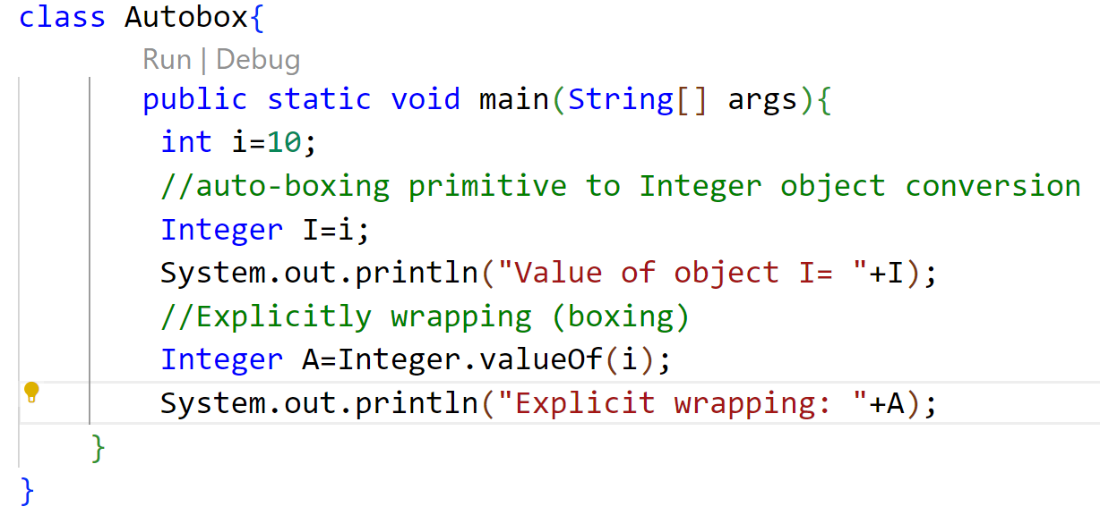
Autoboxing: Example (cont.)
- 09 / Language Fundamentals
Console Output

Auto-Unboxing
- 09 / Language Fundamentals
What is Unboxing?
- Unboxing is automatically converting an object of a wrapper type (Integer, for example) to its corresponding primitive (int) value.
Explicit Conversion
- To explicitly convert object to corresponding primitive type we use xxxValue() method.
Automatic Unboxing
- The Java compiler applies unboxing when an object of a wrapper class is:
- Passed as a parameter to a method that expects a value of the corresponding primitive type.
- Assigned to a variable of the corresponding primitive type.
09 / Language Fundamentals Auto-Unboxing: Example
Autounbox.java
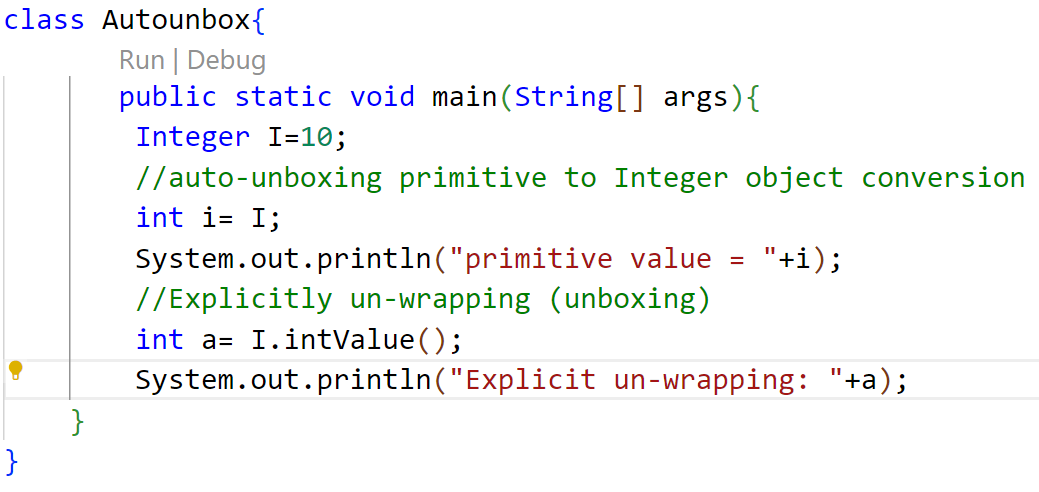
Auto-Unboxing: Example
- 09 / Language Fundamentals
OUTPUT

toString() Method
- 09 / Language Fundamentals
Core Purpose
String Representation
- The toString() method returns the String representation of the object.
Compiler Behavior
Automatic Invocation
- If you print any object, Java compiler internally invokes the toString() method on the object.
- So overriding the toString() method, returns the desired output, it can be the state of an object etc. depending on your implementation.
toString() Method: Example
- 09 / Language Fundamentals
JAVA CODE
TERMINAL OUTPUT
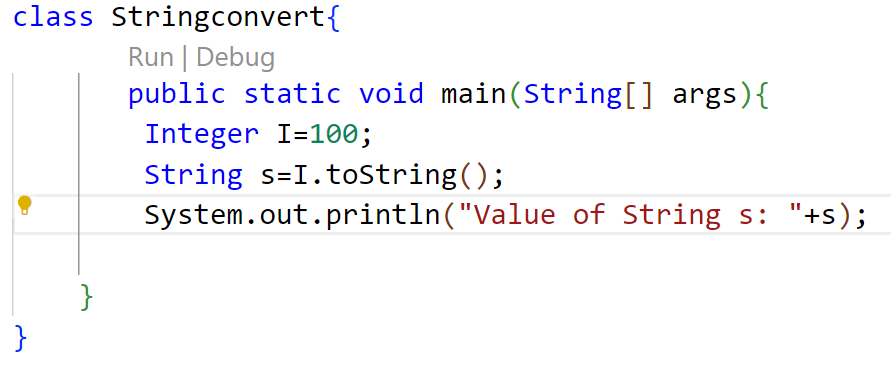
parseXXX() Method
- 09 / Language Fundamentals
Core Purpose
String Conversion
- parseXXX() method is use to convert String to a primitive type.
JAVA CODE
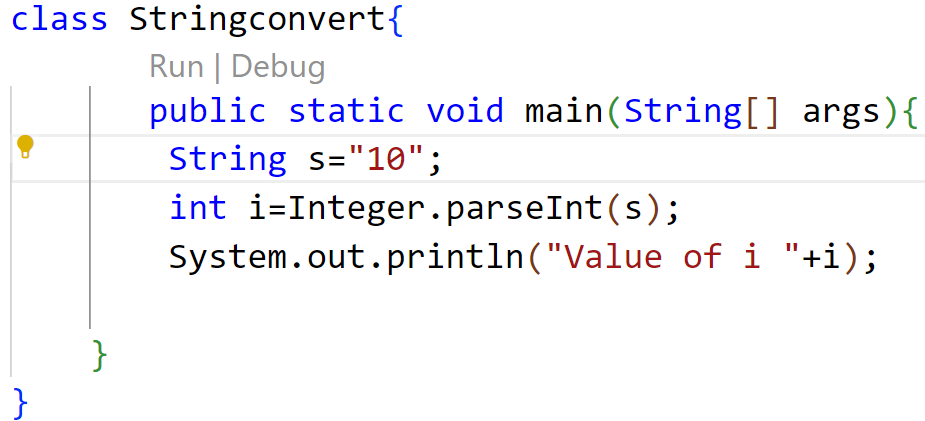
parseXXX() Method: Example
- 09 / Language Fundamentals
TERMINAL OUTPUT
