ITMBU UNIVERSITY • COMPUTER SCIENCE & ENGINEERING
Unit 5: Class Modeling
Study guide to UML and class modeling, with practical extensions on Java I/O, exception handling, and multithreading.
Source boundary: The supplied slides list some subjects without enough accompanying explanation to expand them reliably: values and attributes, additional UML representations and examples, association ordering/bag/sequence, and Slides 13, 19, and 21. Related explanations below are clearly presented as learning examples rather than additional claims from the slides.
TOPIC 1
UML: Unified Modeling Language
UML (Unified Modeling Language) is an OMG Standard [Slide 3: UML representation of classes/objects] .
It is an Object-Oriented (O.O) Visual Modeling language [Slide 3: UML representation of classes/objects] .
Used for Class/object representation [Slide 3: UML representation of classes/objects] .
A visual model lets a team discuss a system before focusing on implementation. A class diagram describes the kinds of objects in a domain and the relationships between those kinds; an object-level view describes particular instances and their values. In this way, a diagram can communicate the design without requiring every reader to inspect source code.
Reading a Simple Class Model
A common UML class box is divided into compartments:
-
Class name: identifies the modeled kind of object.
-
Attributes: name the information represented by each object, often written as name: Type.
-
Operations: name the services available through the class, often written with parameters and a result type.
Student ------------------------- studentId: int name: String ------------------------- enroll(course: Course): void
Modeling tip: Use a class to describe shared structure and behavior; use an object when you need to talk about one particular instance. Keep a diagram at the level of detail needed to answer the design question.
TOPIC 2
Object Identifiers
In class modeling, objects identifiers are implicit [Slide 5: Object identifiers] . Objects that belong to the same class and have the exact same attributes and values may still be different, individual objects [Slide 5: Object identifiers] .
An identifier represents which object is being discussed; its attribute values describe what that object is like. These are different ideas: two library copies may both have the title “Java Basics” and the same edition, but they are still two separately tracked copies.
Keep identity separate from state:
Identity: distinguishes one object from every other object.
State: the current values of that object's attributes.
Class membership: says which common structure and operations the object follows.
A class model can treat identity as implicit even when an implementation later uses a database key or another explicit identifier.
Changing an object's state does not automatically make it a different object. Likewise, matching attribute values do not by themselves prove that two references identify the same object.
TOPIC 3
Operations and Methods
3.1 Operations
An operation is a function or procedure that may be applied to or by objects in a class [Slide 6: Operations and Methods] .
Each operation has a target object as an implicit parameter [Slide 6: Operations and Methods] .
All objects in a class share the same operations [Slide 6: Operations and Methods] .
The behavior of the operation depends on the class of its target [Slide 6: Operations and Methods] .
Polymorphic Operations: The same operation may apply to many different classes. Such an operation is POLYMORPHIC [Slide 6: Operations and Methods] .
Think of an operation as the service promised by a class, rather than the instructions used to perform it. A caller asks a target object to perform an operation; the target is implicit in the request, while any additional arguments provide the other information needed for the request.
Example: A BankAccount class might offer deposit(amount). The particular account receiving the deposit is the target object; amount is an explicit argument. Other account classes could offer the same operation while implementing their rules differently.
3.2 Methods
A method is the implementation of an operation for a class [Slide 7: Operations and Methods] .
A different piece of code may implement each method [Slide 7: Operations and Methods] .
An operation may have arguments in addition to its target object, which act as placeholders for values and/or for objects [Slide 7: Operations and Methods] .
Signature: When an operation has methods on several classes, these methods must have the same SIGNATURE: the number and types of arguments, and the type of result value [Slide 7: Operations and Methods] .
An operation can therefore be understood as the model-level contract, while a method is the class-specific implementation of that contract. Two classes can provide different method bodies for the same polymorphic operation while presenting a consistent signature to callers.
Operation in the model: calculateArea()
Circle method: area = π × radius × radius Rectangle method: area = width × height
The example illustrates the distinction: callers use the common operation, but each class supplies behavior appropriate to its own data.
TOPIC 4
Links and Associations
Link: A physical or conceptual connection among objects [Slide 9: Links and Association concepts] .
Most links relate two objects, but some links relate three or more objects [Slide 9: Links and Association concepts] .
Defined as a tuple (a list of objects)
[Slide 9: Links and Association concepts] .
A link is an instance of an association [Slide 9: Links and Association concepts] .
Association: A description of a group of links with common structure and semantics [Slide 10: Links and Association concepts] .
Denoted by a line in UML [Slide 10: Links and Association concepts] .
Its name is optional if the model is unambiguous [Slide 10: Links and Association concepts] .
The distinction is similar to the difference between an individual connection and the rule describing a family of connections: a link joins particular objects, while an association describes the shared meaning and structure of links between classes. An association can connect more than two classes when the modeled fact depends on all participants together.
4.1 Multiplicity
Multiplicity specifies the number of instances of one class that may relate to a single instance of the associated class [Slide 14: Multiplicity] .
UML diagrams explicitly list multiplicity at the end of association lines using intervals [Slide 14: Multiplicity] :
| Notation | Meaning [Slide 14: Multiplicity] |
|---|---|
| 1 | Exactly one |
| 0..1 | Zero or one |
| 1..* | One or more |
| 0..* | Zero or more |
| 3..5 | Three to five inclusive |
Read a multiplicity at one end as the permitted number of objects at that end for one object at the opposite end. For the Student–Course illustration below, the labels indicate the permitted counts for the association as drawn. Always read the label at the end you are interpreting; the two ends answer different questions.
1 requires exactly one related object.
0..1 permits no related object or one related object.
0..* permits none, one, or many related objects.
1..* requires at least one related object.
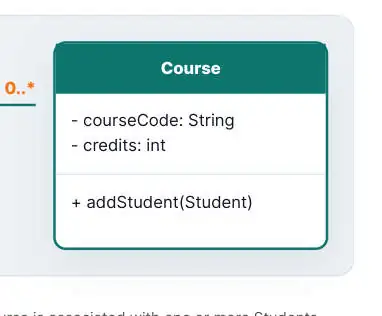
Student Course 1..* 0..*
- studentId: int
- courseCode: String
- name: String
- credits: int
-
enroll(Course)
-
addStudent(Student)
A Student can be associated with zero or more Courses; each Course is associated with one or more Students, according to the multiplicities shown.
4.2 Association Class
UML offers the ability to describe links of association with attributes like any class [Slide 16: Association class] . An association class is an association that is also a class [Slide 16: Association class] .
Use an association class when a fact belongs to the relationship itself rather than to either endpoint alone. In a student-course model, for example, a particular student's enrollment in a particular course could have its own attributes such as term or result. Those values describe that enrollment, not the student in general or the course in general.
Student 1..* -------- 0..* Course | Enrollment term: String result: String
Modeling check: If you are tempted to store the same relationship-specific value on one endpoint, ask whether that value could differ for each relationship. If it can, an association class may better represent the model.
TOPIC 5
Generalization / Inheritance
Generalization (Inheritance) is used for three primary purposes [Slide 20: Use of generalization] :
-
Support of Polymorphism: Increases the flexibility of software. Adding a new subclass automatically inherits superclass behavior [Slide 20: Use of generalization] .
-
Structuring the Description of Objects: Forms a taxonomy (classification), organizing objects according to their similarities. It is much more profound than modeling each class individually and in isolation of other similar classes [Slide 20: Use of generalization] .
-
Enabling Code Reuse: Reuse is more productive than repeatedly writing code from scratch [Slide 20: Use of generalization] .
Generalization groups specialized classes under a more general superclass. The superclass captures common properties or behavior; each subclass represents a more specific kind and can add or specialize its own behavior. This creates an “is-a” classification: a Dog is an Animal, for example.
What changes when a subclass is added?
The superclass remains the shared, general description.
The new subclass inherits the common contract and can provide its own implementation.
Code that works with the superclass can use instances of the subclass, supporting polymorphism.
Generalization is useful when the classes genuinely share a meaningful category; it should not be used only to avoid a small amount of duplicated code.
Interactive Code Playground: Polymorphism & Inheritance
Demonstrating the concept of Polymorphism and Inheritance as described in the slides.
// Demonstrating Generalization and Polymorphism [Slide 6, 20] abstract class Animal { // Operation with target object as implicit parameter [Slide 6] public abstract void makeSound();
}
class Dog extends Animal { // Method: Implementation of an operation for a class [Slide 7] @Override public void makeSound() { System.out.println("Bark!");
} }
class Cat extends Animal { // Different piece of code implements each method [Slide 7] @Override public void makeSound() { System.out.println("Meow!");
} }
public class Main { public static void main(String[] args) { // Polymorphism: Same operation applies to different classes [Slide 6] Animal myDog = new Dog();
Animal myCat = new Cat();
myDog.makeSound(); // Outputs: Bark!
myCat.makeSound(); // Outputs: Meow!
} }
TOPIC 6
Java I/O Programming
Input and output (I/O) move data between a Java program and a source or destination such as memory, a file, a keyboard, or another program. A stream provides a consistent way to process that data in sequence. Files make data persistent after a program finishes.
The editors below send complete Java programs to the local runner. Open this page at http://127.0.0.1:8000/Unit5ClassModeling.html while run_java_server.py is running to use the Run Java buttons.
A stream has a direction: an input stream reads data into a program, while an output stream writes data out. Streams can be connected in a pipeline so that one object adds buffering, conversion, or another useful operation.
How an I/O stream moves data
Source Input stream → → Java program → keyboard / file / memory read
Output stream Destination → write screen / file / network
Variables and arrays keep data only while the program is running and the values remain in scope. A file stores persistent data on secondary storage. In a traditional record-based view, a file contains related records, and records contain fields; applications choose whether to process a file as bytes, characters, or structured values.
Byte Streams and Character Streams
| Data to process | Read with | Write with | Typical use |
|---|---|---|---|
| Bytes | InputStream | OutputStream | Images, audio, and other binary data |
| Text characters | Reader | Writer | Text files and character data |
Common stream operations:
InputStream.read() reads one byte (or returns -1 at end of stream); overloads can fill a byte array.
OutputStream.write(...) writes one or more bytes. flush() pushes buffered output onward, and close() releases the resource.
Reader.read(...) reads characters; Writer.write(...) writes them.
BufferedReader.readLine() is useful for line-oriented text.
Input streams move data from a source into the program; output streams move data from the program to a destination.
Classes such as FileInputStream and FileOutputStream handle bytes. FileReader and FileWriter work with characters; for predictable text encoding, prefer Files.newBufferedReader or Files.newBufferedWriter with an explicit charset such as UTF-8. A BufferedReader, BufferedInputStream, or related buffered wrapper reduces repeated low-level reads and writes.
Useful I/O classes:
File describes a path and supports checks such as whether it exists; it is not itself a stream of file contents.
DataInputStream and DataOutputStream read and write primitive values in a defined binary format.
ObjectInputStream and ObjectOutputStream can restore and save serializable object graphs. Only deserialize data from trusted sources.
I/O operations can fail, so handle their checked IOException rather than assuming every read or write succeeds.
Choosing a Stream Class
| Class or family | Role | Example use |
|---|---|---|
| FileInputStream / | Byte-oriented file input and | Copying a binary file |
| FileOutputStream | output | |
| FileReader / FileWriter | Character-oriented file input | Reading or writing text |
| and output | ||
| BufferedInputStream / | Buffer byte operations | Reducing small repeated |
| BufferedOutputStream | device operations | |
| BufferedReader / BufferedWriter | Buffer character operations | Reading lines or efficiently |
| writing text | ||
| InputStreamReader / | Bridge byte streams and | Decode or encode text with |
| OutputStreamWriter | character streams | a chosen charset |
| PushbackInputStream / | Read a value and push it | Simple look-ahead while |
| PushbackReader | back for a later read | parsing |
| PrintStream / PrintWriter | Provide convenient print and | Formatted text output |
| println operations | ||
| DataInputStream / | Read or write primitive | Storing typed values in a |
| DataOutputStream | values in binary form | known order |
| RandomAccessFile | Read and write at positions | Updating records without |
| in a file | sequentially copying the | |
| entire file |
| Class or family | Role | Example use |
|---|---|---|
| StringReader / StringWriter, | Read from or write to in- | Testing, buffering, or |
| character-array and pipe streams | memory text, arrays, or a | transferring characters |
| connected stream | between threads |
The java.io package groups many classes by direction and data type. Abstract base classes such as InputStream, OutputStream, Reader, and Writer define common operations; concrete subclasses connect those operations to files, memory, pipes, or other sources and destinations.
| Base type | Common operations | What they do |
|---|---|---|
| InputStream | read(), read(byte[]), skip(n), | Read bytes, skip input, estimate |
| available(), close() | immediately readable bytes, and close | |
| the stream | ||
| OutputStream | write(int), write(byte[]), | Write bytes, push buffered output, and |
| flush(), close() | close the stream | |
| Reader | read(), read(char[]), skip(n), | Read characters from a text source |
| close() | ||
| Writer | write(int), write(char[]), | Write characters or text to a destination |
| write(String), flush(), close() |
File represents a path and provides file and directory operations such as checking existence or requesting creation; it does not itself read or write the file's contents. Use a stream or reader/writer for that. File constructors and I/O operations can fail, so account for FileNotFoundException and other IOException conditions.
Depending on the JDK version, useful File operations include exists(), isFile(), isDirectory(), createNewFile(), mkdir(), list(), and delete(). Prefer the newer Path and Files APIs for new code, but the core distinction remains: paths identify locations, and stream objects transfer the contents.
Plan a File Operation
Steps from a path to processed data
Choose path → Choose bytes or characters → Create / open stream →
Read or write → Close resource
To create and use a disk file, decide its name and location, select the data representation, select the appropriate stream family, open the file, perform the operation, and close the stream. A file stream may be created directly from a path, or a File object may first describe the path and then be passed to the stream constructor. Append mode preserves existing content; the default output mode generally replaces it.
// Direct: provide a path to the stream constructor FileInputStream input = new FileInputStream("records.dat");
// Indirect: describe the path first, then open its stream File file = new File("records.dat");
FileInputStream anotherInput = new FileInputStream(file);
These fragments illustrate the two construction styles; real code should declare the checked I/O error and close each resource, preferably with try-with-resources.
Read and Write Bytes in Memory
The same stream abstractions can work with memory as well as files. This small example copies bytes from an input stream into an output stream and prints the decoded text.
Copy a Binary File with Byte Streams
This example writes sample bytes to one temporary file, copies them with FileInputStream and FileOutputStream, compares the result, and removes both temporary files. The same pattern applies to other binary file content.
Primitive Data Streams and Random File Access
Data streams preserve primitive types by writing values in a known order; the reader must consume them in that same order. A RandomAccessFile supports seeking to a file position before reading or writing, unlike a strictly sequential stream.
Text Files, Buffering, and Resource Cleanup
Use try-with-resources for streams and readers. Java closes each declared resource automatically, including when an exception occurs. The example creates a temporary UTF-8 text file, reads it back, and deletes it afterward.
Character Streams with FileReader and FileWriter
Character streams read and write text rather than treating the content as arbitrary bytes. This example uses UTF-8 constructors and a BufferedReader to read complete lines.
Object Serialization
Serialization converts an object's state into a byte representation that can later be reconstructed. A class must implement Serializable; static fields are not part of an individual object's serialized state. This example round-trips an object through memory rather than saving a file.
TOPIC 7
Exception Handling
An exception is an object that represents an unusual condition during program execution. Handling it lets a program recover, report a useful explanation, or stop in a controlled way instead of failing without context.
Errors, Exceptions, and the Exception Hierarchy
| Kind of | When it appears | Typical example |
|---|---|---|
| problem | ||
| Compile- | While javac checks source code; no | Missing semicolon, misspelled identifier, |
| time error | runnable class is produced until | undeclared variable, incompatible |
| compilation succeeds | assignment | |
| Runtime | While a compiled program executes | Divide by zero or accessing an invalid |
| exception | array index | |
| Logic error | The program runs but computes or | Using an incorrect formula or condition |
| displays the wrong result |
When compilation reports several messages, fix the earliest meaningful error and compile again; one source error can trigger additional diagnostics. Runtime failures are different: the program compiled, but an operation or assumption failed while it was running.
Compile-time errors are detected by the compiler, for example a missing semicolon, undeclared variable, or incompatible type.
Runtime failures occur while a program runs. A program may also have a logic error that produces an incorrect result without throwing any exception.
Checked exceptions (for example, IOException) must be caught or declared with throws.
Unchecked exceptions are RuntimeException subclasses, such as NullPointerException, ArithmeticException, and NumberFormatException. The compiler does not require them to be caught.
Error represents serious conditions generally not intended for routine application recovery. It is distinct from Exception.
Where exception handling fits
Operation may fail → Exception is thrown → Matching catch handles it →
Program continues or exits cleanly
Common Runtime Exceptions
| Exception | Common cause |
|---|---|
| ArithmeticException | Invalid integer arithmetic, such as division by zero |
| ArrayIndexOutOfBoundsException | Reading or writing an array position outside its valid indices |
| ArrayStoreException | Storing an object of an incompatible runtime type in an array |
| ClassCastException | Casting an object to a type it does not have |
| IllegalArgumentException | Passing an argument outside a method's allowed range or |
| values | |
| NegativeArraySizeException | Creating an array with a negative length |
| NullPointerException | Using a null reference as if it referred to an object |
| NumberFormatException | Converting text that is not in the expected numeric format |
| StringIndexOutOfBoundsException | Using an invalid index in a string operation |
| StackOverflowError | Exhausting the call stack, often from unbounded recursion |
These examples help identify likely causes; they are not a replacement for checking the specific exception message and stack trace. Some older descriptions call stack exhaustion a “stack overflow exception”; in Java it is represented by StackOverflowError, not a RuntimeException.
Java exceptions descend from Throwable. Catch the most specific condition that the program can meaningfully handle. In a sequence of catch clauses, a subclass must appear before its superclass or the later catch is unreachable.
try, catch, and finally
Put operations that may fail in a try block, handle expected failures in matching catch blocks, and use finally for cleanup that must happen regardless of success or failure. Prefer try-with-resources for closing I/O resources.
A try block holds statements that may throw. Java checks its catch clauses in order and enters the first compatible handler; if none matches, the exception propagates to the caller. A finally block runs as control leaves the try/catch construct under normal exception flow. Resources that implement AutoCloseable should generally use try-with-resources instead of manual cleanup in finally.
Multiple Catch Clauses and Multi-Catch
A try block may have several handlers so different failures receive different responses. Order related handlers from the most specific subclass to the more general superclass. When separate exceptions need identical handling, Java's multi-catch syntax can share the handler.
try { // parse input and access data } catch (NumberFormatException | ArrayIndexOutOfBoundsException error) { System.out.println("Input is invalid");
} catch (RuntimeException error) { System.out.println("A different runtime problem occurred");
}
throw, throws, and Custom Exceptions
Use throw to raise an exception at a particular point. A method's throws clause declares checked exceptions that the caller must handle or pass on. A custom exception can give a domain-specific failure a clear meaning.
Nested try Blocks
A nested try block can give one operation a local recovery path while an enclosing block handles a different failure. Keep each boundary focused and avoid nesting when a single clear handler is enough.
Avoid empty catch blocks and do not catch Throwable to hide failures. Include context in error messages, and preserve the original exception when rethrowing a higher-level error. During debugging, read the exception type, message, and stack trace to locate the failing operation; report useful context to users instead of exposing raw traces.
TOPIC 8
Multithreading
A process is a running program with its own resources; a thread is an independent path of execution within a process. Threads in the same process share memory, which makes communication convenient but means shared state must be coordinated.
| Term | What it describes |
|---|---|
| Multiprogramming | Several programs share processor time, with execution switching among |
| them. | |
| Multiprocessing | Multiple processes execute; depending on available processors, work may |
| run in parallel. | |
| Process-based | Separate processes have separate execution and resource contexts; |
| multitasking | communication between them uses process-level mechanisms. |
| Thread-based | Threads in one process share its memory and resources, while each thread |
| multitasking | has its own path of execution. |
A single-threaded program performs one execution path at a time. A multithreaded program can make progress on several tasks concurrently. The operating system and Java runtime schedule threads, so their exact execution order is not generally predictable.
Creating and Starting a Thread
Put a task in a Runnable and pass it to a Thread, or use an executor for larger applications. Call start() to ask Java to run the task on a new thread; calling run() directly is an ordinary method call on the current thread. The main thread is created automatically when the program starts.
Two introductory ways to define a thread task:
-
Implement Runnable and pass an instance to new Thread(task). This separates the work from the thread object and leaves the class free to extend another class.
-
Extend Thread and override run(). This is concise for a small demonstration, but Java classes can extend only one class, so implementing Runnable is usually more flexible.
In both cases, invoke start() on the thread object to schedule its run() method on a new thread.
Thread Lifecycle and Coordination
A thread begins in NEW, becomes RUNNABLE after start(), and eventually reaches TERMINATED. While active it may be BLOCKED, WAITING, or TIMED_WAITING. Java groups ready-to-run and currently running execution under the RUNNABLE state. Methods such as join() let one thread wait for another; interruption is the standard cooperative way to request that a task stop waiting or wrap up.
Java thread states
NEW RUNNABLE BLOCKED created, not started eligible or running waiting for a monitor lock
WAITING TIMED_WAITING TERMINATED waiting indefinitely waiting for a time limit run method finished
Typical transitions: NEW → RUNNABLE → TERMINATED. Lock contention can cause BLOCKED; calls such as wait() or join() can cause WAITING; sleep() and timed waits can cause TIMED_WAITING. The JVM reports both ready and currently executing threads as RUNNABLE.
| Method | Purpose |
|---|---|
| currentThread() | Returns the thread executing the current code |
| sleep(milliseconds) | Pauses the current thread for a time; it does not release locks the thread |
| already holds | |
| isAlive() | Checks whether a started thread has not yet terminated |
| join() | Waits for another thread to finish |
| interrupt() | Requests cooperative cancellation or interrupts a thread waiting or sleeping |
A thread can inspect itself with Thread.currentThread(), pause with Thread.sleep(...), and report its priority with getPriority(). Priority values and setPriority(...) are scheduling hints only; they do not guarantee which thread runs first. isAlive() is useful after start() to check whether a thread has finished, while join() waits for completion.
An uncaught exception in a worker thread is reported for that thread; it does not automatically become an exception in the main thread. Applications that need to collect task results or failures should use a higher- level coordination mechanism such as an executor and Future.
Thread priorities are scheduling hints, not a correctness mechanism; never rely on them to determine output order. The older suspend(), resume(), and stop() methods are deprecated because they can leave shared data inconsistent or locks held. Prefer interruption and shared cancellation signals.
Synchronization and Shared State
When multiple threads update the same data, unsynchronized operations can interleave and lose updates. A synchronized method or block acquires an object's monitor, allowing only one thread at a time to execute the protected region for that monitor.
A monitor protects a critical section
Thread A Shared monitor Critical section → → → acquires lock one owner at a time updates shared state
Thread B enters after release
Synchronized Blocks
A synchronized block limits locking to the statements that need protection. All code that guards the same invariant must synchronize on the same lock. Avoid exposing a lock object or holding it while doing slow I/O.
Inter-Thread Communication and Deadlock
A thread can call wait() while holding a monitor to release that monitor and pause until another thread signals a condition with notify() or notifyAll(). Always check the condition in a loop: a waiting thread must re-check it after waking. These methods must be called while synchronized on the same object. wait() releases that object's monitor while waiting and reacquires it before returning; sleep() pauses without releasing locks. A notification does not itself release the monitor—the notifying thread releases it when it leaves the synchronized region.
A deadlock occurs when threads wait indefinitely for locks held by one another. Consistent lock ordering and keeping synchronized regions small reduce the risk. The following example uses a condition and notifyAll() to coordinate a worker safely.
UNIT SUMMARY
Study Checklist
Use this checklist to review how the modeling and Java programming topics fit together:
-
Use UML as a visual language to describe classes, objects, and their relationships.
-
Distinguish an object's identity from its class and attribute values.
-
Distinguish an operation's modeled contract from a method's implementation.
-
Recognize a link as one connection between objects and an association as the shared description of such connections.
-
Read multiplicity at each association end independently.
-
Use an association class when the relationship itself has attributes.
-
Use generalization to organize related classes, enable polymorphism, and reuse shared behavior.
-
Choose byte streams for binary data and character readers/writers for text; close resources reliably.
-
Distinguish compile-time errors, runtime exceptions, and logic errors, and handle expected failures specifically.
-
Use start() to run a thread, join() to wait for it, and synchronization to protect shared state.
Practice: Model a small course-registration scenario. Identify the classes, give each object a distinct identity, write one operation and its class-specific method, then add the Student–Course association, multiplicities, and any attributes that belong to an individual enrollment. Then write a small Java program that saves and reads text, handles invalid input, and coordinates two worker threads without relying on a particular scheduling order.
ITMBU University • Computer Science & Engineering • Unit 5 Study Guide